Apr 8, 2026
What is Stripe Connect? A Guide for No-Code Founders
Wondering what is Stripe Connect and how it works? This guide explains Standard, Express, and Custom accounts for marketplaces and SaaS on Bubble.io.

You built the Bubble app. The homepage looks good. Users can sign up. Maybe they can list a service, book a session, or buy from a seller.
Then a key business question shows up.
A customer pays you. Now what happens to that money?
If your app has more than one party involved, this gets complicated fast. You might need to collect a payment from a buyer, keep your platform fee, send the rest to a tutor, creator, freelancer, or vendor, and make sure the right person completes verification before any payout happens. That is usually the moment a non-technical founder starts searching for what is Stripe Connect.
The Payment Problem Every Platform Founder Faces
A normal online store is simple. One business sells one product and gets paid into one Stripe account.
A platform is different. A tutoring marketplace, a service directory, a booking app, or a creator platform has money moving between multiple people. That means your app is no longer just “taking payments.” It is routing payments.
Where founders usually hit the wall
You might be building:
A tutor marketplace: A student pays through your Bubble app, but the tutor needs their share.
A services platform: A client books a freelancer, and your business takes a commission.
A creator app: Subscribers pay on your platform, but creators need payouts on a schedule.
At MVP stage, many founders try to simplify this mentally. They assume Stripe Checkout will solve the whole problem.
It will not, at least not by itself.
Stripe Checkout can help collect a payment. But when your product depends on onboarding sellers, verifying identities, splitting funds, and handling payouts, you need a platform payments system. That is where Stripe Connect comes in.
Why Stripe Connect matters
Stripe Connect has become the industry standard for platforms needing to route payments, with 75% of the world's top marketplaces using it for service provider onboarding, payment management, and payouts (electroiq.com/stats/stripe-statistics).
That matters for one simple reason. You are not trying to invent a new payments model from scratch. You are adopting the same category of infrastructure used by large platforms.
If you are still comparing payment setup options, this overview of third-party payment processors is useful because it helps clarify the broader context before you commit to one stack.
Key takeaway: The moment your Bubble app needs to pay other people, payments stop being a checkout problem and become a platform problem.
Before you wire anything up, it also helps to get clear on the kind of product you are building. A marketplace MVP has different payment needs from a SaaS app. This guide on how to build an MVP is a good starting point if your business model is still taking shape.
How Stripe Connect Works A Simple Analogy
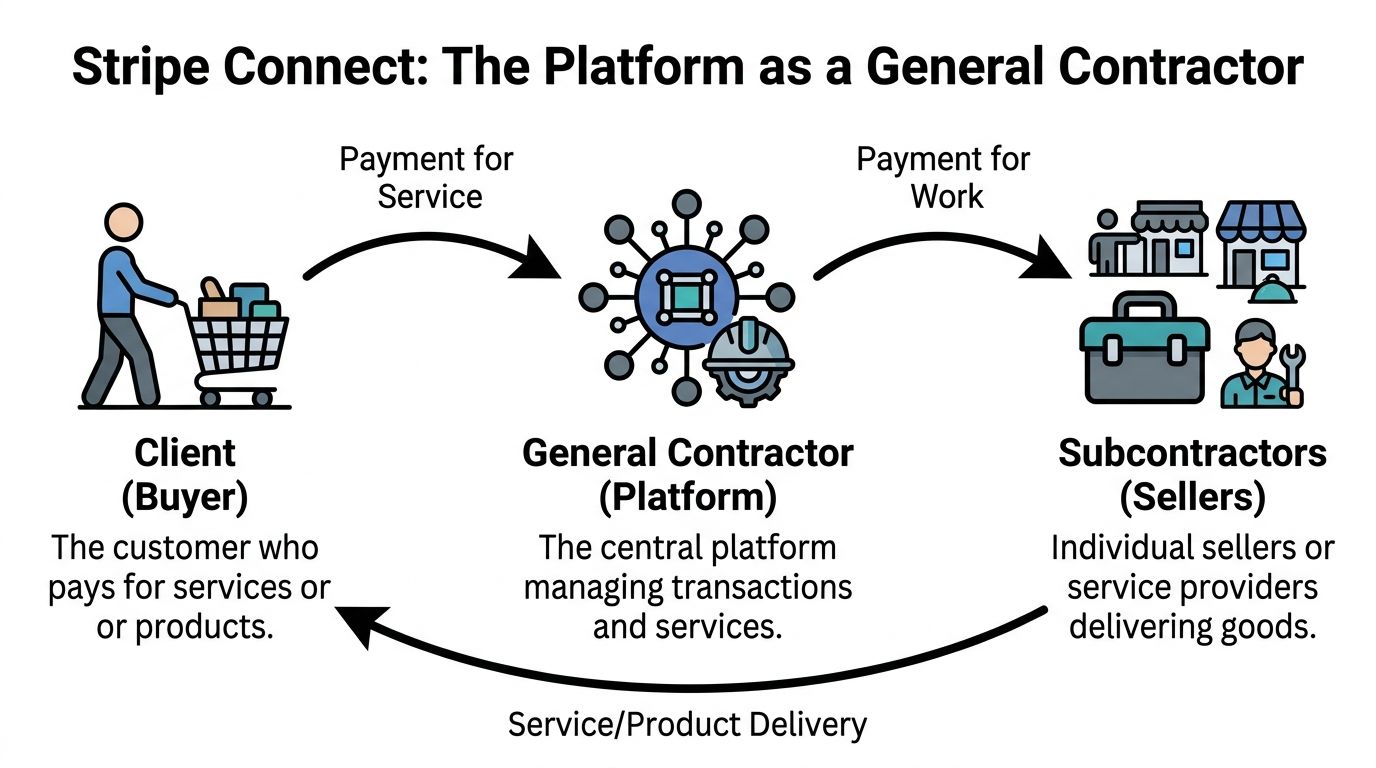
Think of your platform like a general contractor on a building project.
The customer hires the contractor and pays one bill. The contractor does not do every part of the job personally. Electricians, plumbers, and painters do the work. The contractor coordinates the project, keeps a fee, and pays each subcontractor.
Stripe Connect acts like the financial office for that arrangement.
The three main players
In plain language, Stripe Connect has a few core roles:
Role | What it means |
|---|---|
Platform account | Your business and your main Stripe account |
Connected accounts | Your sellers, tutors, freelancers, or service providers |
Customer | The person paying through your app |
Stripe Connect is a payment orchestration API enabling platforms to manage payments across multiple connected accounts (docs.stripe.com/connect/how-connect-works).
“Payment orchestration” sounds technical, but the idea is simple. Your platform tells Stripe who is involved, who can accept money, and where each part of the payment should go.
What the money flow looks like
A typical flow looks like this:
Your seller signs up You create a connected account for them.
Stripe checks what it needs Identity, business details, and payout details may need to be collected.
A customer pays through your app The payment is processed under the rules of your Connect setup.
Your platform fee is separated If your model includes a commission, Stripe can route that automatically.
The seller gets paid out Funds move to the connected account, then to the seller’s bank account based on payout settings.
This is why Connect is different from a basic checkout button. It is not only about charging a card. It is about managing the relationship between your platform and the people you pay.
Why this matters in Bubble
If you build in Bubble, this mental model helps you avoid a common mistake. Founders often think they are connecting “one Stripe account to Bubble.” In a marketplace, you are usually connecting:
your platform’s Stripe account
many seller accounts
payout logic
onboarding status
verification states
Practical tip: If a seller has not completed verification, your app should treat that as a product state, not just a payment detail. Show a “Complete onboarding” button instead of letting them start selling normally.
That is the foundation. Once you understand the roles, the next question is which version of Connect fits your product.
Choosing Your Path Standard Express or Custom
The biggest Stripe Connect decision is not whether to use it. It is which account type you should use.
For most founders, this choice shapes the build more than any plugin does.
The trade-off that matters
Each option answers three practical questions:
Who controls the onboarding experience?
Who handles more of the compliance and support burden?
How much of the payment UI lives inside your product?
For no-code founders, the right choice is rarely the one with the most flexibility. It is usually the one with the best balance between control and complexity.
Stripe Connect Account Types Compared
Feature | Standard Account | Express Account | Custom Account |
|---|---|---|---|
Who owns the Stripe relationship | The user has more direct relationship with Stripe | Shared model with Stripe handling a lot of the heavy lifting | The platform takes on much more responsibility |
Onboarding experience | More Stripe-controlled | Stripe-hosted or embedded, smoother for platforms | Highly customized |
Dashboard for the user | User typically interacts more directly with Stripe | A simplified Stripe experience works well for platforms | Platform usually builds more of the experience itself |
Branding control | Lowest | Medium | Highest |
Compliance burden on the platform | Lower | Lower than Custom, practical for many marketplaces | Highest |
Best fit | Simple platform relationships | SaaS apps and marketplace MVPs | Highly customized payment products |
Why Express is often the sweet spot
For many Bubble founders, Express is the practical middle ground.
You get a cleaner seller experience than Standard, but you avoid much of the complexity that comes with Custom. That matters when you are trying to launch a real MVP without building a payments ops department around it.
By using embedded components like those in Express accounts, platforms can launch complex payment systems in weeks instead of the quarters it would take to build from scratch (docs.stripe.com/connect/build-full-embedded-integration).
That speed difference is not just about development. It affects decision-making. If Stripe can handle more of the onboarding, notifications, and payout infrastructure, you spend less time building edge cases into Bubble workflows.
A plain-English way to choose
Standard
Use this when the connected user should feel like they mainly have their own Stripe relationship.
This can make sense if your platform is lighter-touch and your users are comfortable managing their own payment account experience.
Express
Use this when your product is the main experience, but you still want Stripe to handle a lot of the risky and messy parts.
This is often the best fit for:
marketplaces
multi-vendor apps
coaching platforms
SaaS tools that help users get paid
Custom
Choose this only if your product needs maximum control over the payment experience.
That extra control comes with extra responsibility. In practice, many no-code founders are drawn to Custom too early because it sounds powerful. Usually, it adds complexity before the business has validated the need.
Rule of thumb: If you are building your first Bubble marketplace MVP, start by asking whether Express already gives you enough control. Often, it does.
What founders get confused about
The confusion usually comes from mixing up two different goals:
“I want my app to look branded.”
“I want to own every part of the payments experience.”
Those are not the same thing.
You can have a polished, branded platform while still letting Stripe handle important parts of onboarding and compliance. For an MVP, that is often the safer decision.
Stripe Connect in the Wild Real-World Examples
Theory becomes clearer when you attach it to actual business models.

A freelancer marketplace
A client hires a designer through your app. The client pays once. Your platform keeps a commission, and the designer receives the remainder through their connected account.
This is the classic Connect use case.
The product challenge is not only accepting the client’s card payment. It is making sure the designer is onboarded properly, can receive payouts, and sees the right payment status in your app.
Express is often a sensible fit here because the marketplace wants a cohesive user experience without owning every compliance task itself.
A SaaS platform that helps users charge their own customers
This one is easy to miss.
Suppose your software helps fitness studios, tutors, or consultants sell bookings or subscriptions. In that case, your platform may not be the seller. Your users are the sellers. Stripe Connect lets your app become the layer that enables those businesses to get paid while you manage the software around it.
That makes Connect relevant to “software for service businesses,” not only marketplaces.
A creator or coaching platform
A creator app, newsletter platform, or tutoring marketplace often needs to collect money from buyers and pass it along to the person delivering the content or session. Connect becomes especially useful here for no-code founders building niche products. If you are exploring recurring digital offers in a creator space, this article on how to sell Pilates programs to generate recurring income is a strong example of the kind of business model that often benefits from platform payments infrastructure.
Why global reach changes the equation
Stripe Connect supports payouts to connected accounts in many countries and allows platforms to accept payments in numerous currencies.
For founders, that changes product design. You can think beyond a single-country pilot if your user base is distributed. A tutor in one country, a student in another, and a platform operating elsewhere is no longer a strange edge case. It can be part of the original product model.
Key takeaway: Connect is not tied to one business type. It works whenever your app sits in the middle of a payment relationship between a customer and another party.
Integrating Connect with Bubble The No-Code Reality
Stripe’s product pages can make the setup sound straightforward. In Bubble, the experience is more hands-on.
That does not mean it is impossible. It means you need to understand where the work lives.
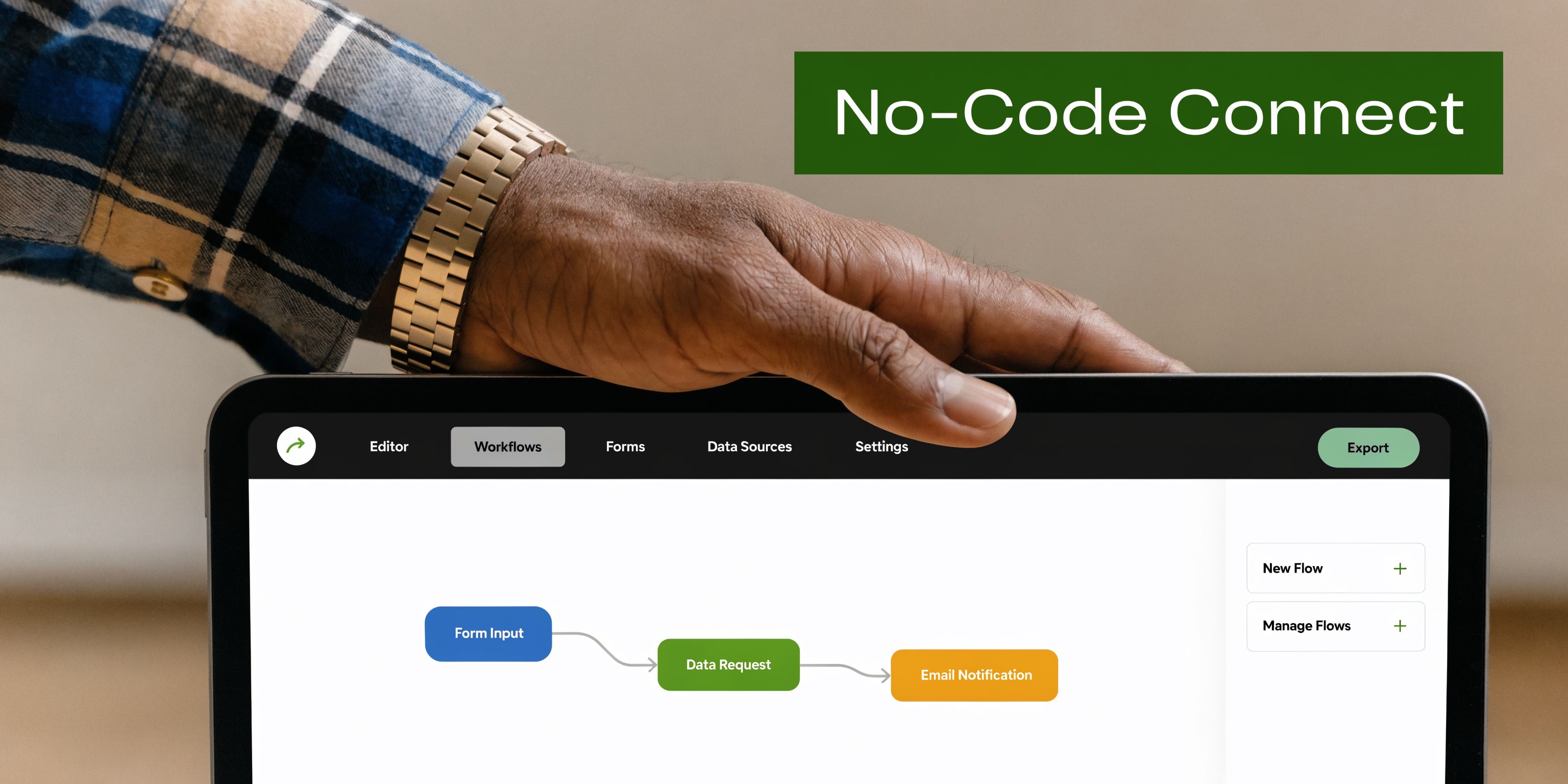
A common but underserved challenge for no-coders is integrating Stripe Connect with platforms like Bubble.io, with founders often struggling with KYC mismatches and API setup, which can lead to longer timelines than code-based integrations (stripe.com/connect).
What Bubble can do well
Bubble is strong at orchestrating steps that founders can see and test:
creating a seller record in your database
triggering API calls through API Connector
storing connected account IDs
showing onboarding status in the UI
responding to webhook-driven changes
If your app logic is clear, Bubble can support a solid Connect workflow.
Where the friction usually appears
The hard parts are usually not “can Bubble call Stripe?” It can.
The friction shows up in details like these:
Onboarding links
You need to create the connected account, then generate the onboarding link, then redirect the user correctly. If one step is missing or the wrong ID is stored, your onboarding flow breaks in a way that feels random to the founder and confusing to the user.
Webhooks
Bubble builders often delay webhook setup because it feels more advanced.
That creates problems later. If Stripe updates an account’s verification status and your app does not listen for that event, your UI can show the wrong state. A tutor may think they are ready to get paid when Stripe still requires more information.
KYC mismatches
This is the issue many no-code founders underestimate.
If a seller enters details that do not match what Stripe expects for their country or business type, onboarding may stall. In a coded app, developers may debug this through logs and custom tooling. In Bubble, founders often feel like they are troubleshooting through a keyhole.
Practical tip: Treat onboarding failures as a product workflow. Build clear UI states for “needs more information,” “under review,” and “payouts enabled” instead of relying on a single generic error message.
Plugins help, but they do not remove the thinking
Some founders expect a Stripe plugin to solve Connect the same way a simple checkout plugin can help with one-time payments.
Connect is different.
You still need to decide:
what data your app stores for each seller
when to create connected accounts
how to trigger re-onboarding
how to represent verification status in Bubble
what happens if payouts are delayed or disabled
If you want a simpler starting point for standard Stripe setup inside Bubble before moving into Connect, this guide on Stripe Embed Checkout is useful because it helps you separate basic checkout work from platform payment architecture.
A walkthrough helps when the docs feel too developer-heavy:
A realistic Bubble checklist
Map the user roles first Define who is the buyer, who is the seller, and where your fee comes from.
Store Stripe IDs carefully Your database should clearly link each platform user to the correct connected account.
Make onboarding visible Use buttons, status labels, and conditional groups so users know what step they are on.
Add webhook handling early Do not leave status syncing until the end.
Test edge cases Incomplete onboarding, changed payout details, and failed verification need UX, not just backend logic.
The no-code reality is not that Stripe Connect is out of reach. It is that successful setup depends on product thinking as much as API setup.
Your Action Plan for Getting Started
If this still feels big, narrow it down to a few concrete moves.
Start with the money map
Write out one transaction in plain English.
Who pays? Who receives money? Does your platform take a fee? Does the seller need to be verified before anything happens? If you cannot explain that flow in one short paragraph, do not touch the integration yet.
Pick a likely account type
Use the comparison earlier and make a provisional choice.
For many MVPs, Express is the most practical place to begin. You can validate the business model before chasing maximum customization.
Review your Bubble setup
Look at the plugins you already use and decide what belongs in:
Bubble workflows
API Connector
Stripe-hosted or embedded UI
webhook-based updates
Get your Stripe basics in order
Before you test any Connect flow, make sure your account structure and keys are organized. This guide on your Stripe API key is a helpful refresher if that part still feels messy.
Best next step: Build the smallest possible onboarding and payout flow for one seller type first. Do not design for every edge case on day one.
The founder mistake is trying to perfect the full payment system before proving users want the product. Build enough to validate the workflow. Then improve the edge cases.
Frequently Asked Questions
Does Stripe Connect let me keep a platform fee?
Yes. Platforms can add an application_fee_percent on charges to route splits automatically, so the platform keeps its fee and the remainder moves to the connected account balance before payout.
Does Stripe Connect handle taxes and seller compliance for me?
It helps with payment infrastructure and parts of onboarding, but founders should not assume every tax or reporting obligation disappears automatically. You still need to understand what your business model requires operationally and legally.
Can I change account types later?
Possibly, but founders should avoid treating that as trivial. The account type affects onboarding, user experience, and platform operations. It is better to choose carefully up front than to assume switching later will be painless.
Is Stripe Connect only for marketplaces?
No. It is also useful for SaaS platforms, creator products, booking tools, and other apps where your software enables other people to get paid.
If you want hands-on help setting up Stripe Connect in Bubble, Codeless Coach gives non-technical founders practical one-to-one guidance on payments, API Connector workflows, plugins, and MVP build decisions so you can ship faster with fewer dead ends.











