
Apr 16, 2026
UAT vs SIT: A Founder's Guide to Bubble App Testing
Confused by UAT vs SIT for your Bubble app? This guide explains the difference, when to use each, and provides practical checklists for non-technical founders.

You’ve finished the build. The screens look clean. The signup flow works when you click through it yourself. Stripe is connected. Twilio sends something. Bubble preview doesn’t show any obvious fires.
And yet you still don’t feel ready to launch.
That instinct is usually right. A Bubble app can look finished while hiding problems in the gaps between workflows, plugins, APIs, and real user behavior. Founders often confuse “I can demo it” with “it’s safe to release.” Those are different standards.
That’s where uat vs sit becomes useful. Not as enterprise jargon, but as a simple way to test two different risks before launch. First, can the system reliably move data and complete actions across all the pieces you connected? Second, can a real user complete the job they came for without getting confused, blocked, or losing trust?
Your Bubble App Is Built Now What
A founder builds a marketplace MVP in Bubble. The homepage looks good. The search works. Listings load. Payments appear connected. During a demo, everything feels smooth.
Then launch week starts.
A test user submits a booking request, but the backend workflow doesn’t create the right database thing. Another user pays, but the confirmation email never sends because the plugin event wasn’t mapped correctly. Someone on mobile can’t finish onboarding because the responsive layout hides the next button.
None of those issues are obvious from a quick founder-led click-through. They show up only when the app gets tested with intent.
That’s the moment most founders realize they need a process, not more guessing. If you’re close to launch, this is also the point where it helps to tighten your release plan before you publish anything publicly. A launch checklist like this guide on how do you launch an app helps frame the bigger picture, but testing is the part that keeps your first users from becoming your first support tickets.
Two safety nets
SIT stands for System Integration Testing. In plain English, it checks whether your systems work together.
UAT stands for User Acceptance Testing. That checks whether the app works for the user in a way that feels right and solves the problem you built it to solve.
They sound similar because both happen late. They are not the same.
One catches hidden breakpoints in your setup. The other catches hidden friction in your product.
Your app isn’t ready because the editor looks complete. It’s ready when the workflows, data, and user journeys survive contact with reality.
Founders who skip this usually don’t save time. They just move testing into production, where the cost is reputation, support load, and confused early adopters.
Defining SIT and UAT in Simple Terms
If you’re non-technical, the easiest way to think about uat vs sit is this:
SIT tests the plumbing.
UAT tests the experience.

SIT is plumbing
In Bubble, your app is rarely just Bubble. You’ve probably connected Stripe, Twilio, API Connector, Google Maps, a file uploader, maybe a calendar plugin, maybe a backend workflow that updates records after a payment.
SIT asks one question:
When one part of the app sends data to another part, does that data arrive correctly and trigger the right next step?
Examples:
Stripe payment to database: Does a successful charge create the right order record?
Form to backend workflow: Does submitting a request trigger the scheduled workflow you expected?
Twilio integration: Does the app send the correct phone number and message body?
This is less about design and more about handoffs between moving parts.
UAT is the test drive
UAT asks a different question:
When a real user tries to do something important, does the app help them do it clearly and successfully?
A user doesn’t care whether your API call returned the right field name. They care whether they can sign up, understand what to do next, trust the payment flow, and complete the task without confusion.
A good UAT scenario sounds like this:
You’re a new customer. Create an account and book your first appointment.
You’re a returning user. Update your billing details and download your invoice.
You’re on mobile. Submit a support request with a screenshot.
The difference that matters
SIT checks whether the app functions correctly as a system.
UAT checks whether the app feels correct to the person using it.
Founders often do a bit of both without naming them. That’s fine. What matters is that you don’t mistake one for the other.
UAT vs SIT A Detailed Comparison for Bubble Builders
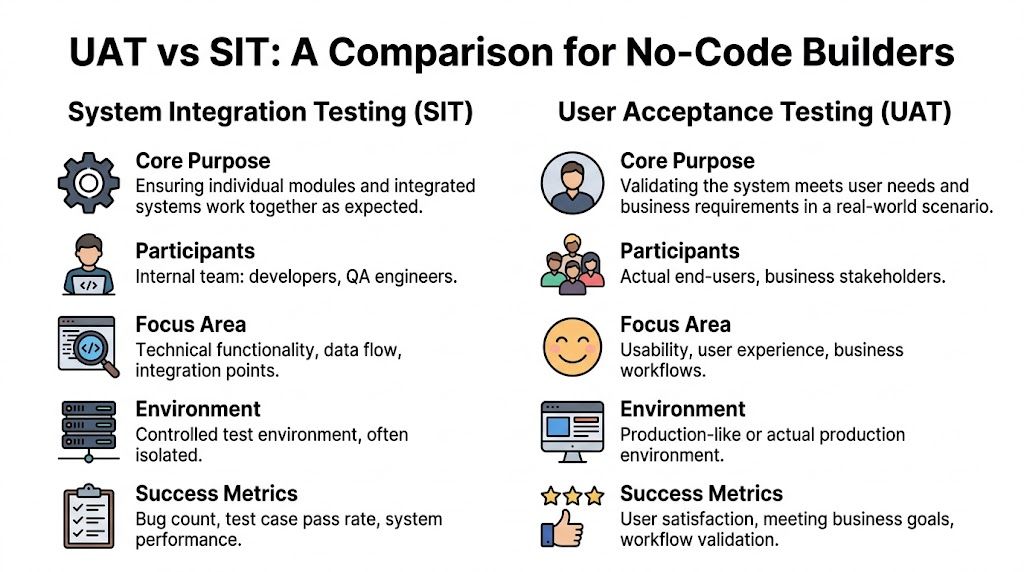
Here’s the fast version first.
Area | SIT in Bubble | UAT in Bubble |
|---|---|---|
Core purpose | Verify integrations, workflows, and data flow | Verify usability, fit, and business value |
Who runs it | Usually you, your builder, or internal team | Real users, stakeholders, or beta testers |
Where it happens | Development or staging version | Private live-like version with realistic use |
What it focuses on | APIs, plugins, backend workflows, database changes | Sign-up, onboarding, booking, checkout, settings |
What success looks like | Technical reliability and stable handoffs | Users can complete core tasks with confidence |
Purpose
SIT is about technical correctness.
If a user clicks “Pay now,” SIT checks whether Bubble passes the right data to Stripe, whether Stripe returns the expected response, whether Bubble stores the result, and whether the next workflow runs.
UAT is about product usefulness.
If a user clicks “Pay now,” UAT checks whether they understand what they’re paying for, whether the page feels trustworthy, whether the button labels make sense, and whether the post-payment experience matches their expectation.
Practical rule: SIT asks “Did the app do the thing right?” UAT asks “Was this the right thing for the user?”
Timing
SIT comes before you put the app in front of outside users for meaningful feedback.
That order matters because users give poor feedback when the app is technically unstable. If the reset password flow breaks, they can’t tell you much about onboarding clarity. They’re just blocked.
For Bubble builders, a bottom-up SIT approach often works well. You test the Stripe API connection before polishing the checkout UI. That sort of structured integration testing is one reason effective SIT can reduce the rate of defects found in UAT by over 40%, according to Keploy’s write-up on SIT methodologies and outcomes.
Participants
In SIT, you are often the right tester.
You know what the workflow is supposed to do. You can inspect the database, read API responses, use Bubble logs, and compare expected behavior against actual results.
In UAT, you are usually the wrong tester.
You already know the intended path. You know where buttons are hidden. You know that the small text under the form explains the next step. A new user doesn’t know any of that.
For SIT, you are the expert. For UAT, you are the student, and your user is the expert.
Environment
For SIT, use a safe environment where you can break things, inspect test records, and rerun flows.
For UAT, use a version that feels real. The closer it is to the actual launch experience, the better the feedback. That includes responsive layouts, transactional emails, login flows, and live-like data conditions.
Focus area
SIT lives in the mechanics:
API fields
Plugin events
Database writes
Conditional workflows
Scheduled backend actions
UAT lives in the journey:
Can I sign up easily?
Do I know what this app does?
Can I trust this payment screen?
Can I recover from a mistake?
Would I use this again?
Both matter. If you skip SIT, UAT gets polluted by preventable bugs. If you skip UAT, you may launch a technically working app that users still abandon.
The No-Code Reality A Hybrid Testing Approach
Traditional advice says you do SIT, then UAT, then launch.
That’s neat on paper. It’s not always how a solo Bubble founder operates.

When you’re building in Bubble, you often add one feature, test the workflow, tweak the layout, send it to a friend, fix a field mapping issue, and retest the whole flow before lunch. That isn’t sloppy. It’s often the most realistic way to reduce risk when you don’t have a QA team.
Why the phases blur in Bubble
No-code tools compress the distance between building and testing.
You can change the database, API settings, page layout, and workflow logic in one session. That means you can also run micro-tests in one session. A strict enterprise sequence can slow you down if you treat every feature like a formal handoff.
There’s also a real cost to skipping adapted testing. One summary of no-code testing challenges notes that 68% of no-code projects face post-launch integration bugs and argues that a unified approach can reduce testing time significantly in Bubble-style workflows, as described in this Marker.io discussion of SIT vs UAT in no-code contexts.
What a hybrid model looks like
A practical hybrid looks like this:
Build one feature Connect the API, create the workflow, save the data.
Run a technical pass Confirm the workflow fired, the right fields saved, and no plugin action failed.
Run a user pass Ask someone to try the same feature without instructions beyond the goal.
Fix immediately Don’t batch obvious issues if the feature is still fresh in your head.
That’s still uat vs sit. You’re just compressing the loop.
In no-code, quality comes from short feedback cycles, not from pretending you have a big-company QA department.
A lot of founders already use Bubble preview mode this way. The difference is being deliberate about what kind of feedback you’re collecting in each pass.
Keep one boundary clear
Even in a hybrid approach, don’t mix technical debugging and user observation at the same time.
If your tester says, “I don’t know what to click next,” that’s UAT feedback.
If you stop the session to inspect whether the API returned the right JSON fields, that’s SIT work.
Those are both useful, but they need different attention.
This walkthrough is useful if you want to see how a Bubble build gets shaped and refined through practical iteration.
If you’re still early, this guide on prototyping an app is a good reminder that testing starts before polish. Prototype decisions affect what you’ll need to validate later.
Your Practical SIT Checklist for Bubble Apps
SIT gets easier when you stop thinking about “testing the whole app” and start testing handoffs.
Every Bubble app has handoffs. A button sends data to a workflow. A workflow updates the database. A plugin receives a value. An API returns a response. A backend workflow changes something later.
APIs and external services
Start with the integrations that can break your core use case.
Stripe flows: Test successful payment, failed payment, canceled payment, and what gets saved after each path.
API Connector calls: Check required fields, empty fields, and bad responses. Make sure Bubble handles failure without trapping the user.
Twilio or messaging tools: Confirm the right recipient, the right message, and the right trigger event.
For Bubble apps, a bottom-up mindset works well here. Test the connection before you test the polished page around it.
Plugins and visual components
Plugins often fail subtly. The page loads, but the action doesn’t behave as expected.
Use this mini-checklist:
Calendar plugins: Do records display from the database with the right dates and labels?
File uploaders: Does the upload finish, save, and stay linked to the correct thing?
Maps and address tools: Does selecting an address save usable data, not just a visible label?
Responsive elements: Do conditionals or hidden groups break interactions on smaller screens?
Backend workflows and database logic
Many founder-built apps often become fragile.
Check:
Scheduled API workflows: Do they run at the expected time?
Database updates: Are things being created, modified, and deleted exactly once?
Privacy-sensitive actions: Does the workflow fail because the current user lacks access?
Chained actions: If step one succeeds and step two fails, do you notice it?
Test the step after the click. That’s where Bubble bugs usually hide.
If you want a deeper technical framing for this kind of work, System Integration Testing: A Practical Guide is a useful companion resource. It’s especially helpful when you want to think more clearly about dependencies and failure points instead of just clicking around until something breaks.
What to document
Keep a simple log with four fields:
Test | Expected result | Actual result | Fix needed |
|---|---|---|---|
Stripe payment success | Order saved and confirmation sent | Order saved, no email | Check trigger |
Form submit | New lead created | Passed | None |
You do not need a heavy QA tool for an MVP. A clean spreadsheet is enough if you use it.
Running UAT That Delivers Real User Insights
SIT tells you whether the app works. UAT tells you whether anyone wants to keep using it.

The biggest mistake founders make here is asking the wrong people. Friends who want to be supportive aren’t always useful testers. Your ideal tester is someone close to your target user and far enough from the build that they’ll react honestly.
Pick testers who match the real job
If you built an app for salon owners, test with salon owners or front-desk staff. If you built an internal portal for property managers, don’t hand it to a startup friend who has never managed a property.
Use a small set of focused testers and give them realistic tasks.
Good UAT tasks sound like user stories:
You’re a new user: Sign up and create your first project.
You need support: Find how to contact the team and send a message.
You want to pay: Upgrade your account and download the receipt.
Bad UAT tasks sound like developer instructions:
Click the blue button in the top right.
Go to page three.
Use the “Create” workflow.
Watch behavior, not just opinions
A tester saying “looks good” tells you almost nothing.
A tester pausing for ten seconds, scrolling up, and clicking the wrong button twice tells you a lot.
Ask them to narrate their thinking as they go. Don’t rescue them too early. Confusion is the signal.
If users need you in the Zoom call to explain the interface, the interface still needs work.
A simple UAT script
You can run a useful UAT session with a short structure:
Set the context
“Please act like you’ve never seen this before.”Give one task at a time
“Create an account and complete your first booking.”Ask follow-up questions
What felt confusing?
What did you expect to happen here?
Was anything harder than it should’ve been?
Did the app behave the way you expected?
Close with prioritization
“What’s the one thing that would most improve this experience?”
If you want better structure around gathering and organizing responses, this guide on how to collect feedback from customers gives a practical framework you can adapt to beta testing without turning the session into a survey marathon.
What to do with the feedback
Not every complaint is a roadmap item.
Split UAT findings into three buckets:
Critical blockers: Users can’t complete a core task.
Clarity issues: Users complete the task, but hesitate or misunderstand steps.
Nice-to-have requests: Useful ideas, but not launch blockers.
That keeps you from overreacting to every suggestion while still respecting what users show you.
Managing Timelines Handoffs and Risks
A simple pre-launch testing sprint is enough for most MVPs if you stay disciplined.
A practical two-week rhythm
Week 1 is internal technical testing.
Use that time for workflows, plugins, API behavior, data checks, edge cases, and regression checks after each fix.
Week 2 is external user testing.
Once the app is stable enough that people can complete core tasks, hand it to users and watch what happens.
The handoff matters. Don’t move into UAT just because you’re tired of debugging. Move into UAT when the app is stable enough that feedback will be about product experience, not basic breakage.
What counts as a handoff
For a founder, the handoff can be simple:
Core flows run end to end
No critical defects remain
Test data behaves as expected
You can observe users without constant apologizing
That’s enough to start learning from real usage.
If UAT reveals a bigger problem
Sometimes UAT exposes something painful. The app technically works, but users don’t understand the offer, the layout, or the task flow.
Don’t panic and rebuild everything.
Use this triage:
Fix now: Anything blocking sign-up, checkout, booking, or your main success path
Fix soon after launch: Repeated friction that doesn’t stop task completion
Log for later: Feature requests and edge-case ideas
This is also where product process helps. If you need a cleaner frame for sequencing pre-launch work, the stages described in stages product development are useful when you’re deciding what belongs before launch and what belongs in the next iteration.
Common Testing Questions from Founders
Do I really need both SIT and UAT for a simple MVP
Yes, but you don’t need heavyweight versions of either.
A light SIT pass plus a light UAT pass is much better than skipping one. Even a small MVP can fail because the payment workflow doesn’t save correctly or because users don’t understand the first step.
Think scaled-down, not skipped.
I’m a solo founder, can’t I just test everything myself
You can do a lot of SIT yourself.
You know where the integrations are fragile. You can inspect logs, database changes, API responses, and workflow behavior. That part is often fine for a solo founder.
You can’t do strong UAT by yourself. You already know how the app is supposed to work, so you fill gaps without noticing. Fresh eyes catch hesitation, confusion, and trust issues that you’re blind to.
Are there any Bubble tools that can help with testing
Yes. Start with what Bubble already gives you.
Debugger: Use step-by-step inspection for workflows that behave strangely.
Logs: Check whether backend workflows ran and whether actions completed.
Development and live versions: Keep a safe version for internal testing and a controlled version for user testing.
Preview mode: Useful for quick hybrid cycles when you’re still shaping a feature.
You can also create a simple staging process with duplicate test users, sample records, and known scenarios. That alone improves consistency.
What’s the biggest mistake founders make with uat vs sit
They treat testing like one final event.
The better approach is to separate the questions even if you run them close together. First ask, “Does this system hold together?” Then ask, “Does this experience make sense to someone who didn’t build it?”
That shift saves time because the feedback becomes clearer.
If you’re building in Bubble and want hands-on help with testing, workflows, APIs, or launch prep, Codeless Coach gives non-technical founders practical one-to-one support to get apps working properly and out into the world with fewer surprises.











