Mar 28, 2026
Web App vs Mobile App A Founder's Decision Guide for 2026
Deciding on web app vs mobile app? This guide helps founders make the right choice with clear data on cost, speed to market, user engagement, and ROI for 2026.
As a founder, one of the first big decisions you'll face is whether to build a web app or a mobile app. This isn't just a technical choice; it's a strategic one that will shape your budget, your timeline, and how you connect with your first users. Getting it right from the start is crucial.
If you need to test your idea and get to market quickly, a web app is almost always the answer. For deep user engagement, offline access, or features that need the phone's hardware, a mobile app is the way to go.

A Founder's Strategic Decision Framework
Let's break down the practical trade-offs so you can make the right call for your business, especially if you're building with no-code tools.
A web app is what you access through a browser, like Chrome or Safari. It's your fastest path to a live product. There are no app store approvals to wait for, so you can push updates instantly and reach anyone with an internet connection, regardless of their device. This makes it perfect for launching a Minimum Viable Product (MVP) and seeing if your idea has legs. If you're exploring this path, understanding modern web app development services can give you a solid roadmap.
A native mobile app, on the other hand, is installed directly on a user's phone from the App Store or Google Play. Being on the device itself unlocks powerful features. You can send push notifications to bring users back, and you can tap into the phone's hardware for a much richer experience.
Progressive Web Apps: The Hybrid Solution
There's also a third, compelling option: the Progressive Web App (PWA). Think of it as a web app that has learned to act like a native app. Users can add it to their home screen, and you can even send push notifications—all without dealing with app store gatekeepers. Exploring progressive web app development is a smart move if you want to balance the reach of the web with the feel of a native app.
For founders, the question isn't "Which technology is better?" It's "Which is the right first move for me?" Most of the time, a web-first strategy lets you validate your core concept before you commit the time and money to building native apps.
To make this even simpler, here's a quick framework based on your primary goal.
Quick Decision Framework: Web vs. Mobile App
Primary Goal | Recommended Path | Why It Makes Sense |
|---|---|---|
Fast Market Validation & Broad Reach | Web App | You can launch faster, bypass app store reviews, and reach anyone on any device with a web browser. |
Deep User Engagement & Hardware Access | Mobile App | Perfect for leveraging push notifications, offline mode, and device integrations (like the camera or GPS) for a stickier experience. |
Balanced Cost, Reach & Performance | Progressive Web App (PWA) | Get app-like features and web accessibility in one package, all while avoiding app store fees and lengthy approvals. |
Comparing Development Speed and Time to Market
As a founder, your most valuable asset is time. Getting your product into the hands of real users isn't just a milestone—it's your primary source of learning and validation. So when you’re weighing a web app against a mobile app, the first question you should ask is: which one gets me to market faster?

The answer is almost always a web app, especially if you're building with a no-code tool like Bubble. You’re working from a single platform where you can build, test, and deploy. The biggest time-saver? You completely sidestep the app stores.
When a feature is ready or a bug needs squashing, you just hit deploy. Your changes are live instantly. There's no submission process, no review queue, and no unpredictable waiting period. You're in complete control of your launch and update schedule.
The Mobile App Gauntlet
Building a native mobile app is an entirely different beast. Right from the start, the process is inherently slower. You're not just building one app; you're building for two separate worlds: Apple's iOS and Google's Android. This often translates to double the work, double the testing, and double the headaches.
And that’s all before you face the app store review process. Once you submit your app, you're at the mercy of Apple and Google's timelines. Approval can take a few days if you're lucky, but it can easily stretch into weeks. Rejections for small, seemingly minor issues are common, forcing you back to development to fix the problem and restart the clock.
Launch your web app in the time it takes just to get your mobile app approved.
This isn't a one-off delay, either. Every single update—whether it's a critical bug fix or an exciting new feature—has to go through the exact same review cycle. This creates a painful lag between when you've solved a problem and when your users actually get the solution.
A Timeline Reality Check
Let's put this into perspective with a typical timeline for building a Minimum Viable Product (MVP).
Responsive Web App (No-Code): You can realistically build and launch a solid MVP in just 2-6 weeks. When you need to iterate, you can push updates immediately.
Native Mobile App (Dual Platform): A polished app for both iOS and Android will likely take 4-6 months—or even longer—before it's available on both app stores.
That's a massive difference. You could launch a web app, gather months of user feedback, and pivot your entire strategy in the time it takes to get a native app through its first approval. For founders looking to move even quicker, it's worth exploring the top no-code automation tools for web apps to find more ways to streamline development.
The No-Code Advantage
If you’re a no-code builder, the choice becomes even clearer. For anyone using Bubble, a responsive web app is the fastest path to a live product that works across all devices. You build and iterate right in the browser, completely avoiding app store friction.
While native apps have their place—especially for features that need deep access to device hardware—building for both platforms can easily double your workload. By starting with a web app, no-code founders can shrink their time-to-market by 50-70%. This approach is perfect for validating an idea before committing the significant resources required for a native mobile build. The entire industry is shifting, and you can learn more about how low-code and no-code platforms are changing the game.
Ultimately, speed gives you the one thing every startup needs: the ability to learn. A web app lets you test your core ideas, prove your value, and start building a community while your competitors are still waiting in line at the app store.
Analyzing Development Costs and Total ROI
When you're deciding between a web app and a mobile app, the price tag is a huge factor. But it’s not just about the initial build—you have to think about the total cost of ownership and your potential return on investment. The path you choose here will seriously affect your startup’s cash flow from day one.
For founders watching every penny, web apps built with no-code tools like Bubble are almost always the more affordable way to get started. Why? You’re building one product that instantly works on any device with a browser. You don't have to sink money into separate projects for iOS and Android.
Breaking Down the Initial Build Costs
The difference in up-front cost between a no-code web app and a traditionally coded native app is dramatic. Let's be real, for an early-stage founder, this is often the most important number.
No-Code Web App MVP: Using a platform like Bubble, you can work with a freelancer or small agency to get a solid MVP built for somewhere between $5,000 and $15,000.
Traditionally Coded Mobile App MVP: A native app for just one platform (iOS or Android) is going to start around $40,000 and can quickly climb past $100,000. If you need both, you can pretty much double that budget.
This massive difference in initial investment is a game-changer. It means you can get your product to market, start collecting feedback, and maybe even generate revenue with a fraction of the capital. That leaves you more cash for what comes next: marketing and actually growing the business. We get into the specifics of these figures in our guide on how much app development costs.
Uncovering Ongoing and Hidden Costs
The financial story doesn't end once your app is live. This is where the long-term costs of maintenance and hidden fees really start to show the divergence between web and mobile apps.
With a web app, your main ongoing cost is hosting. For a Bubble app, this is handled through a predictable monthly subscription. As you get more users, you might need to upgrade your plan, but the costs are clear and scale right alongside your growth.
Mobile apps, on the other hand, come with a whole different set of financial obligations that can really eat into your profits.
The "app store tax" is the big one. Apple and Google take a 15-30% commission on every dollar you make through their stores, from in-app purchases to subscriptions. That’s a huge slice of your revenue that web apps don't have to worry about at all.
On top of the commission, you're constantly on the hook for maintenance. Every time Apple or Google pushes a major OS update, something in your app might break. You’ll have no choice but to hire a developer to patch it, leading to surprise expenses just to keep your app working.
Finally, you have to pay to play. You'll need an active developer account with both Apple ($99/year) and Google (a $25 one-time fee). While these are smaller costs, they're part of a larger pattern. By building on the web, you own your customer relationships and payment systems directly. You keep 100% of your revenue (minus standard payment processing fees like Stripe's) and stay in full control. For a new founder, that direct path to profitability makes a web-first strategy incredibly hard to argue with.
Strategies for User Engagement and Retention
When you're deciding between a web app vs a mobile app, it’s easy to get hung up on reach. Web apps often win that initial battle, but the real war is for user loyalty—and that's won through engagement. Historically, mobile apps have been the undisputed champs at creating "sticky" products that people come back to day after day.

The secret is how deeply a native app integrates into the user's device. It’s not just another bookmark; it’s a permanent fixture with direct access to features designed to pull users back in, turning a simple service into a daily habit.
The Home-Turf Advantage of Native Apps
A mobile app's real power comes from its constant presence on a user's phone. This, combined with direct access to the phone's hardware, creates a powerful feedback loop that web apps have traditionally found difficult to replicate.
The numbers don't lie. When it comes to engagement, native apps have a clear edge. Features like offline access and deeper hardware integrations just keep users hooked for longer. In fact, research shows that 88% of users prefer apps for daily tasks over browsing on their phone. This preference translates into 3x higher retention rates and average transaction conversion rates that are 200% higher than mobile websites. You can dig into the specifics by checking out the full mobile app statistics research.
What drives this massive difference? It boils down to a few key features:
Push Notifications: This is your direct line to a user’s home screen. When used thoughtfully, push notifications are the single most powerful tool for re-engagement. A timely reminder or a personalized update can bring a user back instantly.
Offline Access: The ability to function without an internet connection is a game-changer. It lets your users keep working, browsing, or playing on the subway, on a plane, or anywhere with spotty service.
Hardware Integration: Tapping directly into the phone’s camera, microphone, GPS, or contacts list creates a seamlessness that just isn't possible on the mobile web. Think scanning a QR code or geotagging a post without ever leaving the app.
Closing the Gap with Modern Web Apps
While native apps have a built-in advantage, the lines are blurring. Modern web technologies—many of which are now accessible through no-code platforms like Bubble—are giving founders the tools to build incredibly engaging web apps.
You no longer have to choose between the reach of the web and the stickiness of mobile. The goal now is to build a web app that feels like a native app, even though it lives in a browser.
A mobile app turns a service into a habit; a web app makes it an accessible destination. Modern tools let you build a destination that feels like a habit.
Here’s how you can replicate that native-level engagement with a web app you build on Bubble:
Browser Push Notifications: Most modern browsers now support push notifications. With the right setup (and user permission), your web app can send alerts directly to a user's desktop or phone, closing one of the biggest gaps with native apps.
Progressive Web App (PWA) Functionality: You can build your Bubble app as a PWA, which lets users "install" it to their home screen. It gets its own icon and a permanent spot on their device, just like a native app.
Offline Caching: While it's not quite as robust as true native offline mode, you can use browser caching to store key data. This ensures parts of your app stay functional even when a user's connection drops.
A Responsive Design That Feels Native: Bubble’s responsive engine is powerful. You can design layouts specifically for mobile screens, incorporating mobile-first patterns like bottom navigation bars and swipe gestures to make your web app feel right at home on a phone.
Ultimately, the web app vs mobile app debate is less about the technology and more about your strategy. By understanding what really drives engagement and using modern web tools creatively, you can build a product that keeps users coming back—all on the web.
Comparing Monetization Models and Revenue Potential
How you plan to make money is one of the biggest factors in the web versus mobile app debate. Your platform choice doesn't just influence your tech stack; it fundamentally shapes your revenue strategy, user expectations, and how much of each sale you actually get to keep.
The App Store's Frictionless Economy
Mobile apps have become an absolute powerhouse for monetization, largely because of how ridiculously easy they make it for users to spend money. Think about it: a customer's credit card is already saved to their Apple or Google account. A purchase is just a thumbprint or face scan away.
This built-in, frictionless payment system is a major driver behind the explosive growth of the mobile market. Projections show it hitting $378 billion in 2026 and rocketing past $1.2 trillion by 2035. If you want to dive deeper into the numbers, there are some great insights on mobile market statistics that break down this growth.
For certain business models, the closed-garden economy of the app stores is a huge win. The entire system is engineered to encourage specific kinds of spending.
Mobile apps truly shine with revenue models that thrive on impulse buys or small, repeatable transactions:
In-App Purchases (IAPs): This is the lifeblood of mobile gaming and countless "freemium" apps. Selling virtual goods, extra features, or premium content is seamless.
One-Time Paid Apps: While less popular today, the classic "pay-to-download" model is incredibly straightforward. The app store handles the entire transaction before your app is even installed.
Subscriptions: Both Apple and Google have poured resources into making subscriptions simple to start and manage, which has fueled the success of services like Spotify, Netflix, and Headspace.
But that convenience comes at a steep price. In exchange for access to this massive, ready-to-buy audience, the app stores act as gatekeepers and take a 15-30% cut of every single dollar you make.
Owning Your Revenue on the Web
While the mobile world grabs headlines with its massive numbers, web apps offer a compelling alternative built on a simple, powerful idea: ownership. When you monetize on the web, you control everything—the customer relationship, the payment flow, and most importantly, your revenue.
This direct-to-customer model is a fantastic fit for SaaS platforms, B2B tools, or any service with more complex pricing. By building your app on the web with a platform like Bubble, you can integrate directly with payment processors like Stripe. This move lets you keep nearly 100% of your revenue (minus standard processing fees) and gives you total flexibility.
Want to experiment with tiered subscription plans, offer usage-based billing, or create custom discount codes? On the web, you can. You're not stuck with the rigid rules of the app stores. This control is invaluable for fine-tuning your business model and building a direct, long-term financial relationship with your customers.
To make the differences clearer, here’s a practical look at how the most common monetization models stack up on each platform.
Monetization Models: Web App vs. Mobile App
Monetization Model | Web App Advantage | Mobile App Advantage | Key Consideration |
|---|---|---|---|
Subscriptions | Full control over pricing tiers, trials, and billing cycles. You avoid the 15-30% app store fee, maximizing recurring revenue. | Frictionless signup using the customer's existing Apple/Google account, which can boost initial conversion rates. | Are you a B2C service where convenience is king (mobile), or a SaaS/B2B tool where pricing flexibility is critical (web)? |
In-App Purchases | Not a common web model. Better handled as one-time purchases for specific features or content access. | This is the ideal platform for IAPs. Perfect for selling digital goods, unlocking content, or consumable items in games. | If your core revenue will come from small, frequent digital sales, the mobile ecosystem is built from the ground up to support it. |
Advertising | Access to more diverse ad networks and formats. You have greater control over ad placement and user data. | Users are often more accustomed to ads in exchange for free content (especially in mobile games). Revenue is integrated into the platform. | Web apps give you more control over the user experience around ads, while mobile apps offer a huge, often captive, audience. |
Ultimately, there's no single "best" choice—only the one that aligns with your specific product and business goals. Choosing a web app gives you financial control and flexibility, while a mobile app gives you access to a frictionless, high-volume marketplace.
A Practical Decision Framework for Founders
The web app vs. mobile app debate can feel overwhelming. To cut through the paralysis, let's put all the theory aside and walk through a simple, practical framework. Forget the endless technical comparisons for a moment. Instead, we'll use a few key questions to zero in on what truly matters for your business right now.
The objective isn't to pick the "best" platform forever, but to choose the smartest one for your first step. For most startups, that first step is almost always a web app. It’s the fastest way to see if your big idea has legs before you commit to the much heavier lift of native mobile development.
Start With Your Core Function
First things first: what is the one single thing your app must do to be valuable?
Does your core function absolutely need native hardware? If the heart of your app is something like advanced camera controls, the phone’s gyroscope, heavy background processing, or deep OS integrations with contacts and calendars, then a mobile app is pretty much a given. These are the things native apps were born to do.
Is your main goal rapid market validation? If you need to test an idea on the widest possible audience with the least amount of cash, a web app is your ticket. You can launch quicker, reach anyone on any device with a browser, and push updates instantly based on what your first users are telling you.
Honestly answering this question gets you 80% of the way there. Be ruthless about what’s a "must-have" for your Minimum Viable Product (MVP) versus what’s just a "nice-to-have" for later.
As a founder, the single most dangerous thing you can do is build something nobody wants. A web app is the fastest, cheapest way to find out if you're on the right track before you sink a ton of time and money into a native build.
Adopting a Web-First Strategy with Bubble
For most builders, especially in the no-code space, this line of questioning points directly to a web-first approach. This strategy is particularly effective when you're using a tool like Bubble. You can build a single, powerful web application that’s fully responsive, ensuring it looks and works great whether it’s on a giant desktop monitor or a small phone screen.
This decision also has a big impact on how you make money, which is a critical piece of the puzzle.
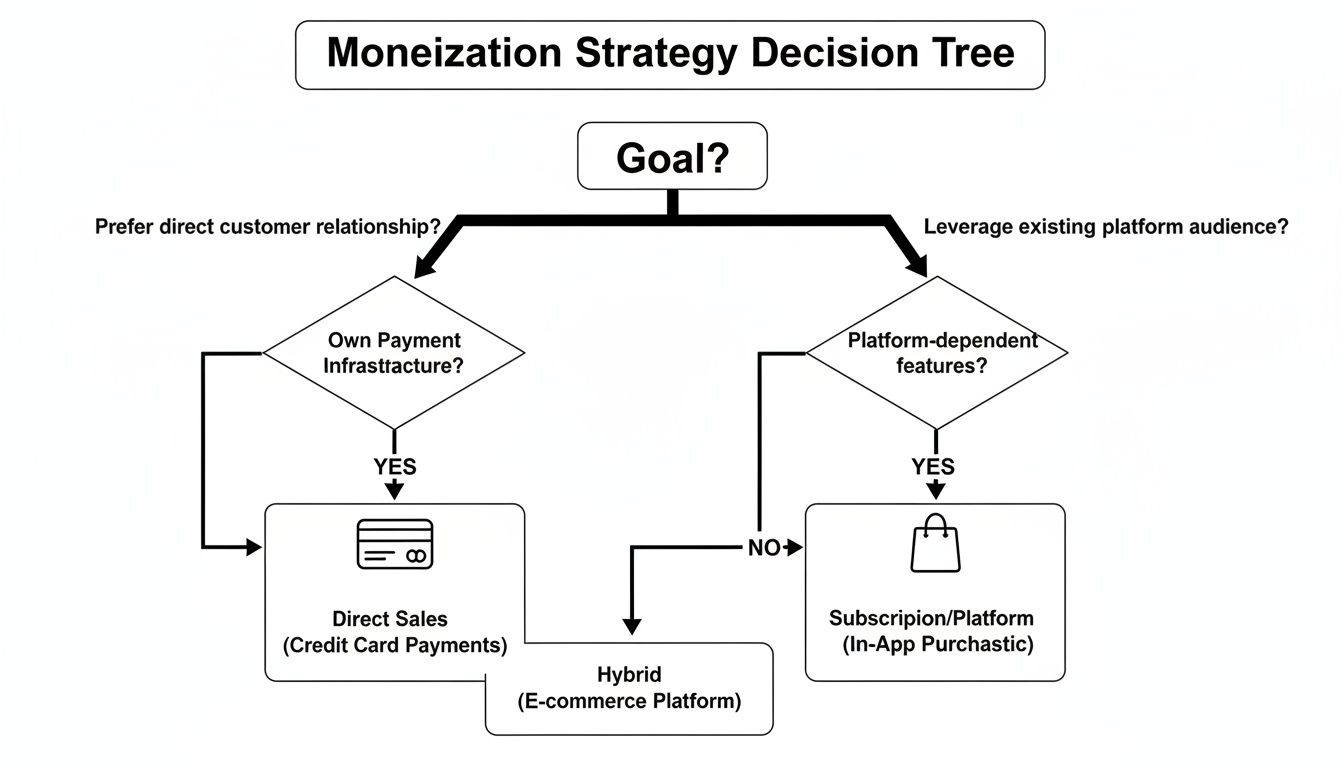
As you can see, going web-first gives you a direct line to your customers and your revenue, completely bypassing the app store gatekeepers and their fees.
This doesn't mean you’ll never launch on the app stores. It’s simply a strategic sequence. Once your web app has found its audience and is proving itself in the market, you can start thinking about expanding your reach.
When to "Wrap" Your Bubble App
A popular and powerful next step is using a "wrapper" service. These tools take your finished web app and package it inside a native mobile "shell." This shell can then be submitted to the Apple App Store and Google Play, getting you listed without having to rebuild everything from the ground up.
It's time to consider a wrapper when:
You've validated your product. You have traction, you have paying customers, and they are starting to ask for a dedicated mobile app.
You want to unlock basic native features. You're ready to use things like push notifications or simply want the credibility that comes with an app store listing.
You're not ready for a full native build. You want to test the mobile app channel without committing the serious budget and months of development a ground-up native app requires.
By starting with a responsive web app in Bubble, you build in maximum flexibility from day one. You can get to market fast, prove your concept, and then make a calculated move into the mobile ecosystem when the business case is undeniable.
Frequently Asked Questions
As you’re weighing the web app vs. mobile app decision, a few practical questions always seem to pop up. Let's tackle them head-on with some straight answers.
Can I Turn My Web App into a Mobile App Later?
Absolutely. In fact, this is the exact path I recommend for most founders just starting out. The smartest move is often to build a fully responsive web app first, get it in front of real users, and validate your core idea.
Once you have traction, you can use a "wrapper" service. These tools essentially wrap your existing web app in a native container. That container is what you then submit to the Apple App Store and Google Play Store.
Going web-first is a massive de-risking move. You get to prove your concept in the real world before committing the serious time and money that a full native build demands.
What Is a Progressive Web App and Is It a Good Compromise?
A Progressive Web App (PWA) is a clever hybrid—it’s a web app that has been enhanced to act and feel a lot like a native mobile app. For many, it's the perfect middle-ground solution.
PWAs have a few key superpowers:
Installable: A user can add your app right to their phone's home screen, complete with its own icon, without ever visiting an app store.
Offline Access: They can be designed to work with limited or no internet connection, which is a huge plus for user experience.
Push Notifications: You get the ability to send push notifications directly to users' devices, a powerful engagement tool that used to be only for native apps.
For a lot of businesses, a PWA hits the sweet spot. You get the deep engagement features of a mobile app combined with the instant deployment and broad reach of a web app.
How Do SEO and User Acquisition Differ?
This is a big one, and the difference is night and day. Your strategy for getting users will be fundamentally different depending on which path you choose.
Web apps have a huge built-in advantage: Search Engine Optimization (SEO). People can find your app simply by searching on Google. This creates a powerful, sustainable, and often free channel for new users to discover you.
Mobile apps are stuck inside the "walled gardens" of their app stores. Discovery depends almost entirely on App Store Optimization (ASO)—getting your listing to rank for keywords within the app store itself—and paid ads. Your app is invisible to Google search, making organic discovery a much steeper climb.
Which Platform Is Better for a No-Code MVP?
For almost every Minimum Viable Product (MVP) built with no-code tools, a web app is the clear winner.
Tools like Bubble let you build and launch on one platform that works for every user on any device. That speed and efficiency are everything when you're just trying to test an idea. You can get feedback, pivot, and iterate at a fraction of the cost and time it would take to even start planning a native mobile project.
Ready to build your web app without wrestling with code? At Codeless Coach, we provide one-on-one Bubble.io tutoring and consulting to help you launch faster. Book a session today and turn your idea into a reality.











