Mar 10, 2026
Low Code No Code: Build Apps Faster with low code no code
Explore how low code no code platforms accelerate building, testing, and launching your MVP—learn when to use each approach.
What if you could launch a functional version of your business idea in just a few weeks, instead of waiting months? That’s the reality that the low-code and no-code movement has created. These platforms let you build software visually, giving founders a way to turn ideas into real applications without the traditional hurdles of time and money.
Build Without Code From Day One

The path from a brilliant concept to a working product has always been a long and expensive one, paved with mountains of complex code. If you weren't a developer yourself, you had to hire a costly team and wait months just to see a basic version of your vision come to life. The rise of low-code and no-code tools is changing that entire dynamic.
Think of it this way: traditional software development is like being a five-star chef. You have to source every single raw ingredient, master the science of how they interact, and painstakingly prepare an elaborate meal from scratch. The result can be incredible, but it demands years of expertise and a whole lot of time.
A New Way to Build
Using a no-code platform is like getting a high-end meal kit delivered to your door. All the ingredients are pre-measured and ready to go, with simple, visual instructions. You don’t need to be a chef to assemble a fantastic meal—you just follow the steps and create something great.
Low-code, on the other hand, is like that same meal kit, but with the freedom to add your own special spices or swap out an ingredient. It provides a solid, pre-built foundation but leaves an "escape hatch" for you to inject your own custom code when you need that extra bit of flexibility.
The core promise of low-code and no-code is speed and accessibility. It shifts your focus from how you're building to what you're building, letting you solve real business problems and get user feedback almost immediately.
This is a massive shift because it puts you, the founder, directly in the driver's seat. You can build, test, and tweak your product based on what your customers are actually saying, iterating in days rather than months. That agility is a powerful competitive advantage. If you're curious about how this applies to mobile, we cover that in our guide on how to make an app with these tools.
To help you figure out where to start, let's lay out the key differences side-by-side.
Development Approaches at a Glance
This table provides a simple overview of the skills, speed, and flexibility you can expect from no-code, low-code, and traditional development.
Approach | Technical Skill Required | Typical Speed to MVP | Customization Flexibility |
|---|---|---|---|
No-Code | None (Visual Builder) | Days to Weeks | Low to Medium |
Low-Code | Basic Coding Logic | Weeks to Months | Medium to High |
Traditional | Expert Programming | Months to a Year+ | Unlimited |
As you can see, each approach offers a different trade-off between speed and control. The right choice depends entirely on your project's goals, your technical comfort level, and how quickly you need to get your idea into the market.
Understanding Low Code vs No Code
You hear the terms low-code and no-code thrown around a lot, often in the same breath. While they're related, they're not the same thing. For a founder, understanding the difference isn't just academic—it's one of the first major decisions you'll make when mapping out your product. Both can help you build much faster than traditional coding, but they offer very different levels of control.
At its heart, no-code development is exactly what it sounds like: a completely visual way to build software. You’re not writing code. Instead, you're piecing together an application by dragging and dropping elements, connecting workflows, and tweaking settings in a user-friendly editor.
The best way to think about it is like building with a massive set of LEGOs. The platform gives you all the standard bricks, windows, doors, and wheels you could ever need. You can assemble these pre-made pieces into incredibly complex and functional models—a simple car or an elaborate castle—without ever having to mold a single piece of plastic yourself.
The No-Code Promise: Accessibility and Speed
This is the real magic of no-code. It puts the power to build directly into the hands of subject matter experts, marketers, operations managers, and entrepreneurs. The people who actually understand the business problem can now build the solution themselves. This closes the feedback loop instantly, making it perfect for rapid prototyping and testing ideas in the real world.
No-code platforms generally share a few core traits:
Drag-and-Drop Interfaces: You visually design your app's screens by arranging elements like buttons, forms, and images.
Pre-built Components: Common features like user login systems, data tables, and payment forms are ready to go out of the box.
Declarative Logic: You define how the app works with simple rules, not code. For example: "When this button is clicked, then send an email."
This approach is fantastic for getting many types of applications off the ground quickly and proving an idea has legs before you sink a fortune into custom development.
Where Low Code Adds More Power
Low-code development starts with the same visual-first approach, but it includes a critical "escape hatch" for developers. You'll still build the majority of your app with drag-and-drop tools, but you have the option to write your own code to push beyond the platform's built-in features.
Think of it as graduating from a standard LEGO set to LEGO Technic. You still have all the regular bricks, but now you’ve got motors, gears, and programmable controllers. If the standard parts don’t do exactly what you need, you can engineer a custom mechanism or write a small script to create truly unique functionality.
Low-code bridges the gap between the rapid deployment of no-code and the limitless potential of traditional programming. It’s about building fast and then adding custom functionality where it matters most.
This "code escape hatch" is what gives low-code its extra muscle. It typically allows you to:
Write Custom JavaScript: Create unique front-end interactions or complex data manipulations.
Integrate with any API: Connect to niche third-party services or older internal systems that don't have a pre-built plugin.
Build Proprietary Algorithms: Implement custom business logic or calculations that are unique to your product's secret sauce.
Deciding Between Low Code and No Code
The choice really boils down to a single, fundamental question: Will your core functionality eventually require custom code?
No-code platforms are designed as powerful, self-contained ecosystems. They do a lot, but they operate within the guardrails set by the platform’s creator. Low-code platforms, on the other hand, are built with extensibility in mind. They acknowledge that once you reach a certain scale or level of complexity, you might need to step outside the visual builder.
For most founders, a powerful no-code tool gives you more than enough firepower to build and launch a successful Minimum Viable Product (MVP). The decision isn't about which one is "better" in a vacuum. It’s about picking the right tool for your specific job and where you see your product going in the long run.
When to Choose No Code for Your MVP

As a founder, your most valuable resource isn't money—it's time. The quicker you can get a functional version of your idea into the hands of real users, the faster you can learn what people actually want. This is where no-code becomes your secret weapon for testing the market. Going all-in on no-code is simply the fastest way to get from a great idea to a working Minimum Viable Product (MVP).
An MVP isn't the final, polished product with every bell and whistle. It's a stripped-down version built to test one core assumption. Do people need what I’m building? Are they willing to pay for it? No-code helps you get those answers in weeks instead of months, all without touching a single line of code.
Perfect Scenarios for a No-Code MVP
A no-code MVP is your best bet when your main goal is to validate a business idea fast. It works beautifully when the core logic is relatively straightforward and you don't need to build a complex, proprietary algorithm from scratch.
Here are a few classic examples where a no-code MVP just makes sense:
Simple Marketplaces: Imagine a site connecting local dog walkers with pet owners, or designers with people who need logos. You can build out the essential features—user profiles, service listings, messaging, and basic payment processing—using a powerful no-code tool.
Community Platforms: Want to start a niche social network for vintage comic book collectors? You can test the waters and see if you can build an engaged audience before sinking a ton of cash into a custom-coded platform.
Subscription Box Services: The entire flow for a subscription business—signing up users, managing recurring payments, and keeping track of shipments—can be handled cleanly with a no-code app.
To get a feel for what’s possible, it’s worth checking out some of the best no code website builders out there. They showcase just how much you can accomplish with purely visual development tools.
The point of a no-code MVP isn't to build your forever product. It's to build your right now product—a learning machine designed to gather real user feedback and prove your concept has legs.
From Idea to Validation in Weeks
Let's walk through a real-world scenario. A founder had an idea for a subscription box featuring artisanal coffee from small, independent roasters. With a traditional development team, building the basic website with sign-ups and payments would have been a six-month slog with a hefty price tag.
Instead, she chose a no-code platform. In just three weeks, she had a working web app. People could create accounts, pick a subscription plan, pay securely through a Stripe integration, and manage their shipping details. It wasn't perfect, but it was real.
She launched to a small, hand-picked audience and immediately started learning. It turned out customers were more interested in buying single bags of coffee than subscribing, and they really wanted detailed tasting notes. This critical feedback, gathered from a live product, allowed her to pivot her entire business model for the better—a lesson that would have cost tens of thousands more to learn the old-fashioned way.
Internal Tools and Simple Automations
No-code isn't just for customer-facing products. It's also fantastic for building internal tools to solve your own business headaches. As your team grows, you'll inevitably hit operational snags. Instead of forcing your team to use clunky, off-the-shelf software, you can build your own.
Custom Project Managers: Forget one-size-fits-all tools. Build a project tracker that perfectly mirrors your team's unique workflow.
Automated Approval Workflows: Set up a simple app for expense reports, vacation requests, or content approvals to finally kill those endless email chains.
Simple CRMs: Design a lightweight customer relationship manager that only tracks the information your sales process actually requires.
When your top priorities are speed, learning, and validating an idea, no-code is an absolute game-changer. It gives you the power to build, measure, and learn from real customers without the massive time and cost of traditional development.
How Low Code Solves Complex Problems

While no-code is fantastic for getting ideas off the ground and building a huge range of apps, you might eventually feel like you’re hitting a wall. What do you do when your project needs something that just isn’t available in the pre-built block library? That’s exactly where the low-code approach comes in, creating a vital link between fast visual development and total customization.
Think of it this way: a no-code platform is like a high-end auto shop packed with the best off-the-shelf parts. You can build an amazing car, and you can build it fast. But what if you need something truly unique, like a custom-fabricated supercharger to give you an edge no one else has?
Low-code is what lets you build that supercharger. It gives you an "escape hatch" to write small, specific snippets of code that unlock features well beyond the standard toolkit. You're not building the entire engine from scratch—you're just adding that one special component that changes everything.
Unlocking Custom Capabilities with Code
Low-code really proves its worth when a project’s complexity grows and standard solutions just won’t cut it anymore. These are the moments that demand a level of control that only code can offer, combining the sheer speed of visual tools with the precision of traditional programming.
Here are a few common scenarios where you’ll be glad you have low-code capabilities:
Complex Integrations: No-code tools have tons of integrations, but what about connecting to a proprietary internal database? Or a niche third-party service with a weird API? A little bit of custom code can build that bridge where one doesn't already exist.
Bespoke Security Rules: Maybe your app needs a really specific, multi-layered security protocol that goes beyond standard user roles. With low-code, you can write that custom logic yourself instead of trying to force a pre-built system to fit.
Proprietary Algorithms: Is the "secret sauce" of your business a unique pricing engine, a custom matching algorithm, or a specialized data analysis process? Low-code lets you write, implement, and protect that core intellectual property right inside your application.
This means you get to have your cake and eat it, too. You can build 80-90% of your application with the fast, visual tools you're used to. Then, a developer (or a founder who knows their way around code) can jump in and write the last 10-20% to handle those uniquely complex features.
Low-code isn't about replacing the visual builder—it's about supercharging it. You build the standard stuff visually, then inject custom code exactly where it delivers the most impact.
Practical Examples of Low Code in Action
Let’s make this real. Imagine a company building a new dashboard for its internal operations team. They can use a drag-and-drop editor to quickly assemble the user accounts, data tables, and reporting charts. It’s fast and efficient.
But there’s a catch: the company’s inventory data is stuck in a 20-year-old system on a server in the back office, and it has no modern API. This is where a developer can step in and use the low-code platform’s scripting capabilities. They can write a small function to pull data directly from that legacy system, clean it up, and display it right alongside data from their modern cloud tools.
Without that low-code flexibility, the project would either be dead in the water or require a massive, expensive, and time-consuming custom build from the ground up.
This ability to blend low code and no code is a game-changer. It keeps your development moving quickly and your costs under control, all without forcing you to compromise on the critical features that make your product stand out. You get the speed of no-code with the unlimited potential of traditional coding, giving you a clear path to scale your app as it grows.
Finding Your Place in the No-Code Ecosystem
The world of no-code isn't one giant platform; it's a vibrant ecosystem filled with specialized tools. Think of it like a woodworker's shop. You wouldn't use a sledgehammer to carve fine details, and you wouldn't use a tiny chisel to frame a house. Picking the right tool for the job is everything, and to do that, you first need to understand what's on the tool wall.
Not all no-code platforms are built the same. Some are designed for one specific task and do it brilliantly, while others give you a wide-open canvas to build almost anything. This specialization is the ecosystem's greatest strength. It means the perfect tool for your idea—whether it's a simple landing page or a complex new business—is out there waiting for you.
From Single Pages to Full Applications
Let's break that down with a few examples. A tool like Carrd is the undisputed king of beautiful, single-page websites. It’s simple, incredibly fast, and masters its one job. You’d use it for a portfolio, an event page, or a personal profile in a heartbeat. But you’d never try to build a social network with it.
On the other end of the spectrum, you have automation platforms like Zapier or Make. These are the digital duct tape of the internet. They don't build apps you can see or touch; instead, they create powerful workflows that connect your other tools behind the scenes. A perfect example is automatically adding a new customer from Stripe into your Mailchimp email list—it's silent, efficient, and saves you a ton of manual work.
And that brings us to where a platform like Bubble.io fits into the picture.
Bubble isn't for simple websites or basic automations. It's a full-stack, visual development platform designed specifically for building complex, data-driven web applications—the kind of software that entire businesses are built on.
Think about the apps you use every day: a SaaS platform, a two-sided marketplace like Airbnb, or a custom CRM. These aren't simple websites. They require a few key ingredients that the more specialized tools just don't have:
A robust database: You need a way to store, connect, and manage all your user data, from profiles to payments.
Customizable user logic: Your app needs to react to what users do. "When a user clicks this button, send an email, but only if they are a paying customer."
Full back-end control: You need to define what happens on the server, not just what the user sees in their browser.
Bubble gives you all of this in one place, without needing you to write a single line of traditional code. It puts the power of both a front-end and a back-end developer into your hands, all through a visual interface.
To help you visualize where different tools fit, here's a quick comparison of some popular options.
Which No-Code Tool Should You Use?
Choosing the right platform is the first critical step. This table breaks down some of the most popular tools to help you match your project's needs with the right solution.
Tool | Best For | Ideal User | Coding Knowledge Needed |
|---|---|---|---|
Bubble | Complex web apps (SaaS, marketplaces, CRMs) | Founders, entrepreneurs, product managers | None, but logic-oriented thinking is key. |
Webflow | Content-rich, visually stunning websites | Designers, marketers, agencies | Basic HTML/CSS knowledge is helpful. |
Adalo | Native mobile apps (iOS & Android) | Anyone wanting to build a mobile-first app | None. Very beginner-friendly. |
Carrd | Simple, one-page websites | Freelancers, artists, event organizers | Absolutely none. The easiest to learn. |
Zapier/Make | Automating tasks between different apps | Business owners, operations managers | None. Focus is on workflow logic. |
While this table gives a great overview, remember that many projects use a combination of these tools. The real magic happens when you understand each one's strengths and how they can work together.
Bridging the No-Code and Low-Code Divide
Bubble has masterfully carved out a space right between pure no-code and the more flexible world of low-code. For 90% of what you'll build, you can stay entirely within Bubble's drag-and-drop editor and visual workflow system. This is how founders are able to build and launch sophisticated products at a speed that was unimaginable just a few years ago.
But what about the other 10%? Bubble gives you the "escape hatches" you need to grow. Its API Connector is a total game-changer, letting you connect to practically any third-party service out there. This means you can pull in data from a specialized AI tool or push user info to an external accounting system, opening up endless possibilities.
On top of that, Bubble's extensive plugin marketplace offers pre-built solutions for everything from Stripe payments to advanced charts. And if you still can't find what you need, you can use a little bit of JavaScript to build your own plugin. This is the low-code power that ensures you never hit a hard wall.
This unique blend makes Bubble a true force multiplier for founders. You get the speed of no-code to build your core product and the power of low-code to scale and customize it without limits. Learning a platform like this isn't just about mastering a tool—it's about gaining the ability to turn your biggest ideas into real, market-ready businesses. To see how Bubble stacks up against other tools in more detail, you can learn more about the leading no-code platforms in our complete guide.
Your Action Plan for Building a No Code MVP
It’s one thing to feel inspired, but turning that idea into a product someone can actually use is a whole different ballgame. This is where you need to get practical. Forget about building a thousand features—you need a clear, step-by-step plan to get your Minimum Viable Product (MVP) off the ground with low-code no-code tools.
The objective isn’t to launch the perfect, finished product right away. It's to build just enough to see if your core idea has legs. Let's walk through the exact steps to make it happen.
Define Your Single Core Problem
Before you even think about opening a builder, you have to nail this one question: What is the single most important problem you are solving, and for whom? Your first build should focus on solving that one problem exceptionally well. Everything else is a distraction.
For instance, if you're building a marketplace, your core problem is connecting a buyer with a seller. That's it. Forget about fancy recommendation engines, affiliate programs, or in-depth analytics for now. Just nail that initial connection.
Ruthlessly Cut Non-Essential Features
Okay, now that you've identified your core problem, list every single feature you've ever dreamed of for your app. Got it? Good. Now, grab a metaphorical red pen and slash everything that isn't absolutely essential to solving that one core problem.
This is, without a doubt, the hardest step for any founder. We all fall in love with our ideas. But your MVP must be both minimum and viable. Extra features will only slow you down and muddy the waters when you're trying to get honest feedback.
Choose the Right Tool for the Job
Your choice of tool is completely dependent on what you're trying to build. Just as you wouldn't use a hammer for a screw, the same thinking applies to the world of low-code no-code.
This flowchart is a great way to visualize where to start based on what your project actually does.
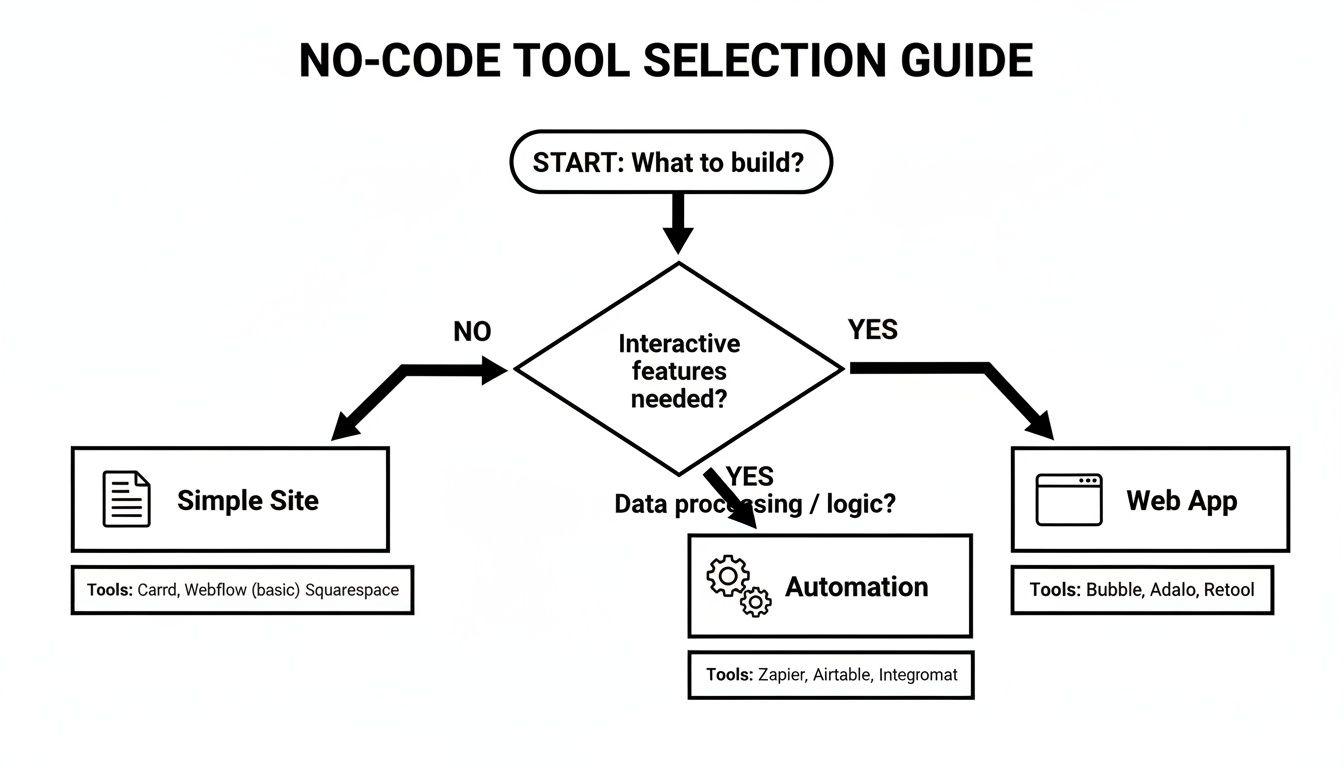
The takeaway here is simple: while some tools are great for simple sites, a complex project like a SaaS platform or social network needs an all-in-one powerhouse.
Simple Website or Landing Page: Tools like Carrd or Webflow are excellent choices.
Workflow Automation: Look to platforms like Zapier or Make to connect your tools.
Complex Web App: For a true app with a database and custom logic, a full-stack builder like Bubble.io is the way to go.
For most founders who need a scalable, data-driven MVP, a platform like Bubble gives you the database, logic, and front-end control you need from day one. You can learn more about this first phase in our guide on prototyping an app.
Commit to Building but Know When to Ask for Help
Now it's time to get your hands dirty and start building. Dive in and commit to learning the platform you've chosen. But—and this is important—you don't have to go it alone. The learning curve for powerful tools can be steep, and it's easy to waste weeks on a technical hurdle an expert could solve in 15 minutes.
This is where getting some guidance isn't a cost, but an investment. An experienced coach can help you sidestep the most common mistakes, speed up your build, and make sure you don't get stuck.
Booking a one-on-one session isn't a sign of failure; it’s a smart move to protect your most valuable asset: time. Whether it's setting up your database correctly, integrating payments, or figuring out an API call, a quick tutoring session can save you days of frustration. Your next step is to get started.
Frequently Asked Questions About Low Code No Code
Even after seeing what low code no code tools are capable of, it's natural for founders to have some tough questions. I hear them all the time. Concerns about security, scale, and ownership are completely valid—after all, you're trusting a new kind of platform to be the foundation of your business.
Let's tackle these common worries head-on.
Can a Business Scale on a No Code Platform?
Absolutely. There's a persistent myth that no-code is just for hobby projects or simple prototypes. That couldn't be further from the truth.
Sure, if you’re aiming for millions of simultaneous users, a custom-coded solution might eventually be in your future. But you can build a very profitable business with thousands of loyal customers, all running smoothly on a powerful no-code platform like Bubble. The key is choosing a tool that was built for complexity from the ground up, one that has the architecture to handle serious user growth and data.
Who Owns the App and Its Code?
This one is all about understanding the trade-off. When you build with a low code no code platform, you generally don't own the underlying source code. You're effectively licensing the platform's infrastructure, which is precisely what lets you build so fast without worrying about servers or backend frameworks.
But here’s the crucial part: you always own 100% of your data, your user base, your designs, and your intellectual property. That's the real value of your business, and it's always yours to control or export.
Is It Secure Enough for Customer Data?
Yes. In fact, for most startups, using a reputable platform is often more secure than trying to manage security in-house.
Platforms like Bubble invest millions in their security infrastructure and compliance with standards like SOC 2 and GDPR. They have entire teams dedicated to server maintenance, security patches, and monitoring for threats. This is a massive, full-time job that most early-stage companies simply can't afford, letting you focus on your product while they handle the enterprise-grade protection.
What Happens if the Platform Shuts Down?
This is a fair question, often called "vendor lock-in." The best way to manage this risk is to choose a well-established platform with a big user base and solid funding. The market leaders usually have contingency plans or offer ways to export your application data if the worst should happen.
When starting out, identifying the right tools is a critical first step. You can check out the best no-code app builders to get a feel for which platforms are stable and well-respected. For most founders, the incredible speed to market you gain far outweighs this long-term, and often remote, risk.
Working through these questions is just part of the founder's journey. At Codeless Coach, we help you navigate these decisions with confidence. If you're ready to stop planning and start building, book a one-on-one session to get your Bubble.io app launched faster. Book a coaching session.











