Feb 23, 2026
A UK Entrepreneur's Guide to No Code Platforms
Discover how no code platforms empower UK entrepreneurs. Learn to build apps, automate workflows, and launch your startup without writing a single line of code.
Let's break down what no-code platforms are all about. In simple terms, they're visual tools that let you build websites, apps, and automated workflows without having to write a single line of code. They rely on intuitive drag-and-drop interfaces and ready-made components, opening up software development to anyone with an idea, not just seasoned programmers.
What Are No-Code Platforms and How Do They Work?
Think of it like building with LEGO bricks versus sculpting from a block of clay. Traditional coding is like sculpting – you need specialised tools and skills to shape the raw material (code) into something useful. It’s a powerful but demanding process.
No-code platforms are the LEGO set. You get a box full of pre-made, perfectly formed bricks that you can combine in endless ways. The instructions are visual, and you simply snap the pieces together to bring your creation to life. This approach empowers you to build fully functional software, even if your technical expertise is zero.
The Magic Behind the Curtain
So, how does it actually work? At their core, these platforms are clever translators. Every time you drag a button onto the screen or set up a rule for what happens when a user signs up, the platform is busy writing clean, functional code (like HTML, CSS, and JavaScript) in the background. You just never have to see it.
This visual development model has given rise to a new group of creators, often called 'citizen developers'. These are people from all sorts of backgrounds—marketers, entrepreneurs, project managers—who can now build, test, and launch their own digital tools. It's no surprise the market for these platforms is booming, especially in the UK, as they've torn down the traditional barriers to getting a digital idea off the ground.
The whole point of no-code is to hide the complexity. The platform takes care of all the messy, behind-the-scenes stuff like coding, hosting, and server management, so you can pour all your energy into the design and logic of your application.
This change in process has a huge impact on speed. Projects that would typically take months and a team of developers can now be prototyped and launched in just weeks, sometimes even days. It means you can get your Minimum Viable Product (MVP) in front of real users faster than ever before, which is a massive advantage for testing an idea.
The Building Blocks of No-Code
While every platform is a bit different, most of them are built around a few key features that make the magic happen. Once you understand these, you'll see how it all fits together.
Visual Interface: This is your canvas. It’s a drag-and-drop space where you design the look and feel of your app by arranging elements like text boxes, images, buttons, and forms.
Pre-built Templates: Why start from scratch? Most platforms offer ready-to-use templates for common apps (like directories, e-commerce stores, or booking systems) that give you a massive head start.
Workflow Automation: This is where you define the logic. You can create visual "if this, then that" rules. For example, "When a new user signs up, send them a welcome email and add their details to the customer database."
Data Integration: No app is an island. These tools make it simple to connect to other services and data sources through APIs without needing to write complicated integration code. Think connecting to Google Maps, a payment gateway, or your favourite email marketing tool.
By mixing and matching these features, you can build an incredible range of applications. Whether it's a simple landing page for your business or a complex marketplace connecting buyers and sellers, no-code is making it possible for more people to innovate and turn their ideas into reality.
Exploring the Different Types of No Code Tools
The term "no-code" isn't a catch-all. It actually describes a whole family of different tools, each built for a specific job. Saying all no-code platforms are the same is like saying all vehicles are cars; sometimes you need a lorry for the heavy lifting, and other times a bicycle is just right for a quick trip down the road. Picking the right tool from the start is half the battle won.
At a high level, we can sort these platforms into four main groups. Getting your head around what each one does best is the key to building a powerful, custom tech stack without ever touching a line of code.
Website Builders
This is the category most people think of first. Website builders are all about creating visually stunning, content-driven websites – everything from a simple one-page portfolio to a full-blown e-commerce shop or a popular blog.
Their main strength is handling the "front-end," which is just a technical way of saying everything your visitors see and interact with. Modern builders like Webflow or Squarespace give you incredible design control, letting you craft pixel-perfect, responsive sites that look like they were built by a professional agency. Imagine a UK-based fashion brand launching a gorgeous online boutique that perfectly captures its unique style – that's the kind of thing these tools make possible in days, not months.
The primary goal of a website builder is to control the presentation layer. They give you complete command over the visual design and user experience, which is crucial for marketing sites, portfolios, and online shops where first impressions matter most.
These platforms are fine-tuned for things like marketing, sharing static information, and driving sales. While they might have some dynamic elements, their real magic lies in design and presentation, not complex, custom logic.
Application Builders
Now, what if your idea is more than just a website? What if you need custom logic, user accounts, and a sophisticated database? That's when you need an application builder. These are the heavyweights of the no-code world, giving you the power to build fully-fledged web applications like social networks, internal dashboards, or two-sided marketplaces.
A tool like Bubble is a classic example. It lets you not only design the user interface but also construct the entire backend logic using visual workflows. A London-based founder, for instance, could use Bubble to build a Minimum Viable Product (MVP) for a new service marketplace. They could create user profiles, booking systems, and even payment processing to prove their concept and attract that crucial pre-seed funding.
Key features you’ll typically find in application builders include:
Full Database Control: You get to design your own data structures to store and manage information exactly how your app needs it.
Custom Workflows: You can define complex "if this, then that" logic that dictates precisely how your application responds and behaves.
User Authentication: Easily handle user sign-ups, logins, and different permission levels without the usual security headaches.
Workflow Automation Tools
Think of workflow automation tools as the digital glue holding your entire software ecosystem together. They excel at creating automated chains of events, or "workflows," that shuttle data between the different web apps you use every day.
Tools like Zapier or Make are the undisputed champions of integration. They let you connect hundreds of different apps without needing to understand what an API is, let alone how to code for one. A UK e-commerce store, for example, could set up a workflow where every new sale in Shopify automatically creates a customer in their CRM, adds a task in their project tool for the fulfilment team, and sends a personalised 'thank you' email. This simple automation can save countless hours of mind-numbing manual work and cut down on human error.
Database and Internal Tool Builders
This final category is all about organising information and building custom internal tools to run your business more efficiently. Platforms like Airtable and Notion have cleverly blended the simplicity of a spreadsheet with the power of a proper database, creating flexible and collaborative workspaces.
With these, you can build just about anything, from a simple content calendar to a complete project management system or a bespoke Customer Relationship Manager (CRM). For a growing consultancy in Manchester, this might look like a custom dashboard in Airtable that tracks client projects, billable hours, and invoices all in one organised, easily searchable place.
To help you decide which path to take, this table summarises the different categories and what they're best suited for.
Choosing Your No Code Platform Type
Platform Type | Primary Use Case | Example Platforms |
|---|---|---|
Website Builders | Creating marketing websites, blogs, portfolios, and simple online shops. | Webflow, Squarespace, Wix |
Application Builders | Building custom web apps, marketplaces, social networks, and SaaS products. | Bubble, Adalo, Glide |
Workflow Automation | Connecting different apps and automating repetitive tasks between them. | Zapier, Make, IFTTT |
Database/Internal Tools | Organising data and creating custom internal software like CRMs or project managers. | Airtable, Notion, Coda |
Ultimately, the right tool depends entirely on what you want to build. Start with a clear idea of your end goal, and then work backwards to find the platform category that fits the job perfectly.
The Strategic Advantages of Building Without Code
Choosing a no-code platform isn't just a technical decision; it's a powerful business move. For UK entrepreneurs and established companies, building without code offers a serious competitive advantage by tackling the two biggest headaches in software development: time and money. The power to get from a rough idea to a working product at incredible speed completely changes the game.
Traditionally, launching any kind of digital product was a long, expensive slog. It meant months (or even years) of development, a huge financial commitment, and a total reliance on a team of specialised engineers. A brilliant idea could easily become obsolete before a single customer ever saw it. No-code completely flips this script.
Accelerate Your Time to Market
The most obvious and powerful benefit is the massive reduction in development time. Instead of writing code from the ground up, you're essentially assembling and customising pre-built, functional blocks. This shift means you can create a Minimum Viable Product (MVP) and get it into the hands of real users in a matter of weeks, not months.
This isn't just about being quick for the sake of it; speed is a strategic weapon. It gives you the power to:
Validate ideas faster: You can stop guessing what customers want and start getting real-world feedback almost straight away.
Outpace competitors: In fast-moving industries like UK fintech and e-commerce, being first to market with a new solution can be the deciding factor.
Generate early revenue: Launching sooner means you can start testing your pricing and bringing in income, which is a huge boost for your cash flow.
One study found that using no-code platforms can cut the time it takes to get to market by an average of 18 weeks. That saved time is a longer financial runway for a startup and a quicker return on investment for any business.
Drastically Reduce Development Costs
Speed and cost savings go hand in hand. When you don't need to hire a large team of developers, your initial investment drops dramatically. Research has shown that no-code tools can lead to average cost savings of £187,000 for some businesses, simply by reducing the need for expensive, specialised talent.
By democratising who can build, no-code platforms enable innovation to happen anywhere in an organisation. Your marketing team can build a custom campaign landing page, or your operations lead can create an internal tool to streamline a process, all without needing to join the IT department's queue.
This financial accessibility is a lifeline for founders who might not have deep pockets or venture capital backing. It allows you to bootstrap an idea, prove it works with a real MVP, and then approach investors from a position of strength, with actual user data and traction to show for it.
Foster Agility and Empower Your Team
Beyond just speed and money, no-code cultivates a culture of agility and empowerment. When building software is no longer a dark art reserved for coders, your entire team can get involved in solving problems. This movement is gathering real momentum.
In fact, the UK holds a solid 7% share of Europe's No-code AI Platform Market, largely because it's a global fintech hub where both nimble startups and big banks are embracing these tools. This is part of a much bigger picture; it's predicted that by 2026, a staggering 70% of all new business applications will be developed using no-code or low-code methods. You can dive deeper into these trends by exploring the No-code AI Platform Market findings from Fortune Business Insights.
What this all means is that you can react and adapt to market feedback instantly. If a feature isn't hitting the mark, you can tweak it in hours, not weeks. This cycle of continuous improvement makes your business far more resilient, responsive, and ultimately, much more likely to succeed.
Understanding No-code Limitations and When to Ask for Help
No-code platforms are incredibly powerful, but it’s vital to go in with your eyes open. Like any tool in the toolbox, they come with their own set of limitations. Knowing what these are from the get-go will help you set realistic expectations, make smarter decisions, and avoid hitting a wall later on.
One of the biggest questions people have is about performance and scale. It's a fair question. While modern no-code platforms like Bubble can comfortably handle a surprising amount of traffic and complex logic, they aren't built for creating the next X (formerly Twitter). In reality, performance often has more to do with how well you design your database and workflows than the tool itself, but there is always a ceiling.
Navigating Common Platform Constraints
Beyond pure performance, remember that you’re building inside a closed ecosystem. This isn't necessarily a bad thing, but it does mean you have to weigh a few key trade-offs before you commit.
Customisation Guardrails: You can build an enormous amount, but you are ultimately playing in the platform's sandbox. If you need a very niche, specialised function that isn’t supported out of the box, you’ll either need a clever workaround or have to accept that it’s not possible without custom code.
Vendor Lock-in: When you build your app on a no-code platform, it lives there. Moving a complex application from one tool to another—or to a traditional coded framework—is rarely a simple copy-and-paste job. In most cases, it means a complete rebuild. This makes choosing a stable, well-supported platform for the long haul absolutely crucial.
Data and Security: Reputable platforms invest heavily in security, which is a huge plus. However, you are still entrusting your app's data to a third party. Make sure you do your homework and review their security protocols, compliance certifications, and data ownership policies.
To get a better feel for these trade-offs, it helps to understand the bigger picture. Reading up on the differences between No Code vs Real Code: A Practical Guide for App Builders can give you the context to decide when no-code is the right strategic move for your project.
Knowing When to Get Expert Help
The no-code journey is all about learning, but you don't have to go it alone. Far from being a sign of weakness, knowing when to ask for help is one of the smartest things you can do. It saves you time, money, and a whole lot of frustration.
A single hour with an expert can often solve a problem that would have taken you weeks of painful trial-and-error to figure out on your own. It's an investment in momentum.
So, when do you push through, and when do you call in a pro? For small layout tweaks or simple workflow logic, it's often best to troubleshoot yourself. But for the bigger, more foundational challenges, booking a session with an expert is a game-changer.
Situations where expert help is invaluable:
Complex Database Design: Getting your data structure right from day one is the single most important thing you can do for your app's future performance and scalability.
Tricky API Connections: Can't get that Stripe or Google Maps integration to work? An expert can spot the problem in minutes, not days.
Performance Optimisation: If your app feels sluggish, a coach can quickly identify inefficient queries or workflows that are slowing you down.
Investing in targeted support at the right moment can be a massive accelerator. If you're building with Bubble, a one-to-one tutoring session is a brilliant way to blast through those hurdles and keep your project moving forward.
How to Choose the Right No Code Platform for Your Project
With so many powerful tools out there, picking the right one can feel like the toughest first step. The goal isn't to find the single "best" no code platform; it's to find the one that fits your project, your skills, and your long-term goals like a glove.
Getting this right from the start saves you the massive headache of having to tear everything down and rebuild it later. Think of it like choosing a vehicle for a trip – you wouldn’t take a sleek sports car on a rugged off-road adventure. Let's walk through a simple framework to help you make a smart, strategic choice.
Define Your Core Project Needs
Before you even start looking at platforms, you need to get brutally honest about what you're actually trying to build. Is it a straightforward marketing website, or a complex web app with user accounts, payments, and custom logic? Your answer here will instantly slice your options in half.
For example, if you're building a content-heavy blog, a portfolio, or a simple business site, a dedicated website builder is your best bet. If you're weighing your options, checking out a review of the best no code website builders can give you a great starting point.
But if your vision is a two-sided marketplace, a custom social network, or an internal business tool, you'll need the serious horsepower of an application builder like Bubble. This first decision is fundamental – it’s the most important filter you’ll apply.
Evaluate Key Platform Characteristics
Once you know what type of tool you need, you can start comparing specific platforms. It’s crucial to look past the slick marketing and dig into the details that will actually shape your building experience.
Here’s what you should be looking for:
Learning Curve: How quickly can you get up to speed? Some tools, like Glide, let you spin up a basic app in an afternoon. Others with more depth, like Bubble, demand a real time investment to master. Be realistic about how much time you can actually put into learning.
Scalability: Think about your future. Can the platform handle growth in users, data, and features? A great way to gauge this is to look for case studies of successful businesses built on the platform to see how they’ve managed to scale.
Integration Capabilities: Your app won’t exist in a vacuum. You need to know how easily it can connect to other vital services like payment gateways, email marketing tools, or CRMs. Solid API and integration support is a must-have for almost any serious project.
Community and Support: When you hit a wall—and trust me, you will—a lively community forum or quick-to-respond customer support is a lifesaver. A large, active user base is usually a great sign of a healthy, well-supported platform.
This decision tree gives you a simple way to think about when to push through a problem on your own versus when it's time to call in an expert. It's a common crossroads on the no-code journey.
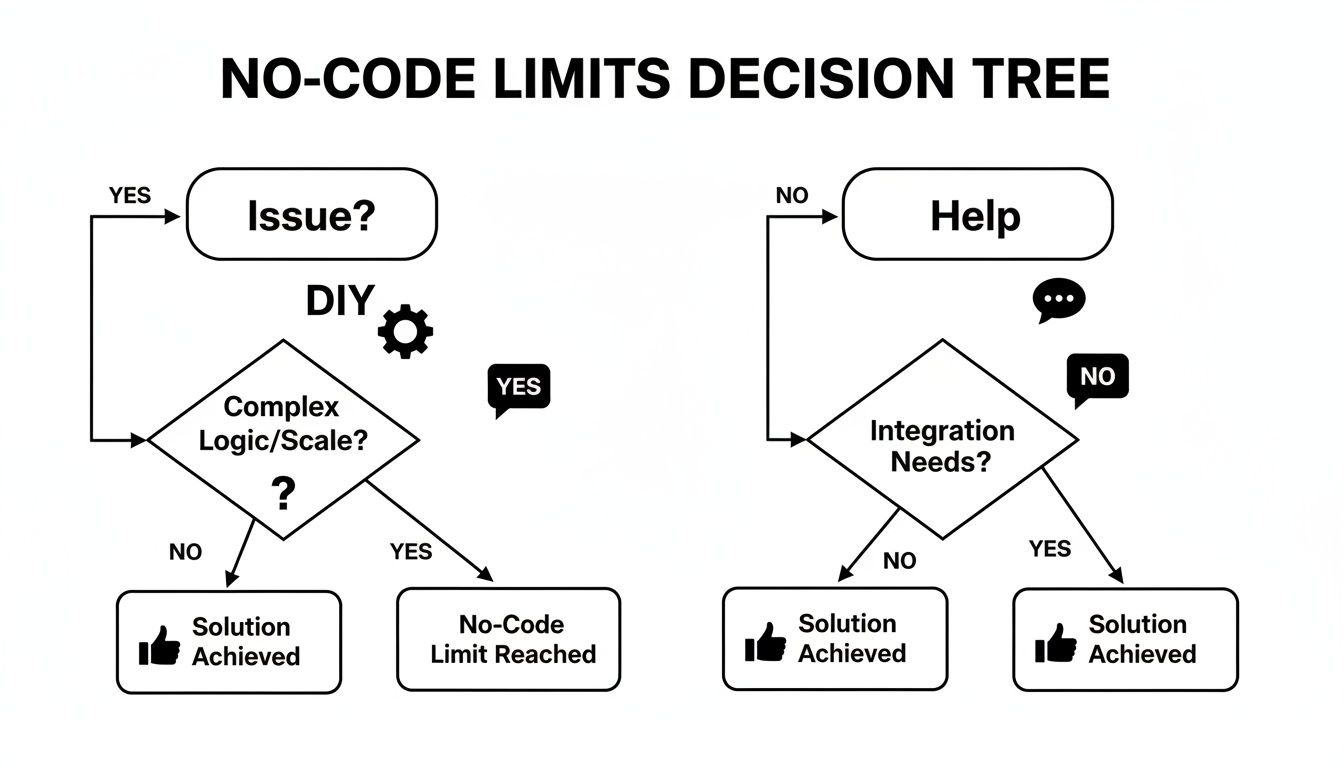
This really gets to the heart of building with no-code: it’s a constant balance between learning yourself and knowing when to ask for help to keep things moving.
Consider Pricing and Long-Term Costs
Finally, let's talk about money. Most platforms use tiered pricing based on features, traffic, or how much data you can store. Make the most of free trials and starter plans to really put your top contenders through their paces before you commit to a subscription.
This kind of flexible access is fuelling incredible growth. Projections show that by 2026, a staggering 70% of new business applications in the UK and globally will be built using no-code or low-code tools. This trend is especially strong among small and medium businesses, which are set to take up 60% of the no-code market share while growing at a 36% compound annual rate from 2026-2029.
When you look at pricing, think about the total cost over time. A cheaper plan might look good now, but if it forces you into a costly upgrade sooner than you expected or lacks a key feature, it could end up being more expensive in the long run. Always choose a plan that gives you some room to grow.
Your Action Plan: From Idea to First Launch

Alright, enough theory. It’s time to shift from learning to doing. The true magic of no-code platforms only reveals itself when you actually start building, and this final section gives you a clear roadmap to take your concept from a fleeting idea to a live product. The secret? Start small, stay focused, and resist the urge to build everything at once.
Your journey starts with defining a Minimum Viable Product, or MVP. An MVP isn't just a watered-down version of your grand vision. Instead, think of it as a laser-focused tool that solves just one core problem for one specific type of user, and does it brilliantly. The hardest discipline for any first-time builder is saying "no" to all the extra features you can dream up, but it's also the most important.
This lean approach lets you launch fast, get feedback from real people, and prove that your idea has legs before you pour more time and money into it.
Scoping and Prioritising Your First Build
To build an effective MVP, you need to be ruthless with your feature list. Start by brainstorming every single thing you want your app to do. Got the list? Great. Now, sort every item into one of three buckets.
Must-Haves: These are non-negotiable. Without them, your app simply can't solve the core problem. For a simple booking app, this would be the ability to see available slots and make a reservation. That's it.
Should-Haves: These features add a lot of value but aren't strictly necessary for your first launch. Think user reviews or customisable profile pages. They can wait.
Nice-to-Haves: These are the bells and whistles. Things like a dark mode option or advanced search filters fall squarely in this category. Park them for a future version.
Your MVP is built only from your "Must-Haves" list. This discipline is what stops "scope creep" in its tracks and keeps you focused on getting a lean, effective product out the door. It's a critical step when you decide to make an app using no-code tools.
This MVP-first mindset is fast becoming the standard, especially as the tools get better. In the UK, the No Code AI Platform Market exploded to a USD 3.9 billion valuation in 2025 and is on track to hit USD 17.2 billion by 2032. That growth is fuelled by everyday entrepreneurs and small businesses building their own MVPs on platforms like Bubble, dramatically cutting their reliance on expensive development teams. You can read more in the UK No Code AI Platform Market report from Mobility Foresights.
Knowing When to Call for a Co-Pilot
Building your first app is an amazing learning curve, but you will hit walls. I’ve seen countless builders get stuck for weeks trying to perfect a tricky responsive design or integrate a payment gateway like Stripe. This is where getting expert guidance is a smart move, not a sign of weakness.
Don't think of getting help as a failure. See it as a strategic investment to buy back your most valuable asset: time. A single focused tutoring session can save you weeks of banging your head against a wall.
A one-to-one session with a coach can transform a major roadblock into a solved problem in just an hour. Instead of getting frustrated and giving up, you can get direct, hands-on help to master the specific skill you need, right when you need it. This kind of targeted learning is what keeps your momentum going and ensures your project doesn't die a slow death right before the finish line.
Frequently Asked Questions About No-Code
As you start digging into the world of no-code platforms, it's only natural for some practical questions and "what if" scenarios to pop into your head. This final section tackles the most common queries we hear from aspiring builders, giving you the clarity you need to move forward.
These are the questions that get to the heart of what it really means to commit to this new way of creating software.
Can I Build a Truly Unique Business on a No-Code Platform?
Absolutely. The old idea that no-code just spits out generic, template-based websites is completely outdated. Modern platforms like Bubble offer incredible flexibility, letting you design custom workflows and unique user experiences that are anything but cookie-cutter. Your creativity is really the only ceiling.
Scalability has also come on leaps and bounds. Plenty of successful, high-growth businesses now run entirely on a no-code foundation. The secret is picking the right tool for the job and—this is crucial—designing your app’s database and logic efficiently from day one. Getting that foundation right is where a bit of expert guidance can give you a massive head start.
What Happens if the No-Code Platform I Use Shuts Down?
This is a fair question, often called 'vendor lock-in'. While it's a potential risk with any service you rely on, it’s not as scary as it might sound. The big players in the no-code space are stable, well-funded companies, so a sudden collapse is highly unlikely.
When you evaluate a platform, you're also evaluating the business behind it. Look into its history, funding, community size, and data export policies to make an informed decision and minimise this risk.
To protect your work, look into your options. Some advanced platforms offer dedicated server plans that give you more control, and almost all of them provide solid ways to export your user data. Do your due diligence on the company’s health before you go all-in.
Do I Need Design or Database Skills to Use No-Code Tools?
You definitely don't need to be a programmer, but a basic understanding of UI/UX design principles and how databases work will be a massive help. No-code provides the tools, but you’re still the architect drawing up the blueprints.
A logical data structure is especially important. If you get that wrong, you’re setting yourself up for major performance issues and headaches as your app gets bigger. This is exactly why building a focused Minimum Viable Product (MVP) is such a fantastic learning exercise. For more on this, check out our guide on what an MVP is and how to plan one.
This is also where tutoring can make a huge difference. It helps you learn these core concepts as you build, bridging the gap between having a powerful tool and actually creating a polished, successful product that people will want to use.
Ready to turn your idea into reality but need a co-pilot for the journey? Codeless Coach offers one-to-one Bubble.io tutoring to help you build faster and smarter. Get expert guidance on everything from database design to API integrations and launch your app with confidence. Book your first session at https://codeless.coach.











