
Mar 26, 2026
A Founder's Guide to No-Code Web App Design
Learn modern web app design without writing code. This guide shows founders how to use Bubble and AI tools to build a stunning MVP and go from idea to launch.

At its heart, web app design is about creating something that's both beautiful to look at and a dream to use. It’s not about just picking colors and fonts; it's about deeply understanding a user’s problem and building the most direct, intuitive path to a solution. For a founder, this is where your big idea starts to feel real.
Why Web App Design Is Your New Superpower
Not long ago, building a web app was a fortress guarded by lines of complex code and expensive technical teams. If you were a founder with a brilliant idea but no coding background, you were stuck on the outside looking in. That fortress has officially crumbled.
Today, designing a web app is less of a programming puzzle and more about visual problem-solving. This shift makes design a genuine superpower for entrepreneurs. Thanks to intuitive no-code platforms and clever AI assistants, you can now piece together interfaces and functionality visually, bringing your vision to life faster than ever. You don’t need to write a single line of code to build, test, and launch your product.
From Technical Hurdle to Strategic Advantage
This isn't just a minor convenience—it fundamentally changes the startup game. Instead of sinking months of time and a huge chunk of your budget into hiring developers, you can build your own Minimum Viable Product (MVP). Getting your hands dirty with the build process gives you some serious advantages:
Unmatched Speed: You can go from a napkin sketch to a product that real users can test in a matter of weeks, not months.
Complete Control: Got feedback? You can make updates on the fly without waiting for a developer's schedule to open up.
Cost Efficiency: Keep your development costs incredibly low, freeing up precious capital for marketing and actually growing the business.
The core idea is simple: mastering no-code design tools empowers you to capture market opportunities faster than ever before. You can validate your ideas with real users and build a customer-centric product from day one.
Building with AI and No-Code Platforms
The modern founder's toolkit is a powerful combination of no-code builders and AI-powered creativity. Even if you don't have a "designer's eye," you can find your footing fast. For example, tools like Google's Stitch, which uses the Gemini 3 Pro AI model, can accelerate UI design by generating visual concepts just from a text description.
This means even complete UI novices can find inspiration and then manually build these designs in Bubble.io. This blend of AI inspiration and no-code execution is a game-changer.
We're seeing this happen in a market that's absolutely booming. The global web design services industry is set to climb from $61.23 billion in 2025 to over $92.06 billion by 2030. This explosive growth proves just how much demand there is for great user experiences—and it creates the perfect opening for founders who can build and launch quickly. Discover more insights about these web design statistics.
Kickstart Your Design With AI Inspiration
For any founder, one of the most intimidating things is that blank screen. You know what your app needs to do, but turning that vision into a polished, professional layout can feel impossible, especially if you're not a designer. It’s a common roadblock.
This is the perfect place to bring in AI as a creative partner. The idea isn't to let AI build your app for you. Instead, you can use it as an incredible tool for generating ideas, which fits right into a hands-on web app design process.
Using AI to Spark Ideas
Today's AI tools have gotten surprisingly good at understanding and visualizing concepts. For instance, tools like Google's Stitch, which is powered by the Gemini 3 Pro AI model, can accelerate UI design by generating multiple concepts from a simple text description or even a quick sketch.
Think about describing your app’s dashboard: "I need a clean dashboard for a project management tool. It should have a sidebar for navigation, a main section for tasks, and a small area for team updates." In seconds, the AI can spit out several high-quality visuals based on that prompt. Suddenly, you have a tangible starting point, complete with ideas for colors, component layouts, and even font pairings.
This approach takes a lot of the initial guesswork out of the picture. You get to see what established design patterns look like in practice without needing years of design experience yourself.
Think of AI as your endlessly patient brainstorming partner. It can generate dozens of layout variations, helping you discover design directions you might never have considered on your own.
From AI Concept to Bubble.io Reality
The real magic happens when you connect that AI-generated inspiration with practical, no-code building. Once you find a design concept that clicks, the next step is to get your hands dirty and manually build these designs yourself in a platform like Bubble.io.
This two-step process gives you the perfect balance:
Automated Inspiration: You beat the "blank page" problem and get a clear visual goal to work toward. This helps ensure your app looks thoughtful and well-designed from day one.
Custom Implementation: You keep total control. By building the components yourself in Bubble, you make sure everything is structured properly, connected to your database, and perfectly suited to your specific user workflows.
This workflow lets even complete UI novices create a high-quality MVP without the upfront cost of hiring a designer. If you want to dive deeper, exploring different AI tools for website design can help you generate ideas even more efficiently. We also cover how this applies to more complex builds in our guide to the no-code AI app builder process. It’s all about making smart design choices—guided by AI but executed by you.
The Foundations of Great App Design
What separates a truly great web app from a merely functional one? It's not about cramming in more features. The best apps are built on a handful of core design principles that always, always put the user's experience first. For a founder, getting these right is the difference between building something people tolerate and something they genuinely love to use.
Let's break down the two terms you'll hear constantly: User Experience (UX) and User Interface (UI). They're often used together, but they tackle completely different parts of the design puzzle.
UX vs UI: A Simple Analogy for Founders
To clear up any confusion, I always use the analogy of building a house. It makes the distinction between UX and UI crystal clear.
Design Aspect | UX (The Blueprint & Flow) | UI (The Decor & Fixtures) |
|---|---|---|
Core Question | How does it work and feel? Is it logical? | How does it look and what does it feel like to touch? |
House Example | Is the kitchen next to the dining room? Does the layout make sense for daily life? Can you get around easily? | What color are the walls? What style are the faucets? Are the light switches easy to find and use? |
App Example | How does a user sign up? What's the path to completing a key task? Is the navigation intuitive? | What are the brand colors and fonts? Are the buttons round or square? Do the icons clearly represent their function? |
In short, UX is the underlying structure and logic—the thoughtful architecture. UI is the visual and tactile layer on top—the interior design that makes the space beautiful and enjoyable. You absolutely need both to create an app that feels like home for your users.
The Secret to an Intuitive App
Beneath both UX and UI is an even more fundamental concept: Information Architecture (IA). Think of IA as the invisible scaffolding that holds your entire app together. It’s how you organize, structure, and label everything so users can find what they need without a second thought.
Imagine walking into a supermarket. Great IA is why you instinctively know to look for milk in the "Dairy" aisle and bread in the "Bakery" section. The signs and layout guide you effortlessly. Poor IA would be like finding cereal next to the car cleaning supplies—it’s confusing, frustrating, and makes you want to leave.
A well-thought-out IA is the secret ingredient that makes an app feel completely natural and intuitive to navigate.
The goal of good web app design is to make the user feel smart and capable. When the layout is predictable and the path is clear, users can focus on their goals, not on figuring out your interface.
Responsive Design Is Non-Negotiable
Finally, let's talk about screen size. In this day and age, building an app that only works well on a desktop computer is a guaranteed path to failure. Responsive design, which automatically adjusts your app's layout to fit any device, is no longer optional.
This is an absolute industry standard. Consider that roughly 90% of websites are now built to be responsive. Why? Because over 63% of all global web traffic comes from mobile devices. If your app is clunky or broken on a phone, you're shutting the door on the majority of your potential users.
Fortunately, modern no-code platforms like Bubble.io are built with responsiveness at their core, which is a huge head start.
To really nail these fundamentals, it helps to see them in action. This guide on how to design a web app users will actually love offers some great real-world perspective. And as you get started, you can also check out our guide on mobile application design for more device-specific advice.
Your Practical Bubble.io Design Workflow
Alright, let's turn those design principles into a real, working product. This is where the rubber meets the road—translating your vision into a functional app. Here’s a straightforward workflow for building your Minimum Viable Product (MVP) right inside the Bubble.io editor, starting with the single most important step.
Forget about jumping straight into a fancy design tool. The process actually starts with something much simpler: low-fidelity wireframes. Grab a pen and paper, or open up a basic tool like Miro or Whimsical. Your goal is to sketch out the main screens of your app, focusing only on the core layout and how a user gets from point A to point B. This isn't about colors or fonts; it's about flow. Nailing this down early will save you a world of headaches later on.
From Sketch to Structure in Bubble
Once your rough sketches feel right, it’s time to bring that structure into Bubble’s Responsive Engine. This is where you lay the foundation for your entire app. Instead of thinking in fixed pixels like an old-school website, you'll be working with flexible containers that automatically adapt to different screen sizes.
Think of it like building with LEGOs. You're arranging elements within a system of rows and columns.
Containers: These are your main building blocks. You'll likely have a primary container for the page's body and another for the header or navigation bar.
Rows and Columns: Inside each container, you'll decide if elements should stack on top of each other (a column) or sit next to each other (a row). A user profile page, for instance, is a classic column layout: profile picture, then the name below it, then the bio.
Alignment and Spacing: Finally, you'll set how elements are aligned within their container (centered, left, etc.) and define the "gap" or breathing room between them.
By following this method, you're building a responsive app from the ground up, ensuring it looks great whether it’s viewed on a huge monitor, a tablet, or a phone.
This diagram shows how the big picture of design flows together, from the blueprint to the finished product.
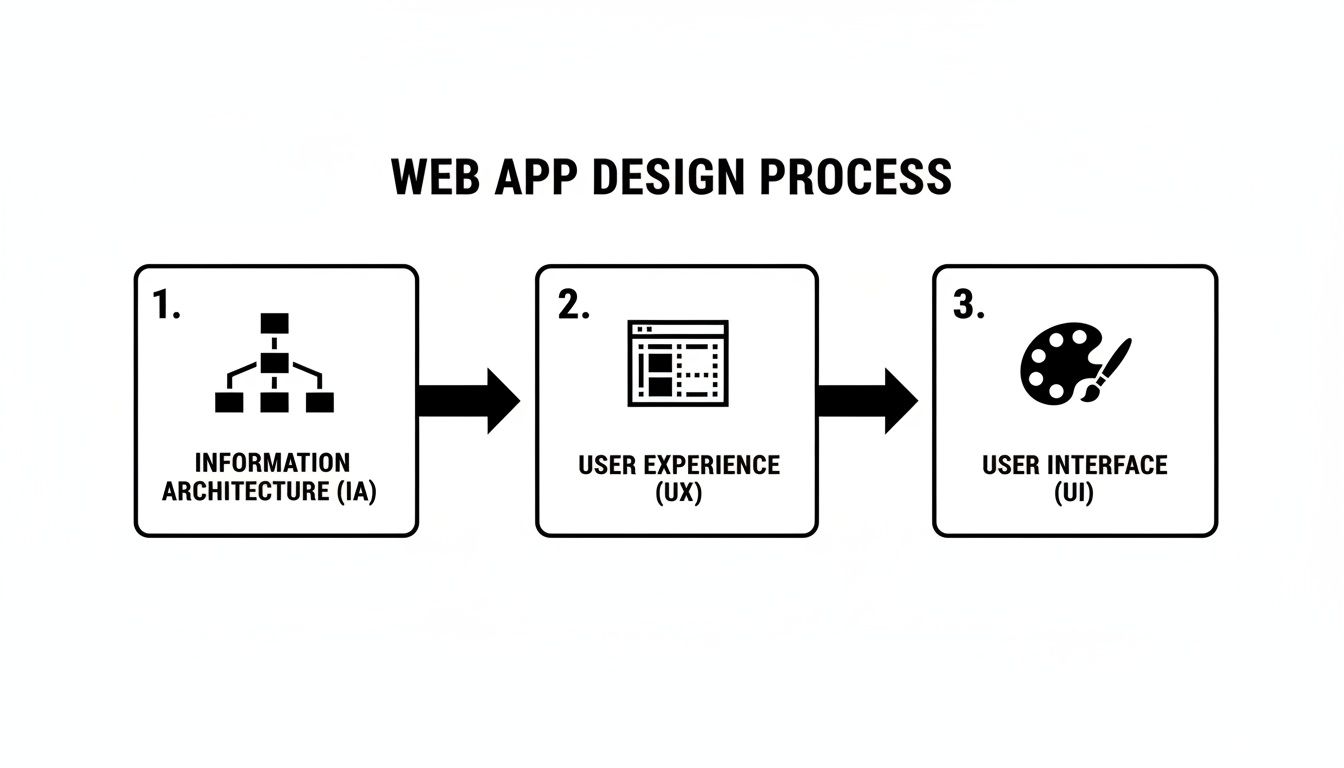
As you can see, a solid structure (Information Architecture) is the foundation for an intuitive user journey (User Experience), which is then polished with a great visual design (User Interface).
Creating Your Reusable Style Guide
With your layouts structured, there's one final step before you start building out every page: establishing a consistent visual identity. Bubble’s Styles tab is your central hub for this. This is where you'll create a reusable style guide that keeps your app’s look and feel consistent everywhere.
Think of the Style Guide as one of Bubble's superpowers for consistency and speed. Instead of styling every single button by hand, you define a "Primary Button" style once and apply it everywhere. If you ever need to change the color, you just update it in one place, and every button in your app changes instantly.
You can set these global styles for all your core elements:
Fonts for headings, body text, and links
Your brand's color palette (primary, secondary, accents)
Designs for buttons, including their size, color, and what they do when you hover over them
The look of input fields, dropdowns, and other forms
This hands-on process takes the mystery out of app development and empowers you to build a professional-looking product right from the start. To see these concepts in action, you can learn more about the Bubble app builder and what makes it so powerful for founders.
Building Essential Layouts and Components in Bubble
Now that you've got your workflows mapped out, it’s time to get your hands dirty and actually build the core pieces of your app. The good news is that nearly every web application—from a simple to-do list to a massive social network—is built from the same handful of common layout patterns and components.
This is where the real work begins. We’ll walk through how to build these fundamental parts using Bubble's visual editor, always tying the practical "how" back to the strategic "why" of great web app design.
Designing a User-Friendly Dashboard
Your dashboard is your app’s front door. It’s usually the first thing a user sees after they log in, so it needs to be immediately clear and guide them toward action. In Bubble, this means using containers to set up a main content area and a navigation sidebar. The goal is to give users a bird's-eye view without throwing too much at them at once.
A classic mistake is to treat the dashboard like a data dump. Resist that urge. Instead, focus on showing only the most critical information. You can use simple text elements for a personal welcome, a repeating group for recent activity, and big, clickable stat cards that draw the eye and lead to more detailed pages.
Structure: Start with a main column container for the page. Inside that, drop in a row container holding two more containers: a narrow column for your sidebar and a wider one for the main content.
Content: Keep it lean. A simple "Welcome back, [User's Name]," a few key metrics (like "Active Projects: 5"), and a list of recent notifications is often all you need.
Usability: Make sure every element has a job to do. Your dashboard should instantly answer the user's most pressing questions and show them where to go next.
Displaying Dynamic Lists with Repeating Groups
Let's talk about the repeating group. This is, without a doubt, one of Bubble’s most powerful and essential tools. Anytime you need to show a list of things from your database—users, products, posts, messages—the repeating group is your best friend.
Think of it as a blueprint for a single list item. You design one cell perfectly, and Bubble automatically duplicates that design for every record you want to display. To get started, you just drag a repeating group onto the page and tell it what data to show (e.g., "Do a search for Users"). Then, you design the first cell with elements like an image for a profile picture and text for a name. Bubble takes it from there, creating a clean, structured list for you.
The real power of a repeating group lies in its efficiency. You design one cell, and Bubble applies that design to hundreds or thousands of records, ensuring a consistent and professional look for all your dynamic lists.
Building Intuitive Navigation and Forms
Great navigation is the unsung hero of a user-friendly app. In Bubble, a smart move is to build a reusable header element that you can place on every page. This header can hold your logo and primary links to sections like "Dashboard," "Profile," and "Settings."
For gathering user input, clean and simple forms are non-negotiable. Use input elements for text, dropdowns for pre-set options, and checkboxes for quick yes/no toggles.
Finally, don't forget about pop-ups for providing quick feedback. A well-designed pop-up can confirm an action ("Are you sure you want to delete this project?") or celebrate a small win ("Your profile has been updated!"). By connecting these practical building steps back to core usability principles, you’ll create an interface that doesn't just work—it feels great to use.
Planning for Scale, Performance, and Integrations
Let's be honest: a gorgeous design is pointless if your app crawls to a halt the moment a user tries to do anything. A beautiful interface means nothing if the app freezes while loading data. This is where you need to think beyond the visuals and plan for performance and integrations, setting your app up to succeed as it grows.
Thinking about scale from day one will save you massive headaches later on. When you're building with a no-code platform like Bubble.io, performance almost always comes down to how smartly you work with your data.
Optimizing Your Bubble App for Speed
One of the most common rookie mistakes is creating inefficient database searches that kill performance. Imagine trying to find one person in a stadium by asking every single person their name. It’s slow. Instead, you should structure your queries to fetch only the specific data you need right at that moment, keeping your app feeling light and responsive.
Another powerful move is to use server-side workflows for any heavy lifting. By running complex calculations or data-crunching tasks on the server, you leave the user's browser free to handle the interface. This is absolutely essential for things like generating a custom report or processing a big chunk of user data, and it directly shapes how professional and reliable your app feels.
A fast, responsive app feels trustworthy. Nailing your database queries and using server-side workflows are the two fundamental pillars for building an app that can handle real growth without frustrating your users.
Connecting Your App to the World
Your app shouldn't be an island. To make it genuinely useful, it needs to talk to other services your users already rely on. This is what integrations are all about, and Bubble’s built-in API Connector is your key to unlocking that wider digital world. It lets you pull data from other platforms or send data out, opening up a ton of possibilities.
Here are a few ways integrations can turn your simple app into a robust tool:
Payment Processing: Connect with a service like Stripe to securely handle subscriptions, one-time payments, and all things money-related.
External Data: Use the API Connector to pull in live information. Think real-time stock prices, weather forecasts, or even user profiles from another service.
Workflow Automation: Link your app to a tool like Zapier to automate all sorts of background tasks. You could automatically add a new user to your email list or create a new task in your project management software without lifting a finger.
This ability to connect and share data is what elevates your app from a standalone novelty into an indispensable part of your users' digital lives.
Frequently Asked Web App Design Questions
As you get ready to build, a few common questions always seem to surface. Let's tackle some of the biggest ones I hear from founders so you can move forward with confidence.
Can I Really Build a Professional-Looking App Without a Designer?
Absolutely. The idea that you need a dedicated designer from day one is a thing of the past. The tools we have now are incredibly good, and even someone new to UI design can create something polished and professional.
It's all about having a smart process. You can lean on AI to get the creative ball rolling. For example, a tool like Google's Stitch (which uses the Gemini 3 Pro AI model) can accelerate UI design by generating visual concepts based on a simple text description. This means even complete UI novices can find inspiration.
Think of AI as your creative partner. It hands you a professional sketch, and then you, as the builder, bring that vision to life. You take that inspiration and manually build these designs in a tool like Bubble.io, making sure every piece works exactly as your app requires.
How Much Design Should I Do Before Building in Bubble?
This is a great question. The best approach is to start with low-fidelity wireframes. Seriously—grab a pen and paper or a simple digital tool and just sketch out the basic screens and user flows. This is the time to be messy and make quick changes.
Working this way lets you figure out the core structure of your app before you've invested hours building something beautiful that might be wrong.
Once you feel good about the flow and the general layout of your main pages, that’s your green light to jump into Bubble. From there, you'll translate those simple sketches into responsive layouts and start defining your reusable styles for things like colors, fonts, and buttons.
What Is the Biggest Design Mistake Founders Make?
Hands down, the most common and costly mistake is feature creep.
It’s the temptation to cram every cool idea, flashy animation, and complex workflow into the very first version. This almost always backfires, leading to a confusing experience for the user and a slow, buggy application that’s a nightmare to maintain.
A great first version, or MVP, should do one thing exceptionally well. Focus on a clean, simple design that solves a single core problem for your user. Clarity and ease of use will always beat a mountain of features, especially when you're just getting started.
Ready to turn your idea into a functional app but need a little guidance along the way? Codeless Coach offers one-on-one tutoring to help you build faster and smarter with Bubble.io. Get expert answers and hands-on help by booking a session.











