Apr 10, 2026
Unlock No-Code Power: Visual Programming Environments
Explore visual programming environments. Build web apps with drag-and-drop logic using tools like Bubble.io. No coding needed! Perfect for founders.
You have an app idea in your notes, a few screenshots in Figma, and a growing sense that waiting for a technical co-founder is turning into a business risk.
You know what the app should do. A user signs up, fills in a profile, books a session, pays, gets a confirmation email, and sees a dashboard. None of that feels mysterious when you describe it in plain English. It only feels hard when someone tells you the next step is learning JavaScript, backend architecture, and deployment.
That gap is where a lot of founders get stuck.
The good news is that modern no-code tools did not appear out of nowhere. They sit on top of a deeper idea called visual programming environments. Once you understand that idea, tools like Bubble start to feel less like magic and more like a set of logical building blocks you can learn to control.
This is important because proficiency is not “dragging things around.” True skill involves learning to think like a builder. You define data. You describe events. You connect actions. You test assumptions. That is programming, even if you never touch text-based code.
If you are also exploring AI-driven product creation, this overview of no-code artificial intelligence solutions is a useful companion because it shows how visual building and AI are starting to overlap in practical ways.
A lot of founders ask the same first question. Can I launch something real this way, or am I just making a prototype that breaks later? The answer depends on scope, tool choice, and how you build. If you want a grounded look at the launch side, this guide on how to ship an MVP is worth reading: https://codeless.coach/blog/how-do-you-launch-an-app
Building Your Idea Without Writing a Single Line of Code
A founder I often picture here is not clueless. They are clear on the problem.
They might run a service business and want a client portal. Or they have a marketplace idea and need a way for buyers and sellers to interact. Or they are tired of patching together Google Forms, spreadsheets, email, and manual follow-up.
What they lack is not vision. It is a practical bridge from idea to working software.
The old assumption
For years, the standard advice sounded like this:
Learn to code: Spend months learning the basics before building anything.
Hire developers: Raise money or pay an agency before testing demand.
Stay in planning mode: Keep refining the concept because execution feels out of reach.
That advice often pushes founders into delay. They spend more time talking about the product than putting it in front of users.
The visual alternative
Visual programming environments change the entry point.
Instead of writing commands as text, you assemble logic visually. You drag interface elements onto a page. You define a workflow such as “when this button is clicked, create a booking.” You connect a payment tool. You store user data in a database. You review the whole flow in a way that is visible rather than buried inside files of code.
Think about the difference between describing a room renovation with raw measurements versus walking through a 3D mockup. Both can represent the same plan. One is just easier for many to grasp and change.
That is why visual tools unlock momentum for non-technical founders. They turn software building into something closer to arranging, connecting, and testing than memorizing syntax.
Tip: If you can explain your app as a series of user actions and outcomes, you are already closer to building than you think.
Why this matters for Bubble users
Bubble is one of the clearest examples of this philosophy in action.
When you build in Bubble, you are not just decorating screens. You are defining how data, logic, and user behavior work together. A signup form is not a picture of a signup form. It is part of a system. Inputs collect data. Workflows process it. Privacy rules shape access. Conditions control what users see.
Once you see that, you stop thinking “I can’t code.”
You start thinking, “I need to map the logic clearly.”
That shift marks the true beginning.
What Are Visual Programming Environments Really
The phrase visual programming environments sounds more academic than it needs to be.
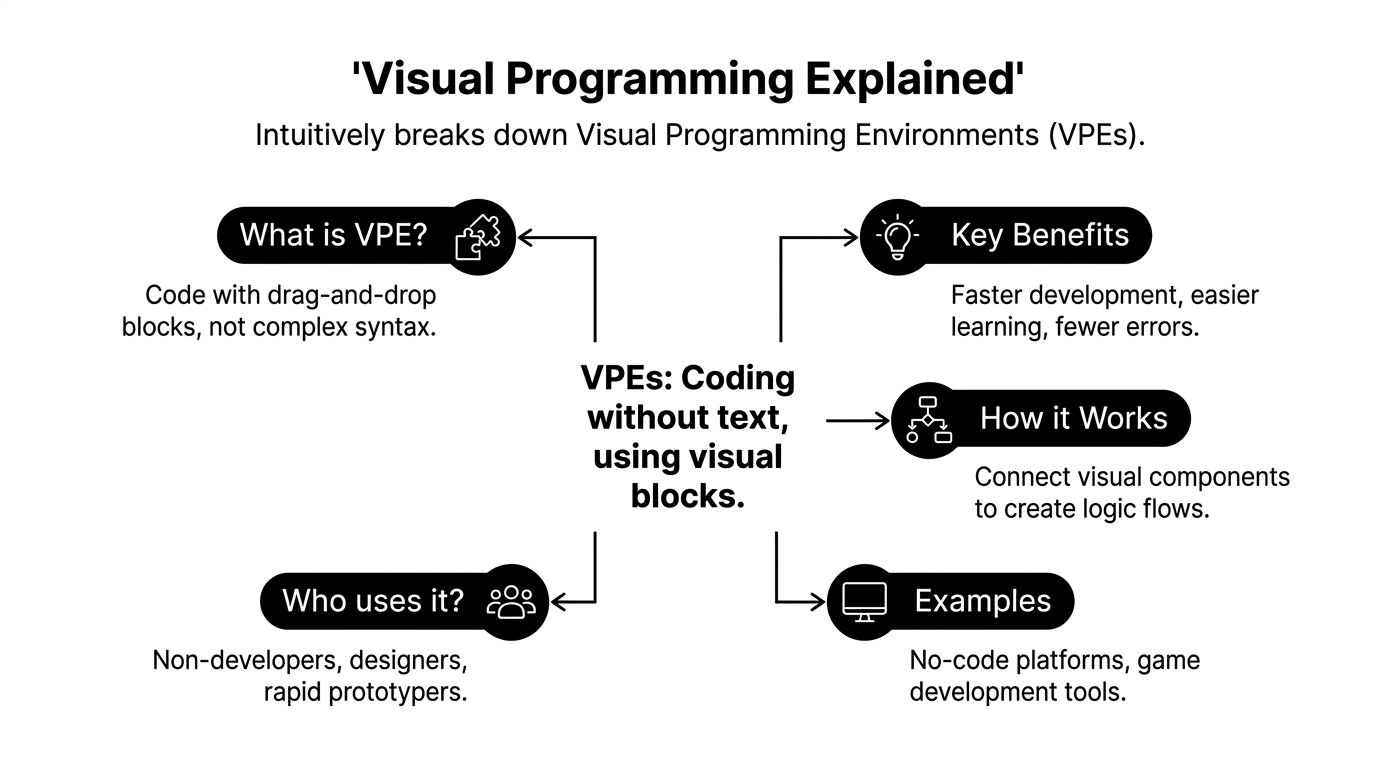
In plain language, a visual programming environment is a place where you build software logic through visual elements instead of typing everything as code. Those visual elements might be blocks, boxes, flows, conditions, forms, or connected actions.
A good mental model is digital LEGO. Each piece does something specific. One piece captures user input. Another saves data. Another sends an email. Another checks a condition such as whether a user is logged in. You assemble the pieces into a working system.
A simpler definition
If traditional coding is writing instructions as text, visual programming is arranging instructions in a visible form.
That visible form usually does three jobs:
Part | What it means | Bubble-style example |
|---|---|---|
Elements | The pieces you work with | Button, input, repeating group, popup |
Connections | How one thing affects another | A button click triggers a workflow |
Logic rules | The conditions behind behavior | Only show this page if the user is logged in |
This is why founders often understand visual builders faster than expected. The structure mirrors how they already think about their business.
They do not think in syntax. They think in actions and outcomes.
Where visual programming came from
Visual programming is not a new trend invented by no-code startups.
Researchers describe visual programming environments as becoming a distinct field in the late 1980s to early 1990s, with earlier experiments going back to the 1970s such as ThingLab. The same survey notes that Google’s open-sourcing of Blockly in 2012 helped power over 80% of major block-coding platforms, and that Bubble.io, launched in 2012, has hosted many applications, with user reports describing MVP timelines shrinking from months to weeks for non-technical founders (UC Berkeley survey).
That history matters because it shows a pattern. People have been trying for decades to make programming more human-readable, more visual, and more accessible.
What makes a tool a visual programming environment
Not every drag-and-drop tool deserves the label in the same way.
Some tools let you design a page visually but rely on hidden code for most serious logic. Others let you control both the interface and the behavior in a visual way. The closer a platform gets to letting you manage data, workflows, user states, and integrations visually, the more it behaves like a true visual programming environment.
Here is a useful distinction:
Design-only tools help you mock up a screen.
Automation tools help you connect systems with workflows.
Full visual app builders help you create the product itself, including database, logic, and interface.
Bubble belongs in that third group.
Why founders should care about the philosophy
If you only think of Bubble as “a no-code app builder,” you miss the part that helps you grow.
When you understand visual programming as a philosophy, you begin to ask better build questions:
What are my core data types?
What event should trigger this workflow?
What should happen if the user is not authenticated?
Which actions belong on the page, and which should happen in the backend?
Those are developer questions. You do not need text-based code to ask them well.
Key takeaway: No-code is not the absence of programming. It is programming expressed in a more visual, human-friendly language.
Understanding the Core Concepts and Approaches
Most confusion around visual programming environments starts when a founder can build a page but cannot explain why the app behaves the way it does.
That usually means they have learned the interface, but not the mental model.
The good news is that the core concepts are not abstract once you tie them to app behavior. In Bubble, Zapier, and similar tools, the same few ideas show up over and over again.
Events drive action
An event is the thing that starts a process.
In Bubble, that might be:
a button click
a page load
a user submitting a form
a scheduled backend workflow
In Zapier, it might be “new row added to Google Sheets” or “new form entry received.”
If you are building a booking app, the event might be “user clicks Confirm Booking.” That event can trigger several actions in order:
Save the booking
Charge the user with Stripe
Send a confirmation email
Update the calendar view
This is programming logic. It is just presented in a visual way.
Dataflow is the path your information takes
Dataflow means tracking where information comes from, where it goes, and what happens to it on the way.
In Bubble terms, think of this chain:
The user types an email into an input
The workflow reads that input’s value
The app creates a user record
The app sends that email to another action such as onboarding
If something breaks, dataflow is often the issue. The button works, but the input is empty. Or the database field exists, but the workflow is saving the wrong thing. Or the next step expects a user object and receives plain text instead.
Visual tools can help in such cases. The structure is more visible than a wall of code. According to the Cognitive Dimensions of Notations framework, tools with strong visibility can reduce debugging time by 30% to 50%, while tools with high viscosity can make edits much slower and can even double the time it takes to edit complex workflows (Cognitive Dimensions paper).
For founders, that trade-off is practical. A tool can feel intuitive at first because everything is visible. Then the app gets bigger, and changing one workflow starts affecting many others.
State is the app’s current situation
State answers the question, “What is true right now?”
Examples:
Is the user logged in?
Has the user paid yet?
Which tab is open?
Is this form in edit mode or create mode?
A lot of “random” app bugs are really state problems.
A popup appears when it should stay hidden. A user sees admin controls they should not see. A dashboard shows old information because the page is still referencing a previous state.
In Bubble, state might live in the database, in custom states on elements, or in the current page context. Founders who understand this become much better builders because they stop treating the UI as static.
Thinking like a visual developer
The shift is simple but important.
Instead of asking, “Where do I type the code for this?” ask:
What event starts this?
What data does it need?
What state must be true?
What should happen next?
That is the mindset behind tools like Bubble. If you want a useful comparison between platform styles, this walkthrough of low-code and no-code differences helps clarify what kind of builder experience you want: https://codeless.coach/blog/low-code-no-code
A quick translation table
If you say this | A developer hears this | A Bubble builder should think |
|---|---|---|
“When they click the button” | Event trigger | Workflow starts |
“Save their details” | Database write | Create or make changes to a thing |
“Only premium users see this” | Conditional access | Privacy rules plus conditional display |
“Show their bookings” | Query data | Search for bookings filtered by current user |
Tip: When a workflow feels confusing, write it in one plain sentence first. “When user clicks Pay, create order, charge card, then show receipt.” If you cannot say it clearly, you probably cannot build it clearly yet.
Why this matters more than tool tutorials
Tool tutorials teach buttons and menus.
First principles teach problem solving.
That is the difference between copying a feature and building one that fits your business.
Practical Use Cases for Non-Technical Founders
The easiest way to understand visual programming environments is to look at the kinds of problems founders solve with them.
Not hypothetical problems. Everyday business problems.
A service business turns manual booking into a product
Start with a consultant or agency owner.
They are managing leads by email, sending invoices manually, chasing follow-ups, and updating a spreadsheet after each call. It works, but only while volume stays low.
A visual tool like Bubble lets them rebuild that process as a client-facing app:
a signup page
a booking form
a dashboard for active projects
payment collection through Stripe
automated messages through email or Twilio
The founder is not “learning software engineering” in the academic sense. They are turning a manual workflow into repeatable logic.
That is often the first meaningful win with no-code. You stop being the glue between disconnected tools.
A marketplace MVP without a large team
Now take a two-sided marketplace idea.
One side creates listings. The other side searches, filters, and requests bookings or purchases. An admin needs moderation controls. Users need profiles. Payments need to flow correctly.
In Bubble, a founder can model this visually by defining:
Data types such as users, listings, requests, and payments
Page logic for search results, detail pages, and dashboards
Workflows for creating listings, sending requests, and confirming actions
Conditions for showing the right controls to the right people
Visual programming environments become more than convenience at this point. They let a founder test whether the business model works before committing to a heavier build path.
Workflow automation for the less glamorous work
Many small business owners do not need a full app first. They need fewer repeated tasks.
A practical example looks like this:
A lead fills out a form. Their details go into Airtable or Google Sheets. A task appears in Trello. A welcome message goes out through Mailchimp. A follow-up reminder gets scheduled if no one replies.
That sequence is visual programming too.
It may happen in Zapier instead of Bubble, but the thinking is the same. Trigger. Data passes through steps. Conditions decide what happens next. Actions update other systems.
This is often the best first project for a non-technical founder because the payoff is immediate. Time gets freed up. Mistakes drop. Processes become visible.
A prototype for pitching and learning
Some founders need a polished MVP for early customer conversations or investor meetings.
The product does not need every edge case solved. It needs enough working logic to show the user journey clearly.
That can mean:
onboarding
sample data
one key workflow
a lightweight dashboard
a payment or subscription path
The benefit of building visually is that changes are fast. If users get confused by the onboarding flow, the founder can revise it directly. If people want a different pricing structure, the app can be adjusted without waiting in a development queue.
Here is a walkthrough that shows visual building in action:
What these use cases have in common
Different business models. Same underlying pattern.
A process exists
The process can be mapped
The map can be turned into visual logic
The founder can test the result with real users
That is the practical promise of visual programming environments. They make business logic buildable by people who understand the business, even if they do not come from a traditional engineering background.
Key takeaway: Your first no-code product does not need to be the full company. It only needs to make one important workflow work well enough for real people to use it.
The Strengths and Limitations of Building Visually
Visual programming environments are powerful. They are not magic.
Founders do better with them when they understand both sides at the start. The strengths are real. The limitations are real too.
Where visual building shines
The biggest strength is speed of understanding.
Traditional code asks you to learn syntax, structure, and tooling before you can express even simple logic. Visual building lets you start with the logic itself. For a founder, that means your early effort goes into the product model rather than the language barrier.
Another major advantage is visibility.
When your app logic is represented in workflows, conditions, and connected actions, it becomes easier to inspect. You can often trace what happens when a user clicks something by following a visible chain.
That is a better fit for many non-technical teams because they can discuss the app in business language:
What should happen after payment?
Who should see this page?
Which status changes trigger an email?
What should the admin review first?
Those are product questions, not purely engineering questions.
Why visual tools teach useful habits
Founders sometimes worry that using Bubble or Zapier means they are avoiding real development.
I think the opposite is often true.
Done well, visual building teaches good product habits:
Skill | Why it matters |
|---|---|
Scoping | You learn to shrink the app to a testable core |
Data modeling | You define what entities your business needs |
Workflow design | You map what triggers actions and what outcomes follow |
Iteration | You change quickly based on user feedback |
Those habits transfer even if you later hire developers or move to a hybrid stack.
Where founders hit friction
The challenge begins when the app grows in complexity.
A persistent critique of visual programming is that it often stays locked into node-and-wire style thinking that does not scale well for general-purpose software. One critique argues that visual programming environments work well in niches such as game development with Unreal Engine Blueprints, but often struggle for broader software work because they can prioritize visual form over domain-specific function, which creates cognitive barriers as systems get more complex (critique of node-and-wire limits).
In founder terms, that friction usually shows up as:
workflows that become hard to scan
conditions spread across too many places
repeated logic that should have been abstracted earlier
pages doing too much work at once
uncertainty about what is happening in the background
The issue is not that visual tools stop working overnight. The issue is that poor structure becomes easier to create when the barrier to building is low.
The common limitations to plan for
Scalability of understanding
A small app can be elegant.
A larger app can become messy if every feature gets bolted on visually without a system. The editor may still function, but the founder can lose clarity. When that happens, development slows down because every change feels risky.
Black box moments
Even strong no-code platforms have layers you do not fully control.
If a plugin behaves strangely, you may not be able to inspect the underlying implementation the same way a traditional developer could inspect custom code. That can make some bugs harder to reason through.
Vendor dependence
When you build extensively into a platform, your product becomes tied to that platform’s way of working.
That is not automatically bad. It just means tool choice is a business decision, not only a technical one.
Performance trade-offs
Some products fit visual platforms beautifully. Others need unusual processing, very custom interactions, or architecture decisions that fit better in code.
The mistake is not using no-code. The mistake is pretending every product has the same technical shape.
Tip: The right question is not “Can this platform do everything?” It is “Can this platform help me validate the most important part of my business quickly and safely?”
A balanced founder mindset
Use visual programming environments where they offer significant advantage.
That usually means:
proving demand
reducing manual operations
launching an MVP
learning what users want
creating internal tools and workflows
Then reassess.
Some businesses will stay happily on visual platforms for a long time. Others will keep a visual core and add code around the edges. Others will outgrow the original setup and rebuild selectively.
That is normal. Good builders do not worship tools. They use them strategically.
The Future Is Visual and Intelligent
The next shift is not visual programming versus AI.
It is visual programming with AI.
That combination matters because visual tools already give founders a human-readable way to build software. AI adds a new layer. It can help generate, refine, and optimize those visual systems faster than a founder could assemble them by hand from scratch.
From drag and drop to prompt and refine
The old no-code workflow was mostly manual.
You added elements, created workflows, tested pages, and repeated. That is still useful because it teaches structure. But newer systems are moving toward a model where a founder can describe a desired outcome in plain language, get a first draft, then refine the result visually.
That is a strong fit for non-technical founders because it matches how they already think. They start with intent. Then they edit details.
Why the technical change matters
One emerging idea is that modern visual programming frameworks are becoming end-to-end differentiable, which means AI models can optimize a whole visual program based on the final outcome. In research covered by Emergent Mind, that approach has shown 15% to 20% accuracy gains in vision-language tasks, and the same discussion suggests future no-code platforms could accelerate MVP validation by up to 40% through automated optimization of flows that founders currently tune by hand (Emergent Mind overview).
You do not need to care about the math behind that term to care about the implication.
For founders, the practical version sounds like this:
the tool suggests a better funnel path
the system reorganizes a workflow that keeps failing
onboarding gets adjusted based on outcome data
user flows improve without endless manual experiments
That is where visual programming starts to become more than a builder interface. It becomes a system that can help improve its own structure.
Why learning visual logic still matters
Some people assume AI will make these skills unnecessary.
I think it makes them more valuable.
If AI generates a workflow and you cannot read or evaluate it, you are stuck. But if you understand events, dataflow, conditions, and state, you can judge whether the generated logic matches your business.
That is the durable skill.
Key takeaway: AI may create the first draft. Founders who understand visual logic will still make the better product decisions.
What this means right now
You do not need to wait for a futuristic platform.
The builders who gain the most from the next wave will be the ones who already know how to think in visual systems today. They will move faster because they can direct the AI, inspect the output, and improve it with intention.
How to Choose Your Tool and Start Building Today
At this point, the main risk is not lack of information. It is analysis paralysis.
You do not need the perfect stack on day one. You need a tool that fits your first meaningful version.
Pick based on the job, not the hype
Start by asking a few plain questions.
What are you building?
A content site, a client portal, a SaaS dashboard, and an internal operations tool have different needs.
Bubble makes sense when you need a custom web app with database logic, user accounts, workflows, and flexible UI. Zapier makes sense when your main problem is automation between existing tools. A simpler site builder may be enough if you only need pages and forms.
Where does your data live?
If your app depends on records, relationships, user-specific views, and search behavior, treat the data model as a first-class decision.
A lot of painful rebuilds happen because founders choose based on design polish and think about data later.
Which integrations are essential?
Stripe, Twilio, Airtable, Google Sheets, Mailchimp, and custom APIs all shape your build path.
If one of those connections is central to the business, test it early. Do not assume a platform handles it well just because the homepage says “integrates with everything.”
If you want a broad starting shortlist, Toolradar’s roundup of best no-code tools can help you compare categories before you commit.
A simple way to start
The best first project is not “build the entire startup.”
It is one narrow workflow that proves the concept.
Choose one user outcome
Pick something concrete such as “user can book and pay” or “lead gets captured and assigned.”
Map the logic in plain English
Write the flow before you touch the editor. If the flow is fuzzy on paper, it will be worse in the app.
Build the data before the design gets fancy
Founders often spend too long polishing screens before defining the records underneath.
Test with real actions
Click every button. Create dummy users. Submit forms. Break your own process on purpose.
Refine after feedback
Your first version is a learning tool.
A landmark MIT study found that students using block-based visual programming tools achieved 25% to 30% higher success rates than those using traditional text-based coding, while novices debugged errors 40% faster and improved retention of concepts like loops by 35% (MIT study summary). That matters here because the same principle applies to founders. Visual systems reduce the entry barrier and make it easier to understand what you built.
One final filter for tool choice
Use this quick checklist:
Can I model my core data clearly?
Can I build the key workflow without hacks?
Can I understand what the app is doing when something breaks?
Can I change the product myself next week?
If you need more platform-specific comparisons, this guide to app builders is a strong next read: https://codeless.coach/blog/best-app-builders
The important part is to begin.
Your app idea does not become more real because you think about it longer. It becomes more real when one user can do one useful thing inside a working product.
If you want hands-on help turning your app idea into a working Bubble product, Codeless Coach offers one-to-one tutoring and consulting with Matt Blake. You can get practical guidance on scoping, workflows, API Connector, responsive layout, plugins, Stripe, Twilio, and launch decisions without spending weeks stuck in trial and error.











