
Apr 1, 2026
Your Guide to SEO in SPA for Bubble.io Apps
Struggling with SEO in SPA development? Learn how to make your Bubble.io single-page application rank on Google with this practical guide for no-code builders.
Single-Page Applications (SPAs) are fantastic for creating those slick, fast, app-like experiences users love. But that fluid user experience often comes at a steep price: your search engine visibility. The whole problem with SEO in SPA boils down to how they're built—content is loaded on the fly with JavaScript, which means search crawlers often show up to find a nearly empty house.
This can make your brilliant Bubble.io app practically invisible to Google, stopping your growth dead in its tracks.
Why SPA SEO Feels Impossible
If you've built an app on Bubble or a similar SPA framework, you’ve probably felt that frustration. You craft an amazing user experience, but the organic traffic just isn't showing up. The reason is a fundamental clash between how your SPA works and how search engines actually find and index content.
To understand why, let's look at the difference.
SPA SEO Challenges vs Traditional SEO
This table breaks down the core conflict. Traditional sites hand everything to Google on a silver platter, while SPAs make crawlers do a lot more work.
SEO Factor | Traditional Website (Multi-Page) | Single-Page Application (SPA) |
|---|---|---|
Initial Content | Serves a complete HTML file with all content for each URL. | Loads a minimal HTML "shell." Content is fetched and rendered later via JavaScript. |
Crawling Process | Simple and direct. The crawler sees the full content on the first visit. | Often requires a two-step process: fetch the shell, then render the JavaScript (which can be delayed or fail). |
URL Structure | Each page has a distinct, static URL (e.g., | A single URL can display multiple "views" or states, which can confuse crawlers if not handled correctly. |
Internal Linking | Uses standard | Often uses JavaScript functions for navigation, which may not be crawlable without proper |
In short, while a traditional site is an open book, an SPA is more like a locked diary—Google needs a special key (and the time to use it) to read what's inside.
The Crawler's Dilemma
Here’s where things get tricky. When a crawler visits your unoptimized SPA, it’s like walking into an empty room and being handed a set of IKEA instructions on how to build the furniture. Google has gotten better at assembling the furniture on its own, but it's far from a perfect science.
For Google, it’s a two-phase mission:
Initial Crawl: Googlebot grabs the basic HTML. If it’s just a shell with a bunch of code, that’s all it sees initially.
Rendering Queue: The page gets tossed into a massive queue to be "rendered" by a service that can process JavaScript.
This second step is the real bottleneck. It can be delayed by hours, days, or even weeks. Worse, if your JavaScript is too complex or needs a user to click something to load the content, the rendering might fail entirely, leaving your most important pages completely invisible.
Considering that organic search still drives an incredible 94% of all clicks, getting this right is non-negotiable. Even with AI Overviews changing the game (and causing up to 60% of searches to end without a click), Google's dominance is undeniable. It processes over 8.5 billion searches daily, commanding 89.2% of global search traffic, which is why it has to be the center of your SEO strategy. You can dive deeper into these numbers with these insightful SEO statistics from SEOPROFY.
The No-Code Founder's Challenge
For no-code founders, this technical hurdle can feel like a massive wall. You picked Bubble for its speed and power, not to get a masterclass in JavaScript rendering. Understanding the wider field of growth marketing SEO is essential for any site, and SPAs are no exception—it’s the foundation for getting seen online.
Here's the good news: You don't need to become a developer to fix this.
Achieving great SEO in SPA environments is completely doable with the right approach. It’s all about learning how to give search engines exactly what they need—discoverable content—without compromising the dynamic experience you built for your users. And that's exactly what this guide will walk you through.
Choosing the Right Rendering Strategy
Getting your rendering strategy right is probably the single most critical decision you'll make for your Bubble app's SEO. I've seen it time and time again: a beautifully designed app with fantastic UX fails to get any organic traffic. Why? Because search engine crawlers saw an empty page.
Here’s the fundamental issue with most Single-Page Applications (SPAs), including those built on Bubble.io. By default, they send a very lightweight HTML "shell" to the browser. Then, JavaScript kicks in to fetch all the data and build the page right in front of the user's eyes. This is client-side rendering (CSR), and while it feels fast and modern for a user, it's often a black box for Googlebot.
Think of it this way: Googlebot is a very impatient inspector. If it shows up and sees an empty room with a bunch of flat-pack furniture and an instruction manual (your JavaScript), it might try to assemble it, or it might just give up and leave. You can't afford to take that chance.
This flowchart really brings the problem home. If your app relies solely on client-side rendering, you're heading straight for a visibility problem.
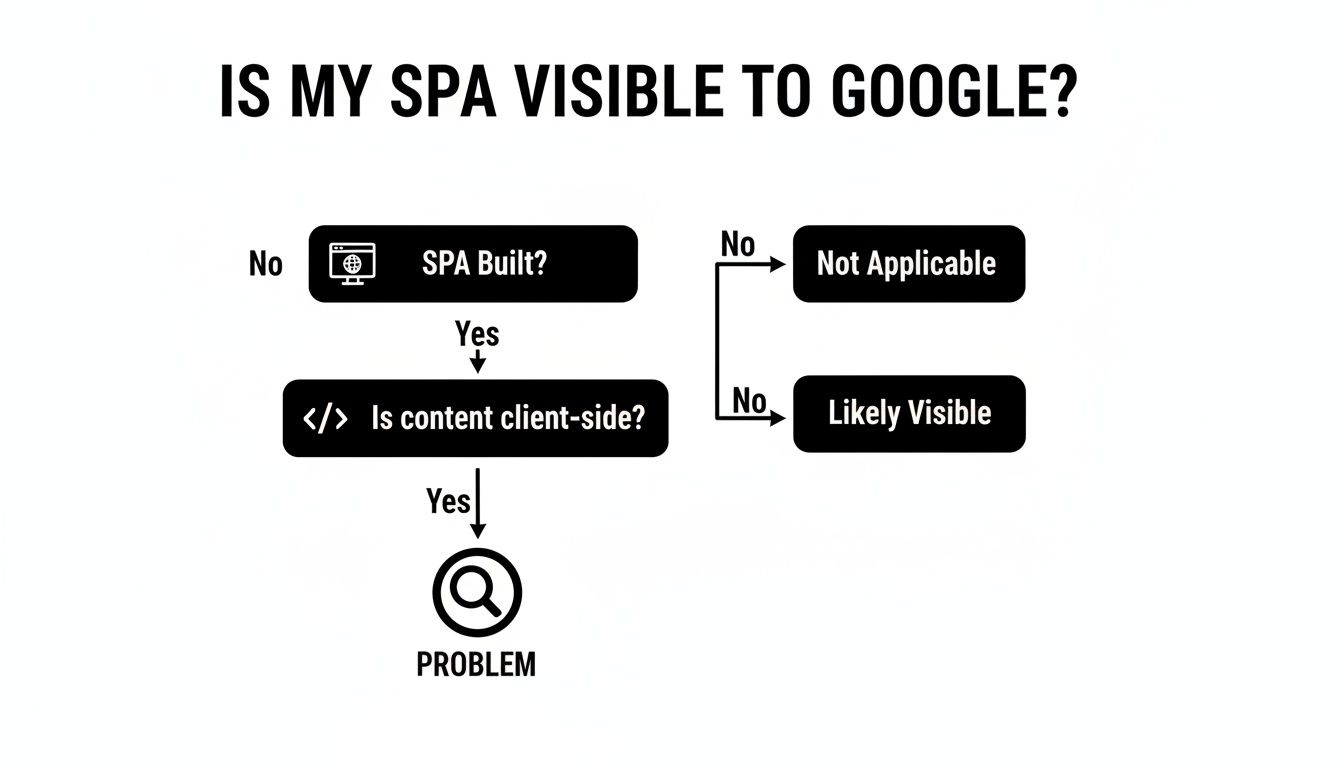
The good news is, you can solve this. The goal is to make sure that when a crawler requests a page, it gets a fully-furnished room—a complete HTML document, ready for indexing. Your main options to achieve this are Server-Side Rendering (SSR), Prerendering, and Dynamic Rendering.
Server-Side Rendering (SSR) Explained
SSR is the old-school, tried-and-true method. When a request hits your server, the server builds the entire HTML page with all the content in place and sends that finished document to the browser. It’s the gold standard for SEO because crawlers get everything they need in one go.
But here’s the catch for no-code builders: true SSR isn't a native feature in Bubble. Trying to force it often involves complicated and brittle workarounds with external servers, which kind of defeats the purpose of using a no-code platform. While you probably won't implement it, it's crucial to understand the concept because the other, more practical strategies are designed to mimic its result.
Prerendering: The Go-To for Bubble Apps
In my experience, prerendering is the most pragmatic and effective solution for Bubble apps. It's the approach I recommend to 95% of my clients.
Here’s how it works: an external service (a "prerenderer") periodically crawls your live site. It acts like a browser, executing all the JavaScript and waiting for the content to appear. Then it saves a static HTML "snapshot" of that fully rendered page.
Now, when a request for one of your pages comes in, a quick check happens:
Is it a real user? They get the normal, dynamic Bubble app experience they're supposed to.
Is it a search engine bot? Instead of the SPA, they are served the pre-made, static HTML snapshot.
For anyone serious about SEO on Bubble, a service like Prerender.io is a no-brainer. It's designed to solve this exact problem, integrates cleanly, and just works. You set it up, and it quietly serves bot-friendly pages in the background.
So, if a bot requests your product page at yourapp.com/product/shiny-thing, it doesn't get a mess of JavaScript. It gets clean, simple HTML, ready to be indexed. It's the perfect compromise: a rich, dynamic experience for users and simple, crawlable content for Google.
Understanding Dynamic Rendering
You'll also hear the term dynamic rendering, which Google often uses interchangeably with prerendering. The concept is identical: serve different content to bots and users. Your server detects the user agent, and if it's a crawler like Googlebot, it provides a simple, rendered HTML version. Human visitors get the full CSR experience.
The technical difference is subtle—prerendering usually implies serving a cached static file, while dynamic rendering might generate that bot-friendly version on the fly. But from the perspective of a Bubble developer using a third-party tool, the outcome is the same. A service handles the heavy lifting of preparing a version for Google.
Which Strategy Is Right for You?
So, how do you choose? It's actually pretty straightforward.
For most public-facing Bubble apps (marketplaces, directories, blogs): Prerendering isn't just an option; it's a necessity. This is your path to getting all those valuable pages indexed properly.
For an early-stage MVP: Start with prerendering from day one. It's affordable and easy to set up, and you'll be building your SEO foundation correctly.
For a completely private app (internal tools, apps behind a login): You can skip all of this. If Google can't access the pages anyway, SEO is not a concern.
Ultimately, getting your content seen by search engines is the first and most important step. Without solving the rendering puzzle, any other SEO work you do is like shouting into the void. By implementing a prerendering solution, you give your Bubble app the chance it deserves to show up in search results and attract the organic traffic you're after.
Alright, you've picked a rendering strategy, which means search engine crawlers can finally see your app's content. That's a huge step. But now comes the real work: telling them what that content is actually about. This is the heart of on-page SEO for a Single-Page Application. With an SPA, a single, static set of meta tags just won't cut it. You need them to change on the fly as your users—and the crawlers—navigate through your app.

Picture a marketplace you built with Bubble. The meta title for the whole site can’t just be "My Awesome Marketplace." When someone is looking at a specific product page, the title in their browser tab and, more importantly, in the Google search results, needs to reflect that. It should say something like "Shiny Red Bicycle for Sale | My Awesome Marketplace."
Getting this right is a game-changer for both the user experience and your search rankings. It’s a fundamental part of making SEO in SPA development actually work.
Bringing Your Meta Tags to Life in Bubble
The good news is that Bubble gives you direct control over the <head> section of your pages. This is your command center for meta titles, descriptions, and other critical SEO tags. The trick is to stop thinking statically and start using dynamic data.
Let’s walk through a real-world example: a product details page.
Inside the Bubble editor for your product page, just double-click on the page itself (the blank area) to pull up the property editor. Scroll down and you'll find the SEO / Metatags section. This is where the magic happens.
Instead of just typing in text, you're going to use Bubble's dynamic expressions to pull information straight from your database.
Page Title: Set this to pull the product's name. The expression would look something like
Current Page Product's Name - My App Name.Page Description: Use the product's description, but be careful. You'll want to truncate it to about 155 characters to avoid it getting cut off in search results. Your expression might be
Current Page Product's Description:truncated to 155.Image: This field powers your social sharing previews. Connect it directly to the product's main image using an expression like
Current Page Product's Main Image.
Once you set this up, every single product in your database automatically gets its own unique, perfectly optimized set of meta tags. You do the work once, and it scales forever.
Avoiding the Duplicate Content Trap with Canonical Tags
Here's an issue I've seen trip up countless SPAs: duplicate content. It happens easily. You might have URLs for filtering or sorting that show the same core content, like myapp.com/products and myapp.com/products?sort=price. To a search engine, those look like two separate pages with identical content, which is a major red flag that can tank your rankings.
The fix is a simple but powerful tool called the canonical tag. It’s a small snippet of code in your page’s header that basically tells search engines, "Of all the versions of this page, this one is the master copy. Please credit this one."
In Bubble, you can add this by going back to the SEO / Metatags tab in your page properties and dropping a line into the "Script/meta tags in header" box. It looks like this:
<link rel="canonical" href="https://your-app.com/Current Page Product's unique_slug" />
This simple line tells Google to consolidate all its ranking power into that one clean URL, focusing your "link juice" and preventing any duplicate content penalties.
Winning at Social Sharing with Open Graph Tags
Ever wonder why some links look amazing when shared on social media, with a big image and a compelling title, while others are just a boring URL? The secret is Open Graph (OG) tags. These are specific meta tags that tell platforms like Facebook, X (formerly Twitter), and LinkedIn what title, description, and image to show in a link preview.
You're in luck here. Bubble’s default meta tag fields are already set up to do double duty as OG tags.
og:title: This pulls from your "Page title" field.og:description: This pulls from your "Page description" field.og:image: This is populated by the "Image" field.
By setting up your dynamic meta tags as we discussed, you're not just optimizing for Google. You're also ensuring that every time a user shares a link from your app, it creates a rich, professional-looking preview that practically begs to be clicked. This is a key part of the larger strategy for getting your app noticed, which we cover in our guide on how to successfully market your website.
The importance of getting this right is reflected in the market itself. The global SEO software market was valued at an astounding USD 84.94 billion in 2025 and is on track to hit USD 295.06 billion by 2035. That explosive growth, detailed in these findings on the SEO software market, is fueled by businesses fighting for online visibility. Mastering these on-page techniques isn't just a "nice-to-have"; it's a competitive necessity.
Getting Your Bubble App's Structure Right for Search Engines

Alright, so you've implemented a rendering strategy. Search engines can finally read your app's content. That's a huge first step, but it's not enough. Now, we have to organize that content so crawlers can make sense of it all.
Think of it as building the architectural blueprint for your app's search visibility. Without a logical structure, you're just handing Google a jumble of pages. By creating clean URLs, building a sitemap, and adding rich context with structured data, we can turn that jumble into a coherent, navigable site that search engines love to explore.
Crafting Clean and Crawlable URLs
One of the biggest red flags I see with SPAs is messy URLs. If your URL looks something like myapp.com/page?id=123&sort=asc&filter=true, you're sending confusing signals to both users and crawlers. It looks unprofessional and can create serious indexing headaches.
Thankfully, Bubble’s built-in router is a powerful tool for this. It lets you create clean, descriptive URLs that actually contain keywords. For example, you can take a generic product link and turn it into something beautiful and SEO-friendly like myapp.com/product/shiny-red-bicycle.
You get this done by setting a "Type of content" for a page in Bubble, then using that data record's unique "slug" to define the URL path. A well-structured URL gives immediate context, which is a massive signal for SEO in SPA environments.
Pro Tip: Make it a habit to use a unique slug for every single database entry that needs a public page. This doesn't just clean up your URLs; it gives every piece of content a distinct address, which is absolutely critical for proper indexing.
Once you get the hang of Bubble's routing, you can build a logical site hierarchy that search engines can easily follow. For a deeper look at these features, our guide to the Bubble app builder covers more advanced patterns.
Building a Dynamic XML Sitemap in Bubble
An XML sitemap is your app's road map. You submit it to search engines to show them all the pages you want them to find. For a dynamic app where content is always changing, trying to update this manually is a fool's errand. You need to automate it.
The good news is you can build this right inside Bubble with a dedicated sitemap page and a backend workflow.
First, you'll create a new page in your Bubble editor, but set its page type to XML. This is key, as it tells any browser or bot that the output is an XML file, not a webpage. On this page, drop in a repeating group. Set its data source to search for all the public content you want indexed—think all published blog posts or all active product listings.
Inside the repeating group's cell, you'll just need a text element. Structure the text to match the standard XML sitemap format, dynamically pulling in each item's URL slug and its "last modified" date.
This setup ensures your sitemap is always current. Add a new product, and it automatically appears on the list the next time a crawler checks in. Once it's built, run it through a sitemap checker to spot any potential issues with how Google will discover your content.
Using Robots.txt to Guide Crawlers
Let's be real: not every page in your app belongs in Google's index. You have user dashboards, admin panels, and test pages that should absolutely be kept private. The robots.txt file is how you tell crawlers to stay away.
It's a simple text file that lives in your site's root directory and gives bots instructions. In Bubble, you'll find this in your app's settings under the SEO / metatags tab.
A standard setup for a Bubble app often looks like this:
User-agent: *
Disallow: /user-dashboard/
Disallow: /admin/
Disallow: /version-test/
Allow: /
This tells all bots (User-agent: *) to ignore the dashboard and admin areas but gives them the green light to crawl everything else. A well-configured robots.txt file is crucial for preventing crawl budget waste and keeping your private sections out of public search results.
Adding Rich Context with Structured Data
Structured data, also known as Schema Markup, is the magic behind those eye-catching "rich snippets" you see in search results—the star ratings, event times, and product prices that make a listing stand out. It's a special vocabulary you add to your site's code to give search engines incredibly detailed information.
In a Bubble SPA, you can inject this dynamically. On a product page, for instance, you could add a JSON-LD script into the page header that pulls data directly from the current page's product.
{ "@context": "https://schema.org/",
"@type": "Product",
"name": "Current Page Product's Name",
"image": "Current Page Product's Image",
"description": "Current Page Product's Description",
"brand": {
"@type": "Brand",
"name": "My App Name"
}
}
See how we're using Bubble's dynamic expressions to fill in the details? This explicitly tells Google that this page is about a specific product, what it's called, and what it looks like. Implementing schema is a non-negotiable part of any advanced SEO in SPA strategy and is one of the best ways to get a competitive edge in the search results.
Testing and Monitoring Your SPA SEO Performance
Getting your rendering solution live is a huge milestone for your app's SEO. But you can't just ship it and hope for the best. SEO isn't a one-and-done project; it's an ongoing process of tweaking, testing, and measuring.
The real question is: How can you be sure Google is actually seeing the fully rendered version of your pages? Without a solid testing plan, you’re essentially flying blind. You might have a perfect prerendering setup, but a simple misconfiguration could be serving Googlebot a blank page, wasting all your hard work. Verifying your setup is the only way to turn technical effort into real results.
Using Google's Tools for an X-Ray View
The best way to see what Google sees is to use Google's own tools. They cut through the noise and give you a direct look at how the search engine renders your pages.
Your first and most important stop is the URL Inspection Tool in Google Search Console. This is the moment of truth. When you plug in one of your app's URLs and hit "Test Live URL," Google will go out, fetch the page, and show you exactly what it saw—both as a screenshot and the raw HTML.
See your fully loaded content? Fantastic. Your rendering strategy is working.
See a loading spinner or a blank white page? That's a red flag. You've got a rendering problem that needs to be fixed immediately.
This one test provides definitive proof. It tells you whether crawlers are getting the complete HTML they need to understand and index your content.
Think of the URL Inspection Tool as a direct line to Google. You're asking, "What do you see when you visit this page?" and getting an immediate, visual answer. It's the most critical diagnostic in your toolkit.
Verifying Structured Data and Mobile-Friendliness
Once you’ve confirmed that Google can see your content, it’s time to check a few other key elements. These quick tests can help you avoid major indexing headaches.
Rich Results Test: Implemented Schema markup? Run your pages through the Rich Results Test. It will tell you if Google can parse your structured data correctly and whether your page is eligible for eye-catching rich snippets in the search results.
Mobile-Friendly Test: Since most of your users will likely be on their phones, mobile usability is non-negotiable. The Mobile-Friendly Test confirms that your responsive design is working as intended, with no issues like tiny text or cramped buttons. A pass here is a strong, positive signal to Google.
Establishing Your SEO Dashboard
With your technical setup validated, the focus shifts to long-term monitoring. Tracking the right data helps you see what's working, find new opportunities, and spot problems before they snowball.
You don't need a complicated setup. A simple dashboard using Google Search Console and Google Analytics is all you need to get started. Keep a close eye on these core metrics:
Organic Traffic: Are more visitors finding you through search over time?
Keyword Rankings: What queries are people using to find you? Are you climbing the ranks for your most important keywords?
Crawl Errors: In Search Console, are there any new errors showing up when Google tries to crawl your site? This is a vital health check.
Impressions & Click-Through Rate (CTR): How often are your pages appearing in search, and what percentage of people are clicking?
Watching these numbers moves your SEO from a checklist of tasks to a data-driven strategy. It creates the feedback loop you need to continuously improve your app's visibility and attract a steady stream of organic traffic.
Common Questions About Bubble and SPA SEO
When you're building a Single-Page Application in a no-code tool like Bubble.io, SEO can feel like a mystery. You're focused on creating an amazing user experience, but you also need people to find it. Let's clear the air and tackle some of the most common questions I get from founders trying to get their Bubble apps to rank.
Can a Bubble.io App Truly Rank Number One on Google?
Yes, it absolutely can—but it won't happen by accident. Out of the box, a standard Bubble SPA is nearly invisible to search engines. Google's crawlers see a bunch of code, not the rich, dynamic content your users see.
But here’s the good news: by adding a rendering solution, managing your on-page SEO elements dynamically, and keeping your site structure clean, you can give Google everything it needs. I've worked with clients who've used these exact methods to go from an organic traffic flatline to landing on the first page for their most important keywords.
It's not about the platform's limitations; it's about how you build on it. A Bubble app doesn't have an inherent SEO problem, it just needs the right technical setup to make its content legible to search engine bots.
With the right strategy, your app can go head-to-head with any other website out there.
What Is the Single Most Important SEO Fix for a Bubble SPA?
If you only do one thing, solve the rendering problem. It's that simple. If Google can't see your content, every other SEO effort is a waste of time. Your perfectly crafted titles, your backlink strategy—none of it matters if the crawler lands on what it perceives as a blank page.
For most Bubble apps, the most straightforward and effective fix is a prerendering service.
How it works: A service like Prerender.io sits between your app and the web. It creates fully-rendered, static HTML versions of your pages and keeps them ready.
What it does: When it detects a search bot (like Googlebot), it serves that simple, lightweight HTML version. When a real human visits, they get the full, interactive Bubble experience you designed.
This gives you the best of both worlds: a fast, crawlable site for Google and a dynamic, engaging app for your users. Fixing rendering is the foundation. Everything else builds on top of it. If you're looking for a deeper dive into the no-code fundamentals, you might find our guide on getting expert Bubble.io help to be a useful starting point.
How Much Does It Cost to Make a Bubble App SEO-Friendly?
The cost can range from almost nothing to a couple hundred dollars a month. It really depends on your app's size and complexity. The good news is that many of the essential Bubble plugins for SEO are either free or have a small one-time fee.
Your main recurring cost will almost always be the prerendering service. For an app with a decent number of pages and traffic, you can expect to pay around $15-$50 per month.
When you think about the value of consistent, free traffic from search engines, it's one of the best marketing investments you can make. The monthly cost for the tools is a tiny fraction of the value you get from ranking on page one for your target keywords.
Should I Use a Plugin or Build SEO Features Myself in Bubble?
My advice? Do both. A hybrid approach gives you the best mix of efficiency and control. There's no need to pick one path when you can leverage the strengths of each.
When to use a plugin:
For the heavy lifting, like connecting to a prerendering service.
For automated tasks, like generating and updating your XML sitemap.
These tools save you a massive amount of time and help you avoid common setup mistakes.
When to build it yourself in Bubble:
For your dynamic on-page elements—think meta titles, descriptions, and image tags.
Building this logic directly in Bubble is a fantastic way to understand how your database directly impacts your SEO.
For instance, creating a workflow that sets the page's meta title from the Current Page Product's Name field is a core Bubble skill. It gives you precise control and connects your app's data to its search performance. This blended strategy makes you efficient without forcing you to give up control over how your app shows up in search results.
At Codeless Coach, we specialize in helping founders like you navigate these exact challenges. If you're ready to turn your Bubble.io app into a growth engine, book a session with us and let's build it right, together.











