
Mar 2, 2026
Your Ultimate Guide to Finding Bubble.io Help
Stuck on your app? Find the right Bubble.io help now. Our guide covers everything from free resources to expert 1-on-1 coaching to build faster.

We’ve all been there. That heart-sinking moment when a feature you just built suddenly breaks. When you hit a wall with your Bubble.io app, the impulse is to panic and post everywhere for help. But before you do that, let’s run through a quick first-aid checklist.
This little routine can often solve the problem in minutes, saving you a ton of frustration. More importantly, it builds your own troubleshooting muscle.
Your Bubble.io First Aid Checklist
So, something’s not working. Instead of spiraling down a forum rabbit hole, take a deep breath and start with a methodical check. Think of it like a doctor’s initial diagnosis—you need to understand the symptoms before you can prescribe a cure. This structured approach helps you solve issues faster and turns frustrating bugs into valuable learning experiences.
Your first and best friend is Bubble's own debugger. This tool lets you watch your workflows run step-by-step in slow motion, showing you precisely where the logic goes off the rails. You can inspect every action and see the data at each stage, making it much easier to spot the exact workflow that’s misbehaving.
This diagnostic flowchart gives you a simple path to follow when you first encounter a problem.
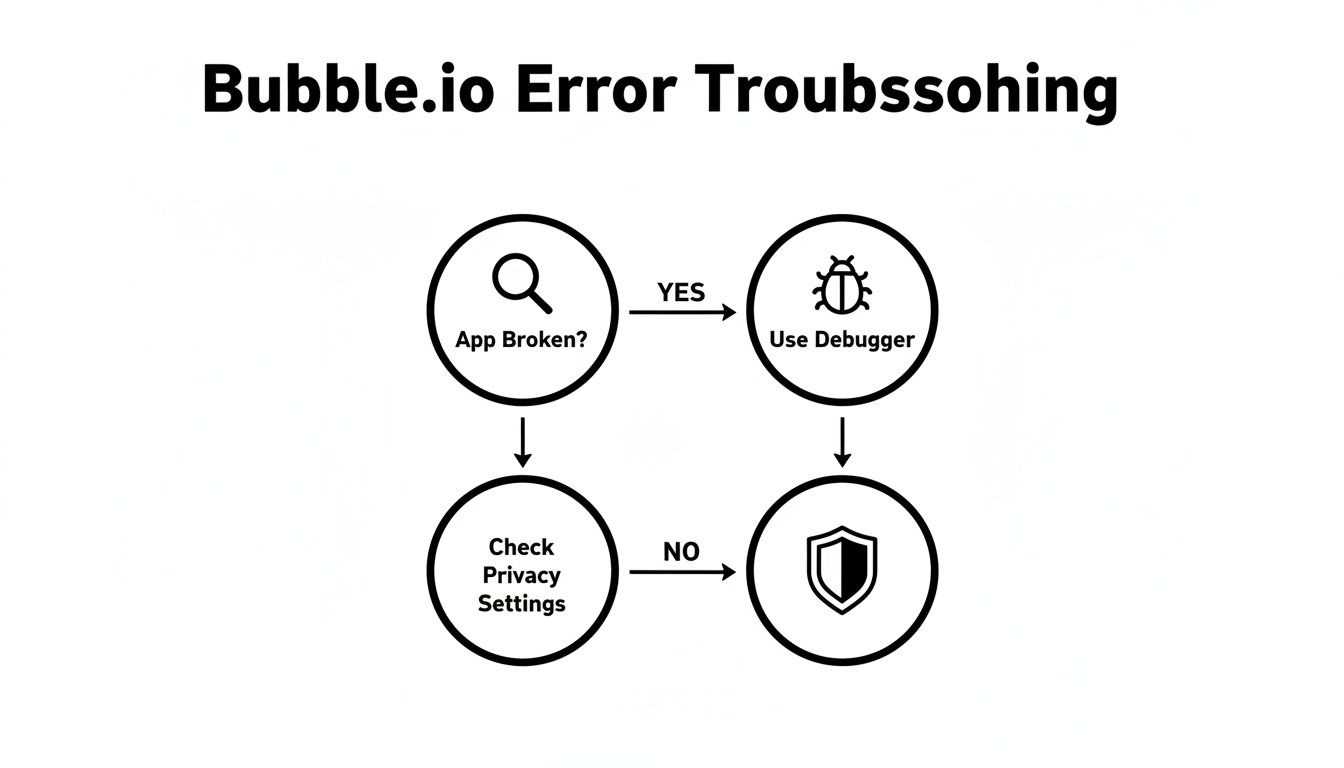
As you can see, the process starts with the tools you have right in front of you. Don't jump to outside help until you've checked the most common culprits.
Verifying Common Issues
What if the debugger doesn’t immediately point to a broken workflow? The next place to look is almost always your Privacy Rules. This is, hands down, one of the most common "gotchas" for new and even experienced Bubblers. Data that seems to have vanished is often just being hidden by a rule you set up earlier.
A classic example: you set a privacy rule that a user can only see data they created. Later, you try to show them a list of items created by everyone. The privacy rule does its job and blocks the data, making it look like your database is empty.
Finally, if the problem is visual—elements are out of place, overlapping, or just not showing up on mobile—your responsive engine settings are the likely culprit. A single misplaced group or a forgotten responsive setting can wreak havoc on your layout.
Running through this checklist first helps you solve a surprising number of issues on your own. It gives you a clear sense of whether you’re dealing with a quick fix or a deeper problem that requires a second pair of eyes. Mastering this process is a huge step toward becoming a truly proficient Bubble developer.
Navigating the world of Bubble support can be confusing. To make it easier, here's a quick comparison table to help you decide which path to take based on your situation.
Finding the Right Bubble Help At a Glance
Help Type | Best For | Typical Resolution Time | Cost |
|---|---|---|---|
Self-Help Resources | Learning fundamentals, common issues, and conceptual questions. | Minutes to a few hours | Free |
Community Forums | Specific, non-urgent bugs or getting feedback on an approach. | A few hours to a few days | Free |
Tailored 1-to-1 Tutoring | Urgent roadblocks, complex logic, and personalized learning. | 1-2 hours | $$ - $$$ |
Hiring a Freelancer | Building entire features or fixing significant, complex issues. | Days to weeks | $$$ - $$$$ |
This table should give you a solid starting point for figuring out where to turn. For quick questions, self-help is your best bet. For a project-killer of a bug, investing in an expert's time is often the smart move.
2. Master Bubble's Free Resources
Once you've run through the quick troubleshooting checklist, it's time to dig into the fantastic free resources Bubble offers. This is your personal library for solving problems and leveling up your skills. I like to think of it like learning your way around a new city: the official documentation is your trusty map, the community forums are where you stop and ask the locals for directions, and the free templates are like touring established neighborhoods to see how everything is put together.

Learning how to navigate these resources on your own is a huge part of becoming a competent Bubbler. And if you really want to connect the dots, it helps to understand the core concepts of no-code automation that make platforms like Bubble tick. That foundational knowledge makes all the official resources much easier to digest.
Get to Know the Official Documentation
For any technical question, your first stop should always be Bubble's official documentation. It’s the single source of truth, written by the people who built the platform. It can feel a bit dense at first, but learning to search it well is a skill that will pay you back a hundred times over.
For instance, if you're wrestling with how to set up your database "things," a quick search for "database relationships" or "data types" will give you the definitive answer. Don't think of the docs as a last resort—treat them like your primary textbook.
Ask Smarter Questions on the Community Forum
The Bubble forum is buzzing with activity. It's an incredible community of builders who are genuinely happy to help each other out. But here’s the secret: the quality of the help you get is directly tied to the quality of your question. A vague post like "my app is broken" will almost certainly get ignored.
To get real, actionable bubble.io help, you have to be specific. Here’s how to frame a question that gets results:
Write a Clear Title: Go for something descriptive, like, "Repeating Group Won't Filter When I Change Dropdown Value."
Give Some Context: Briefly explain your goal and what you’ve already tried. ("I'm trying to filter a list of users. I've already checked the debugger and my privacy rules are wide open.")
Show, Don't Just Tell: Screenshots are your best friend here. Show your workflows, your element settings, and your database structure. Even better? Provide a link to your editor (with "view only" permissions) on a dedicated page that isolates the problem.
When you take the time to frame your question clearly, you make it incredibly easy for an expert to spot the problem. You'll get a solution faster, and your post becomes a valuable resource for the next person who runs into the same issue.
Reverse-Engineer Free Templates
Templates aren't just for starting a new app from scratch. They are a goldmine of working examples built by seasoned developers. Find a free template in the Bubble marketplace that has a feature you’re trying to build, whether it's a social feed, a booking system, or something else.
Open it up in the editor and start picking it apart. Follow the workflows from start to finish. Look at how they structured the database. Inspect the responsive settings. By reverse-engineering a feature that already works, you can see how advanced techniques are applied in the real world and then use those insights in your own app. It’s one of the most effective ways to learn by doing.
Navigating Common Bubble Development Roadblocks
Every single person who builds with Bubble, from total beginners to seasoned pros, eventually hits a wall. It's inevitable. In fact, some of these challenges are so common they feel like a rite of passage in the no-code world. This section is your field guide for navigating these notorious hurdles, with practical fixes that will strengthen both your app and your skills.

Instead of getting bogged down in abstract theory, we're going to dive into real-world pain points. Working through these fixes often leads to those "Aha!" moments that truly deepen your understanding of how Bubble works under the hood. If you're just starting out, our guide on prototyping an app can help you build a solid foundation before these issues even pop up.
Why Is My User Dashboard So Slow?
A slow-loading page is probably the most frequent complaint you'll hear (or make). More often than not, the culprit is an inefficient database query, especially inside repeating groups that are meant to display a lot of information.
Let's say you want to show a list of "Tasks" for the current user. A classic mistake is to load the entire list of every single task in your database and then filter it on the page.
Think of it like this: you ask a librarian for a specific book, and they respond by wheeling out the entire library for you to search through yourself. It's a massive waste of time and energy.
The Fix: The trick is to do the heavy lifting on Bubble’s server before any data gets sent to the user's browser. When you're setting up the data source for your repeating group, use constraints directly in the "Do a search for..." action. This tells Bubble to only fetch the exact data you need, which will dramatically slash your load times.
Untangling API Integration Pains
APIs are the bridges that connect your app to powerful external services, like Stripe for payments or Twilio for messaging. But getting them to shake hands properly can be a major headache. Authentication is a common stumbling block—your app tries to connect, but the service doesn't recognize the request as valid and shuts the door.
Another frequent issue is incorrectly parsing the JSON response. You might successfully connect and get data back, but if you haven’t mapped the fields correctly in Bubble's API Connector, your app has no idea how to actually read and display it.
This is a testament to how Bubble has grown into a full-stack powerhouse capable of complex builds. Today, Bubble powers over 4.69 million apps worldwide, with a huge community looking for help with these very integrations. You can see more on Bubble's incredible growth in the latest statistics on Fueler.io.
Building a Performant Multi-Filter Search
Creating a search function that filters a list based on multiple inputs—like location, price, and category—is a classic Bubble challenge. Many builders get tangled up trying to create logic that handles all the possible combinations without bringing the app to a grinding halt.
A simple but incredibly effective method uses custom states and conditional data sources on your repeating group. Here’s how it works:
Store filter values: For each filter input (like a dropdown or search box), use a custom state to hold its value.
Apply conditional filters: Go to your repeating group's data source and add conditional statements. For example: "When dropdown's value is not empty," you change the data source to a new search that includes a constraint based on that dropdown's value.
This approach keeps your search logic clean and organized. It also ensures the repeating group only re-queries the database when a filter is actively changed, making your app feel snappy and responsive. Mastering this will give you a powerful tool for building dynamic, user-friendly applications.
When to Get Expert Bubble.io Help
Going the DIY route is a great way to learn, but every builder eventually hits a wall. You’ll reach a point where your time is simply more valuable than the money you save by grinding it out alone.
Knowing when to ask for help isn't a sign of failure. Far from it. It’s a smart, strategic move to keep your project moving forward and your momentum high. Your main job is to make progress, and if a technical problem is stopping you, bringing in an expert is often the fastest way to get back on track.
The trick is spotting when you’ve hit the point of diminishing returns. Have you spent more than a day banging your head against a single bug? Is a critical business deadline creeping up on you? If so, the cost of being delayed is probably much higher than the cost of a one-hour coaching session.
Strategic Blockers That Signal It's Time
Some problems aren't just minor bugs; they're foundational decisions that can make or break your app down the road. Getting these wrong can mean having to rebuild entire parts of your application later.
You should seriously consider getting an expert’s opinion when you're:
Making a Major Architectural Decision: If you're setting up your database for the first time or designing a really complex feature, an expert can make sure you're building it to scale. A poorly designed database is a classic mistake that will absolutely cripple your app's performance later.
Hitting a Performance Wall: Your app is slow, and you’ve already tried optimizing your queries and workflows. A seasoned pro can often spot deeper issues in your app's logic or structure that are causing the bottlenecks.
Facing a Complex Integration: Struggling to connect to a crucial third-party API? If you're stuck on authentication or figuring out how to parse the data, an hour with a coach can save you days of headaches.
Hiring help is a strategic move to overcome a specific obstacle so you can get back to building. Think of it as calling in a specialist to solve a problem quickly, allowing you to refocus on growing your business.
It’s also important to understand the limits of any platform. Sometimes, your app's needs will naturally outgrow what's possible, and you'll have to start thinking about evolving beyond the Bubble web builder. An expert can help you see when that time is coming and plan your next steps, making for a much smoother transition when you're ready.
Why 1-on-1 Coaching is the Best Way to Learn Bubble
At some point, you'll hit a wall that free resources just can't help you break through. You've scoured the forums and watched every tutorial, but your specific problem remains unsolved. This is the moment when tailored 1-to-1 tutoring sessions become your single biggest advantage, turning frustration into rapid progress. It's the best way to learn Bubble because it provides a direct, personalized path to fixing what's holding you back.
Think of it this way: a pre-recorded video is like reading a general medical textbook, but a personalized session with an expert like Matt Blake at Codeless.coach is like sitting down with a doctor who’s diagnosing your specific symptoms. The focus is entirely on your app and your unique challenges.

Beyond the Quick Fix to Deep Understanding
A great coaching session does more than just patch up the bug that’s got you stuck. A true expert offers Bubble.io help that sets you up for long-term success. You don't just walk away with a solution; you finally grasp the "why" behind it, building the mental frameworks you need to tackle similar problems on your own down the road.
This approach transforms your building journey from a painful crawl over roadblocks into a high-speed learning curve.
The impact of tailored 1-to-1 tutoring sessions is both immediate and lasting:
Solve Your Immediate Blocker: Get unstuck in real-time. In just one session, you can often push your project past a hurdle that’s cost you days or even weeks.
Learn Core Bubble Principles: You'll finally understand database architecture and efficient workflows because you’ll see them applied directly to your own project.
Gain Strategic Insight: Get an expert’s take on your app's structure, scalability, and even your go-to-market plan.
One focused hour with an expert can easily save you weeks of banging your head against the wall. For founders, that time is everything.
The Codeless.coach Advantage: Tailored Guidance for the Modern Builder
The no-code movement is powered by ambitious people—often entrepreneurs building their dream app while balancing a full-time job. Recent data from SimilarWeb's platform analysis shows the typical Bubble user is aged 25-34, often from the US or UK. With 2.9 million total visits last month and an incredible average session duration of 12 minutes and 2 seconds, it’s obvious that these aren't just casual hobbyists.
People are deeply invested in building real applications. This is exactly why tailored 1-to-1 tutoring sessions deliver the biggest bang for your buck—they connect your commitment and hard work with successful execution.
This is the gap that Codeless.coach is designed to fill. The coaching, led by Matt Blake—who has launched multiple Bubble apps himself (including one featured on Product Hunt)—is built on practical, real-world experience. It’s the hands-on guidance you need to get from a great idea to a launched product. This is what makes Codeless.coach the best way to learn Bubble and overcome any obstacle.
If you’re ready to see how targeted support can fundamentally change your building process, you might want to learn more about the specifics of Bubble coaching. In the end, it’s not just about getting help; it's a strategic investment in your skills and the future of your project.
Your Bubble.io Help Questions Answered
When you're deep in the trenches building your app, questions are inevitable. It’s just part of the process. Whether you're just getting started or trying to scale, seeking out expert Bubble.io help is a smart move. Here are some straightforward answers to the questions we hear most often from founders.
How Can I Best Prepare for a 1-on-1 Bubble Coaching Session?
To really squeeze every drop of value out of a session with an expert, you need to do a little prep work. It’s amazing how often a well-prepared founder gets their main problem solved with enough time left over to talk strategy and plan their next moves.
First, zero in on the top one or two problems holding you back. Don't show up with a list of ten things; focus on the biggest roadblocks first.
Next, set up a dedicated page in your Bubble editor that shows the issue clearly. Isolate the problem. Then, give your coach temporary "view-only" or "edit" access to that specific page. This lets them get straight to work instead of spending the first ten minutes just finding their way around your app.
For instance, don't just say, "My repeating group is broken." Instead, get specific: "I need this repeating group to filter using two different dropdowns at the same time, but it's only listening to the first one." That kind of detail allows a coach at a service like Codeless.coach to start solving, not just diagnosing.
Is Bubble Something I Can Realistically Learn as a Non-Technical Founder?
Absolutely. The whole point of Bubble's visual, drag-and-drop environment is to open up app development to non-technical creators. It’s worlds away from learning traditional code, and countless successful founders have launched incredible apps using nothing but self-teaching and free resources.
That said, the learning curve does get steeper when you move into more advanced territory. To build a truly solid, scalable app, you have to learn to "think like a developer," even if you never write a line of code. This means getting a handle on concepts like smart database design and how to keep your app running fast.
This is where tailored 1-to-1 tutoring sessions can be a game-changer. An expert can teach you these critical ways of thinking in the context of your project, making sure you're building a well-structured app from the very beginning.
How Do I Know If My App Idea Is Too Complex for Bubble?
This is the big question every founder wrestles with. The good news is that Bubble is a beast—it's more than capable of handling complex SaaS platforms, two-sided marketplaces, and powerful internal tools. The fact that over 4.69 million apps have been built on it speaks for itself.
Real limitations are pretty rare. They usually pop up in niche areas like building a native mobile game or doing heavy-duty, real-time algorithmic processing at an enormous scale. For the vast majority of web app ideas, Bubble has all the power you need.
The best way to know for sure? Just ask an expert. In a focused coaching session, an experienced developer can quickly look at your project scope and give you a clear answer.
Feasibility Check: They can give you a thumbs-up or thumbs-down on whether Bubble is the right tool for your core features.
Creative Solutions: If one feature seems tricky, they might know a custom plugin or a clever workflow to get the job done.
Cost-Benefit Analysis: You'll also get a much better sense of timelines and potential costs. Our guide on how much app development costs can give you more background on this.
More often than not, what feels "too complex" is totally doable with the right database setup and workflow logic. A quick consultation can save you from giving up on a great idea or starting to build on the wrong platform.
Ready to stop wrestling with roadblocks and start making real progress? The team at Codeless.coach offers tailored 1-on-1 tutoring sessions to help you build faster, smarter, and with more confidence. Book a session today and turn your Bubble.io challenges into triumphs. https://codeless.coach











