
Mar 24, 2026
Building a Dating App: Launch Your MVP with No-Code in 2026
Learn to go from idea to launch when building a dating app. This guide offers actionable steps for no-code tools like Bubble to create your MVP in 2026.
So you have an idea for a dating app. You've probably also been told that building one requires a team of developers, a huge budget, and a year of your life. For a long time, that was true. But that's not the reality anymore.
You can actually build and launch a fully functional Minimum Viable Product (MVP) using a no-code tool like Bubble.io. And you can do it for a tiny fraction of the cost and time, turning your unique concept into a real app without ever touching a line of code.
Why No-Code Is Your Secret Weapon

When you hear about building a dating app, the first numbers that come to mind are usually six-figure development quotes and timelines that stretch well over a year. That’s where most great ideas get stuck.
No-code platforms, especially Bubble, flip that script entirely. They shift your focus away from the how of technical development and put it squarely on the why—validating your idea. Instead of gambling your life savings on an unproven concept, you can build it yourself, get it into the hands of your target audience, and find out if it has legs.
The Strategic Edge of Building Fast
The real power of no-code isn’t just about saving money; it’s about speed. Going from an idea to a live product in a matter of weeks is a game-changer. This agility gives you a massive advantage.
Validate Your Niche: Does your idea for a dating app for rock climbers, board game lovers, or single parents actually have an audience? Build it and find out.
Gather Real Feedback: Get insights from people actually using your app, not just friends politely commenting on a wireframe.
Iterate on the Fly: When you get feedback, you can make changes to features, user flows, or even the matching algorithm in days, not weeks. This rapid feedback loop is what separates successful MVPs from failures.
This cycle of quick building and testing is the heart of modern app development. If you're new to this approach, getting a handle on prototyping an app will give you a solid foundation for what's ahead.
The point of a no-code MVP isn't to build a perfect, polished app from day one. The goal is to learn. Every sign-up, every match, and every message is data telling you what works and what doesn't.
A Proven Market Ready for New Ideas
The opportunity here is enormous. The global dating app market was valued at USD 11.61 billion in 2025 and is projected to hit USD 24.85 billion by 2035. That kind of growth shows there’s a massive, hungry audience looking for new ways to connect.
This means you’re not trying to create a market from scratch. You’re stepping into a field with proven demand where a unique, well-executed niche idea can find its footing fast.
To put it in perspective, here's a direct comparison of the two paths you could take.
Traditional Code vs No-Code for Your Dating App MVP
Factor | Traditional Development | No-Code (Bubble.io) |
|---|---|---|
Timeline | 6-12+ months to launch an MVP | 4-12 weeks to launch an MVP |
Cost | $50,000 - $150,000+ for an initial version | $1,000 - $10,000 including platform fees & plugins |
Team Required | Dev team (front-end, back-end, mobile), PM, UI/UX designer | One person (you!), maybe a part-time no-code expert |
Flexibility | Changes are slow and expensive, requiring developer time | Make changes to design, features, and logic in hours or days |
Goal | Build a scalable, feature-rich V1 product | Validate an idea and find product-market fit quickly |
The choice becomes pretty clear when you see it laid out. For a founder just starting out, the no-code path isn't a shortcut; it's the smarter, more capital-efficient way to get started.
I’ve personally coached founders who were quoted eye-watering sums for their dating app ideas. By shifting to a no-code strategy with Bubble, they launched, started getting users, and even began generating revenue before they would have finished the first sprint with a traditional dev team.
Defining Your Niche and Core App Features
The biggest mistake I see founders make is trying to build the next Tinder right out of the gate. They get a great idea and immediately start mapping out a dozen flashy features, convinced they need them all to compete. This is a trap. The most successful apps don’t start big; they start incredibly focused.
Before you even think about building, you have to decide who your app is really for. The general dating pool is a red ocean, crowded with massive apps fighting for the same users. Your best move isn't to join that fight. It's to find a dedicated community that feels completely overlooked by the mainstream options.
Find Your Tribe
The secret is to sidestep the giants entirely. Instead of a generic "find a match" app, think about creating a space for people with specific, shared passions. This immediately makes your app relevant and desirable to that group.
Here are a few examples of what this looks like in practice:
Hobby-Based: An app just for board game enthusiasts, serious hikers, or even amateur photographers.
Lifestyle-Focused: A platform for digital nomads, committed vegans, or people embracing a sober lifestyle.
Community-Driven: A dating space for single parents, people navigating life over 50, or members of a particular profession.
When you focus on a niche, you stop being just another dating tool and start becoming a community hub. This not only simplifies your marketing but also fosters a powerful sense of belonging that the one-size-fits-all apps can never replicate.
The most powerful move you can make is to serve a passionate, underserved audience. When users feel like an app was made just for them, they become your most loyal advocates.
Take the app "PlayDate," for instance. It’s for single dog owners. It’s a brilliant, simple niche that provides an instant conversation starter and a genuine shared interest. That’s the kind of specific, relatable value you should be aiming for.
Defining Your Minimum Viable Product
Once you’ve landed on your niche, it's time to get ruthless about your feature set. Your Minimum Viable Product (MVP) should include only the absolute essentials needed to deliver on your core promise. Ask yourself: what is the bare minimum a user needs to sign up, find someone interesting, and start a conversation?
For most dating MVPs, this boils down to four fundamental pillars:
Simple User Onboarding: A frictionless way for people to sign up (email is perfect for an MVP) and create a basic profile. Don't bog them down with a 20-question survey at the start.
A Compelling Profile Creator: Give users space for a few photos and a handful of questions that speak directly to your niche. If your app is for book lovers, ask for their top three favorite authors, not their zodiac sign.
An Intuitive Matching Mechanic: This is the heart of your app's user experience. A swipe-right/left interface is universally understood and easy to implement in Bubble, but don't be afraid to try something different if it serves your niche better.
A Functional Chat System: After a match, users need a clean, reliable way to talk. Forget video calls, GIFs, or complex features for now. Simple text-based messaging is all you need to get started.
From day one, building trust is non-negotiable. As you outline these features, think about how you'll ensure your users are authentic. One effective strategy is incorporating services like Match Verification, which helps confirm that users are who they claim to be. This creates a safer environment and can be a huge selling point, especially for a tight-knit community.
Anything beyond these essentials is a distraction. Your only goal right now is to build a functional foundation that proves people actually want what you're offering.
Alright, let's move past the initial ideas and get our hands dirty. This is where your dating app starts to become a real, tangible thing. We're talking about the database—the backbone of your entire application.
Think of your database as the app's central nervous system. It holds every piece of user information, every photo, every swipe, and every chat message. If you get this structure right from the beginning, your app will be fast and scalable. Get it wrong, and you're setting yourself up for a slow, buggy mess down the road. I’ve seen it happen countless times.
How to Structure Your App’s Database in Bubble
Before you even open the Bubble editor, it pays to have a mental map of how your data will work. A little bit of reading on the basics of Data Modeling and Its Types can save you from major refactoring later. A poorly planned database is probably the #1 reason no-code apps feel sluggish or break entirely as they grow.
Inside Bubble, your database is essentially a set of smart, interconnected spreadsheets. Each "spreadsheet" is what Bubble calls a Data Type. For your dating app MVP, you can ignore the noise and focus on just a few core Data Types to get off the ground.
The Essential Data Types for Your Dating App
Your first job in the Bubble editor is to head over to the 'Data' tab and start setting up these digital filing cabinets. We'll build our foundation on just three critical Data Types: Users, Matches, and Messages.
It’s all about keeping it simple. Your MVP needs to do a few things really well, and your data structure should reflect that focus.
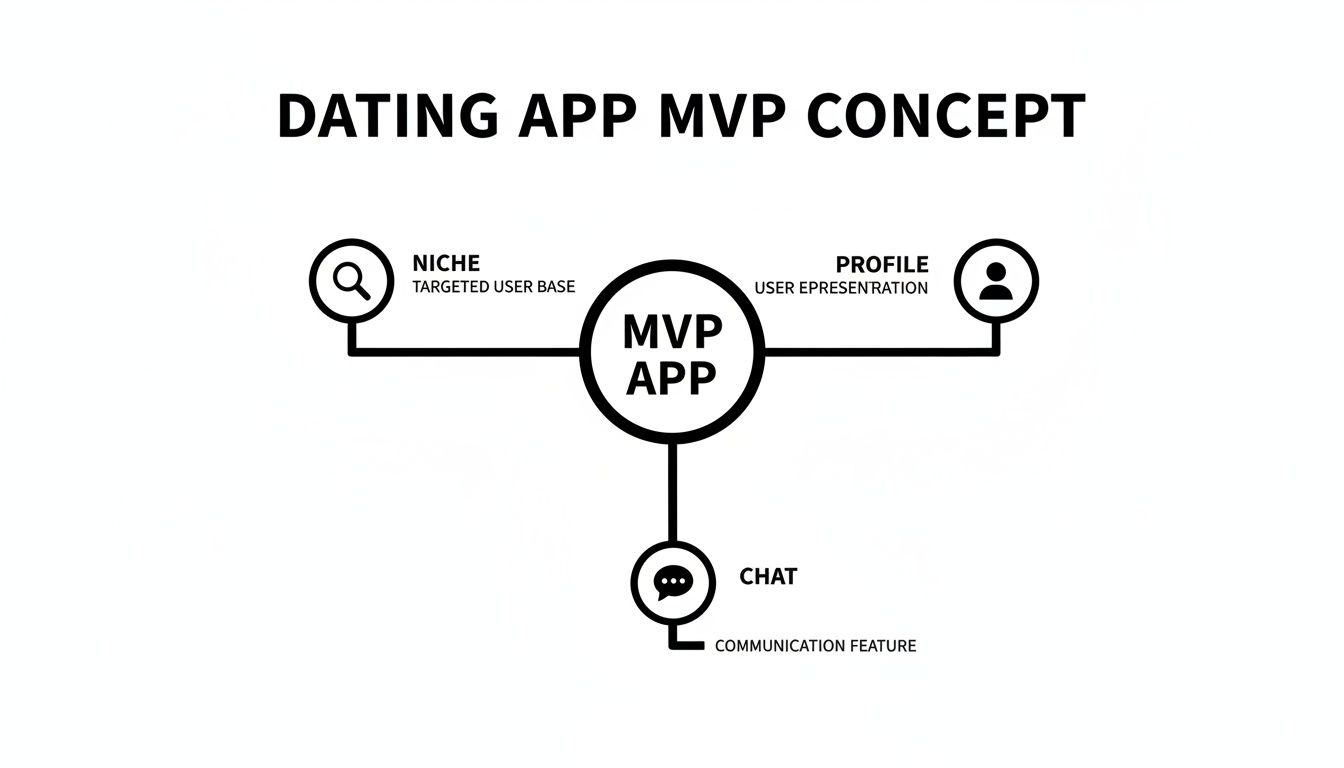
This simple concept map shows how everything fits together. A focused niche attracts the right people, their profiles give them a reason to connect, and the chat lets them interact. Your database is what powers all of it.
Let's break down exactly what information, or fields, will live inside each of these Data Types.
User: This is your most important Data Type. Bubble gives you a built-in 'User' type to start with, which you'll need to customize. This is where you'll store everything about a person: their bio, photos, age, location, and any unique info specific to your niche.
Match: Think of this as the digital handshake between two people. A 'Match' record is created when, and only when, two users have both expressed interest in each other. It doesn't need to hold much data on its own; its power comes from the connections it creates.
Message: This is where every single chat text is stored. Each message a user sends becomes a new row in this data table, linked to the sender, the recipient, and the specific match they belong to.
Sticking to this structure keeps your database incredibly clean. If you want to see this in action, walking through a detailed Bubble app builder guide can be a huge help.
Creating Relationships Between Your Data
Just having these tables isn't enough—they need to talk to each other. This is the magic of a relational database. You'll do this by creating fields inside one Data Type that point to another.
For example, in your Match Data Type, you'll create two vital fields:
User 1: A field with the "Field type" set to User.
User 2: Another field, also with the "Field type" of User.
With that, a single 'Match' entry now officially links two different records from your 'User' table. You've created a connection.
You'll do the same thing for your Message Data Type to connect it to the right conversation and people:
Conversation: A field that links to the Match this message is part of. This is how you'll group all messages for a specific chat.
Sender: A field linking to the User who sent the message.
Message Content: A simple text field for the body of the message.
Pro Tip: As you define these fields, Bubble will ask if it's a single item or a list. This is a critical choice. A user's
First Nameis a single 'text' field, but theirProfile Photosshould be a 'List of images'. Getting this wrong early on is a classic mistake that causes major headaches when building your user interface.
By laying this groundwork, you're building a highly efficient system. When a user opens their chat with "Jane," Bubble can instantly find the 'Match' record for that pair, then pull up every 'Message' record linked to that conversation. This clean architecture is the secret to an app that feels snappy and professional, not cobbled together.
Building the Core User Flows and Experience
Okay, the blueprint for your data is set. Now for the fun part: turning those abstract tables into a living, breathing app that people can actually use. We're moving from the back-end logic into the Bubble.io editor to build the tangible screens and workflows your users will interact with.
We’re going to zero in on the three journeys that make or break a dating app. A clunky interface is a death sentence; if the experience isn't smooth and intuitive, users will be gone in a flash. Our mission is to make these core interactions feel effortless from the very first tap.
Crafting a Welcoming Onboarding Experience
You only get one first impression. A long, confusing sign-up is the fastest way to lose someone before they’ve even seen a single profile. Your goal here is to make getting started completely painless.
Begin with a clean and simple sign-up/login page. For an MVP, a straightforward email and password registration is all you need. It's easy to build, and you can always add social logins down the road.
Once they're in, you have to guide them through creating their profile. This isn't just a data-entry form; it’s their first opportunity to show who they are.
Photo Uploader: Let users add photos with Bubble's Picture Uploader element. Just remember to save these pictures as a "List of images" on the User data type you created earlier.
Bio and Prompts: A Multiline Input element works perfectly for the main bio. For those niche-specific prompts we talked about, simple Input fields tied to custom text fields on the User record are your best bet.
Essential Info: Use dropdowns for structured data like gender and radio buttons for simple yes/no choices. This keeps the interface tidy and prevents user error.
Onboarding isn’t about grabbing every single piece of information. It’s about getting the user to a point where they can see the value of your app—which means seeing potential matches—as quickly as possible. A great onboarding flow helps users put their best foot forward.
Engineering the Matching Engine
This is it—the heart of your app. It's the addictive loop of discovery and connection that will keep people coming back. Building this in Bubble is surprisingly straightforward, mostly revolving around a Repeating Group and some clever workflows.
First, set up your main page for displaying potential matches. Drag a Repeating Group element onto the page; this is Bubble's workhorse for showing any list of things from your database. You’ll set its "Type of content" to User and its "Data source" to a search for all Users.
But you don't want to show all users. This is where your matching "algorithm" comes to life through simple filters. You’ll add constraints to that search to exclude the Current User, anyone they’ve already swiped on, and people who don't fit their preferences.
Building the Swipe Logic
Inside the Repeating Group cell, you'll lay out the profile card with an image element for the profile picture and text elements for the user's name, bio, and other details. Then, add two icons—a heart for 'Like' and an 'X' for 'Pass'.
When a user clicks the heart icon, you'll trigger a workflow. This workflow's job is to take the user being shown in that cell (the 'Current cell's User') and add them to a list on the swiper's record (a field we called 'Users Liked').
Here’s the magic moment. After a 'like' is saved, the workflow needs to immediately check for a mutual connection. You do this with a conditional action: "Only when [Current cell's User's Users Liked] contains [Current User]".
If that condition is true, you've got a match! The workflow then creates a new thing in your Match data table, connecting both users. The final touch? A big, celebratory popup that says, "It's a Match!"
Designing the Chat System
A match is just the beginning; the real connection happens in the chat. A reliable messaging feature is absolutely non-negotiable. You'll typically build this in two parts: a page that lists all of a user's conversations and the actual chat interface itself.
To create the conversation list, use another Repeating Group. This one will have its "Type of content" set to Match, and its data source will search for all matches where the Current User is listed as either "User 1" or "User 2."
The chat screen itself is made of a few key pieces:
A Repeating Group to display all the messages, pulling data from your Message table.
An Input field at the bottom where the user types.
A "Send" button that triggers the workflow to save and display the message.
When that "Send" button is clicked, a workflow runs to create a new Message in the database. It saves the text from the input field to 'Message Content,' sets the 'Sender' as the Current User, and, crucially, links it to the 'Current Page's Match'. This simple action ensures the new message instantly appears in the correct conversation for both people. That's all it takes to build the foundation of a real-time chat feature.
Alright, your app is working. People can swipe, match, and chat. So, what's next? It's time to think about how this thing actually makes money. Building a cool product is one thing, but having a plan to keep the lights on is what separates a hobby project from a real business.
I’ve seen a lot of founders get bogged down here, trying to dream up multiple complex revenue streams. For your MVP, keep it simple. The subscription model is the clear winner. It's predictable, easy to manage, and it’s exactly what users have come to expect from dating apps.
Implementing Subscriptions with Stripe
Don't let the word "payments" scare you. People often think integrating payments is a huge technical hurdle, but Bubble's official Stripe plugin makes it surprisingly straightforward. The goal isn't to put the entire app behind a paywall—that’s a fantastic way to kill your growth before it even starts. Instead, you'll offer a handful of premium features for your most active users.
Here are a few classic premium features that just work for a dating app MVP:
Unlimited Swipes: Let your power users break free from daily limits.
See Who Liked You: This is a huge one. It removes the guesswork and offers that hit of instant gratification people love.
Profile "Boosts": Gives users a way to pay for a temporary bump in visibility.
And if you're wondering if people will actually pay, the market is screaming "yes." In 2023 alone, dating app subscriptions pulled in USD 5,370.9 million. That's not just a trend; it's a proven, reliable business model. Users are already conditioned to pay for these kinds of features, which you can read more about in this market analysis from Allied Market Research.
Getting this set up in Bubble is pretty simple. First, you'll add a "Premium" field to your User data type (a simple yes/no will do). Then, you use the Stripe plugin to set up a checkout. When a user completes the payment, a workflow kicks in and flips their "Premium" field to "yes."
From there, you can gate features with simple conditionals. For example, on the "See Who Liked You" page, you'd run a workflow on page load: "When Current User's Premium is 'no' -> Navigate to 'Upgrade' page." It really is that easy. If you're tackling this for the first time, our guide on how to manage your Stripe API keys in Bubble will help you through the initial setup.
Your Pre-Launch Checklist
With your core features built and payments wired up, it's incredibly tempting to just hit "Deploy." Don't do it. A rushed launch almost always backfires, leaving your first—and most important—users with a buggy, frustrating experience. A quick, methodical pre-launch check is your best defense.
I've refined this personal checklist over dozens of app launches. It’s designed to catch the common mistakes before they become public-facing problems.
A successful launch isn't about having a perfect app. It's about having a stable app that delivers on its core promise. This checklist ensures you meet that standard.
My Go-Live Checklist
Final Responsiveness Testing: Don't just rely on Bubble's built-in editor. Grab your phone, a tablet, and use your browser's developer tools to see how the app looks on different screen sizes. Watch for weird text wrapping or elements that fall off the page.
Connect Your Custom Domain: Nothing screams "prototype" louder than a
bubbleapps.ioURL. Buy a domain and connect it in Bubble's 'Settings' tab. It's a small detail that makes a huge difference in credibility.Upgrade Your Bubble Plan: The free plan is fantastic for building, but it can't handle live traffic. You’ll need to be on a paid plan to use a custom domain and ensure your first wave of users doesn't experience frustrating slowdowns.
Set Up Privacy Rules: This is absolutely non-negotiable. Go back and triple-check your data privacy rules. Make sure a user can only see and edit their own private data. The best way to test this is to log in as different test users and actively try to access each other's profiles and messages.
Debug Mode Sweep: Run through every single user flow one last time with the debugger on. Sign up, create a profile, swipe right, get a match, send a message, and even go through the premium upgrade process. This final sweep is where you’ll often catch those small but annoying bugs you missed.
Once you’ve ticked these boxes, you're ready to go. Just remember, launching your MVP is the starting line, not the finish. The real work—and the real learning—begins the moment your first users sign up.
Growth Strategies in a Competitive Market
Getting your app launched is a huge win, but it’s really just the starting line. The hard truth is that you’re stepping into an incredibly crowded space where user acquisition costs can bleed you dry before you even get traction. I've seen this trip up countless new founders.
The numbers don't lie. The average cost per install (CPI) in the dating app world has shot up from $1.46 to $2.76—a staggering 89% jump in just one year. You can get a closer look at the data yourself over on Adjust's blog covering dating app trends. These figures make one thing crystal clear: throwing money at paid ads from day one is a fast track to an empty bank account.
Your post-launch strategy has to be smarter. It’s all about generating organic growth, not just buying downloads.
Embrace Product-Led Growth
Product-led growth (PLG) isn't some fancy industry buzzword; for a startup, it's a genuine survival tactic. It means your app itself has to be so good that it becomes your main engine for attracting and keeping users. For a dating app, the core experience—matching, chatting, connecting—has to feel so rewarding that people naturally want to talk about it.
Instead of asking, "How do we buy more users?" the question becomes, "How can we make this app so valuable that our users will bring their friends?" That shift in thinking changes everything. It puts the focus squarely on the user experience, which is your best weapon against competitors with deep pockets.
Avoid the Empty Party Problem
The number one killer of new social and dating apps is what I call the "empty party problem." A new user signs up, sees a ghost town, and bounces—for good. To sidestep this disaster, you have to fight the urge to launch your app to the whole world at once.
Your initial launch should be small, targeted, and almost surgical.
Find a Micro-Community: Don't think big; think small and dense. Find a hyper-specific group that aligns perfectly with your app's niche—maybe a club at a local university, a specific department in a large company, or an active subreddit focused on a shared interest.
Onboard Manually: Get personal. Reach out to people in that community one by one. Your goal is to get your first 50-100 users on board before any kind of public announcement. This small, hand-picked group is the seed for your entire community.
Play Matchmaker: In the early weeks, your job is less "CEO" and more "community manager." Do whatever it takes to spark conversations and connections. Get their feedback constantly and make sure those first users are having an amazing time.
A successful launch isn't about thousands of downloads. It's about getting 50 people who are so into your app they open it daily and tell their friends. A small, buzzing community is worth infinitely more than a large, silent one.
Track What Matters and Iterate
Once you have that initial group of users, data becomes your best friend. Your Bubble.io app can easily track the metrics that actually tell you if things are working. For now, ignore vanity metrics like total downloads.
You need to be obsessed with these engagement numbers:
Match Rate: What percentage of swipes turn into a match? If this is low, you might have a problem with your user pool's compatibility or how profiles are presented.
Conversation Rate: Out of all the new matches, how many actually lead to a message being sent? A low number here suggests your "It's a Match!" screen isn't creating enough of a spark to get a conversation started.
Daily Active Users (DAU): This is the ultimate test. How many people are coming back every single day? It's a direct reflection of how engaging your app truly is.
Set up a simple dashboard right inside your Bubble editor to keep an eye on these vitals. If you see a great match rate but a terrible conversation rate, you know exactly where to focus your next development sprint. This constant cycle of building, measuring, and learning is how you'll methodically improve the app and grow your community from the ground up.
Here are some of the most common questions that come up when founders decide to build their first dating app. Let's get them answered.
How Much Does It Really Cost To Build a Dating App MVP with Bubble?
The big question, of course, is cost. When you hear quotes for traditional app development, they often start at a staggering $50,000 and go up from there.
With a no-code tool like Bubble, you're looking at a completely different ballpark. Your main expenses are Bubble's monthly subscription and maybe a few premium plugins. You should plan on spending a few hundred dollars over the 1-3 month period it takes to build and launch. The real investment is your own time, but in exchange, you're saving tens of thousands in engineering costs and getting your idea in front of users fast.
Can a Bubble App Actually Handle Thousands of Users?
Yes, absolutely. But there’s a catch. Bubble is more than capable of handling significant traffic and thousands of active users on its production plans. I’ve seen it happen.
The secret is setting up your database efficiently from day one, just like we talked about earlier. A clean, well-structured database is the difference between an app that flies and one that crawls as soon as you get a rush of new sign-ups. Get this right, and you'll have no trouble scaling.
What Are the Biggest Limitations of No-Code for a Dating App?
Let's be real—no-code isn't magic. Its main limitations are in two areas: accessing deep, native phone functions (like the phone's contact list) and building truly custom, complex algorithms from the ground up. You're not going to code a machine-learning model from scratch inside Bubble, for instance.
But for an MVP, this almost never matters. You can build a responsive web app that feels and acts just like a native app. If you decide you need a presence in the app stores later, you can use a "wrapper" service to get it published.
All the core features that make a dating app work—profiles, swiping, matching, and chatting—are entirely within your reach using no-code tools.
How Do I Create a Unique Matching Algorithm Without Code?
The term "algorithm" sounds intimidating, but in Bubble, it’s really just a series of logical steps and filters that you control. You're not writing complex math; you're building smart workflows.
For example, you can easily create matching logic by telling Bubble to show users who meet specific criteria:
Proximity: Only show users within a 25-mile radius.
User Preferences: Filter by age range, specific interests, or answers to your unique profile questions.
Recent Activity: Give a little boost to users who logged in within the last 24 hours.
This filter-based approach is incredibly powerful for an MVP. Early on, a successful match comes from thoughtful criteria, not some black-box AI.
Feeling overwhelmed? Building an app is a huge undertaking, but you don't have to go it alone. Codeless Coach offers 1-on-1 tutoring sessions to help you break through roadblocks, build faster, and launch your MVP with an expert in your corner. Book a session and get unstuck.











