Mar 9, 2026
A Guide to Rapid Application Development Methodology
Learn the rapid application development methodology to build MVPs faster. Our guide covers RAD principles, stages, and no-code tools for modern app development.
Rapid Application Development (RAD) is a game-changer for building software. It flips traditional development on its head by prioritizing speed and user feedback over exhaustive, upfront planning. The whole point is to build functional prototypes quickly and then refine them based on what real users actually want and need.
What Is Rapid Application Development Methodology
Think about building something from scratch. The old-school way is to spend months, even years, perfecting a detailed blueprint before a single nail is hammered. That’s the traditional waterfall method. The rapid application development methodology is entirely different. It’s like building with a massive set of LEGOs instead of carving a statue from a block of marble.
When you’re building with LEGOs, you can snap together a working model in no time and show it off. If someone says the tower is too tall or the color is wrong, you can swap out the bricks in minutes. That’s RAD in a nutshell: build fast, get feedback, and adapt without having to tear the whole thing down. With a marble statue, one wrong move and you’re starting over.
The Core Idea: Speed Through Iteration
At its heart, the RAD methodology is about one thing: drastically shortening the time between an idea and a working product. Instead of one long, rigid development cycle that can take forever, RAD breaks the work into small, manageable chunks.
A 2025 study confirmed that development speed is what separates successful projects from stalled ones, and RAD hits this nail on the head. The model ditches those long-winded planning phases in favor of a system built on quick prototypes and constant feedback loops. This lets your team pivot the moment a problem or a new opportunity pops up.
The core concept behind RAD is that software is not a building; it evolves. It has the flexibility to alter and become a product that more closely reflects the needs of end-users.
This philosophy is especially powerful for founders using no-code tools. A platform like Bubble is the ultimate LEGO set for web applications. You can visually piece together a fully functional app, get it into the hands of real users, and then make changes on the fly—all without touching a line of code.
Key Principles of the RAD Model
Of course, RAD isn't just about moving fast for the sake of it; it's about moving smart. The entire approach is guided by a few core principles that make it so effective. To really get a handle on it, it's worth understanding exactly What Is Rapid Application Development in more detail.
These principles aren't just suggestions—they are the foundation of any successful RAD project.
Here’s a quick breakdown of what they mean for you and your project.
Core Principles of Rapid Application Development
Principle | What It Means for Your Project |
|---|---|
Minimal Planning, Maximum Prototyping | Instead of writing a 100-page spec doc, you'll build an interactive prototype that users can actually click through and experience. |
Active User Involvement | Your users become part of the development team. They provide feedback continuously, not just at the beginning and end. |
Iterative Development | You build the product in small, repeatable cycles. Each cycle adds new features and refines existing ones based on real feedback. |
Time-Boxing | Each development cycle has a fixed, non-negotiable deadline (often 60-90 days). This forces focus and prevents scope creep. |
By sticking to these principles, you ensure your project stays on track, remains flexible, and ultimately delivers a product that people actually want to use.
The Four Stages of the RAD Model
Rapid Application Development isn't just a fancy term for working faster—it's a whole different way of thinking about building software. Forget the old-school, rigid assembly line where one stage has to be perfectly finished before the next can begin. RAD is much more like a series of hands-on workshops, with each one building on the energy and output of the last.
This cycle is what allows a rough concept to evolve into a fully functional, user-approved product without getting bogged down in endless documentation. The process breaks down into four distinct phases, each with a specific job to do.
Stage 1: Requirements Planning
The first phase, Requirements Planning, kicks things off. But this isn't your typical, months-long planning session that produces a document nobody reads. Instead, think of it as a focused, high-energy workshop where everyone—stakeholders, developers, and actual end-users—gets in the same room.
The whole point is to agree on the big picture, not to sweat every tiny detail. You're trying to get the "gist" of the project down on paper. This means answering crucial questions like:
What's the real problem we're solving here?
Who are we actually building this for?
What are the absolute must-have features for the very first version?
The output isn't a massive, rigid spec sheet. It's a lean, flexible outline that leaves plenty of room to adapt. For a no-code project on a platform like Bubble, this might just be a simple project brief and a checklist of core features for the initial prototype.
Stage 2: User Design
Next up is the User Design stage, and this is where the magic of RAD really starts to happen. Here, your users stop being passive observers and become active partners in building the product. Developers and a core group of users work side-by-side to build and refine working prototypes.
It's a tight, continuous loop: build a piece, let users test it, get feedback, and refine it. A developer could use a no-code tool to knock out a clickable mockup of a key screen in a day or two and immediately put it in front of users.
The philosophy is simple: show, don't just tell. When users can actually click around a working model, they give you incredibly specific feedback on everything from the layout to the core features. This feedback loop ensures the product is built for them, not just for the spec sheet.
This constant back-and-forth catches design flaws and usability issues in days, not months. Problems that would normally derail a project near the finish line are spotted and fixed early, saving a massive amount of time and money.
You can see the difference pretty clearly in how the two workflows are structured. RAD is built on these iterative loops, while traditional methods follow a rigid, one-way path.
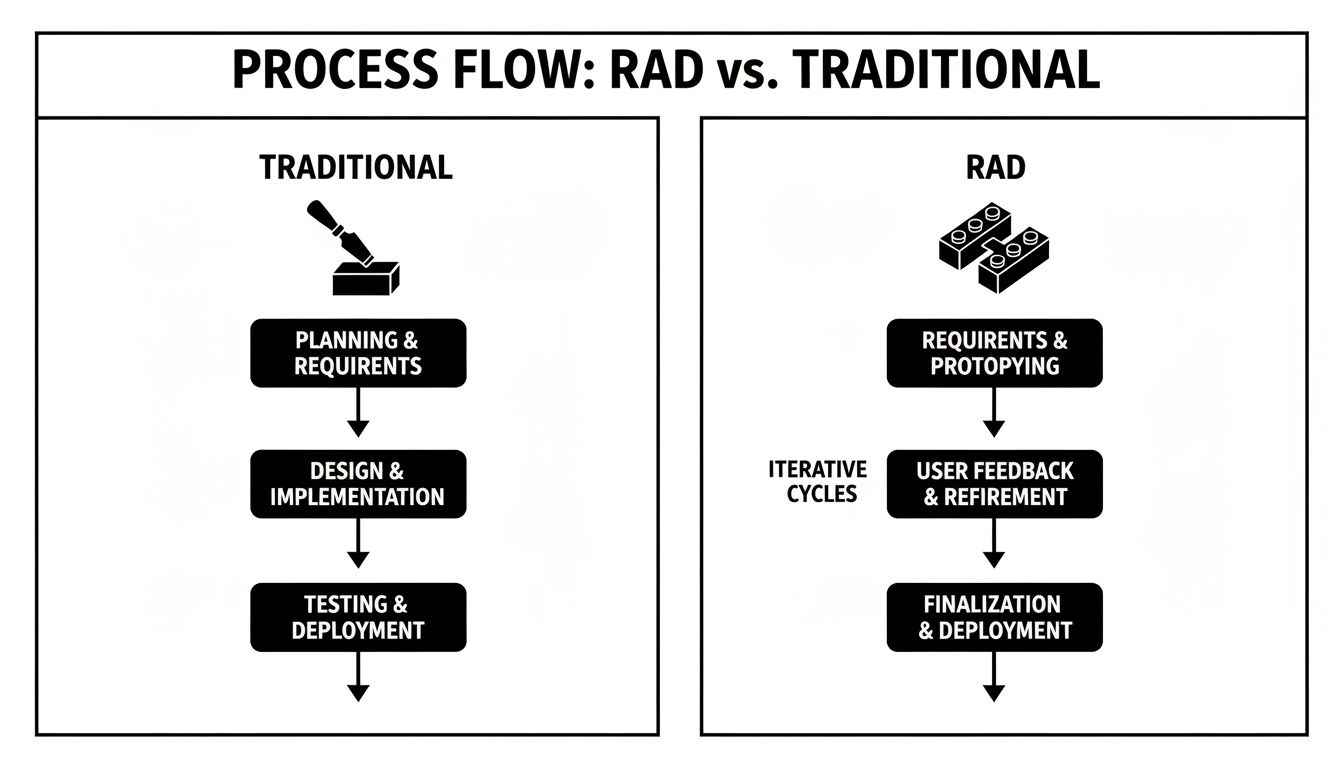
The diagram makes it obvious—RAD's modular, cyclical nature is all about flexibility, whereas the old waterfall model locks you into a path from day one.
Stage 3: Construction
With a user-approved design in hand, the team moves into the Construction stage. This is where the heavy lifting happens, but it's far more efficient than a traditional build phase. You're no longer guessing what users want; you're just building out the concepts they've already signed off on.
The goal here is pure speed. Developers take the tested prototypes and focus on turning them into a polished, working application. This involves a few key activities:
Building the final components based on the prototype.
Integrating with essential third-party services or APIs, like connecting to Stripe for payments or Google Maps for location data.
Continuously testing each piece as it’s finished, rather than waiting until the end.
Because so much of the design was validated during the User Design stage, the construction phase moves quickly. There’s far less backtracking and rework because the team is building features they know will hit the mark. The prototype literally evolves into the final product.
Stage 4: Cutover
Finally, the Cutover stage is the "go-live" moment. This is when the application moves from the development environment to the real world, ready for users. It’s more than just flipping a switch; a smooth launch requires a few final, critical steps.
First, the team runs a final round of testing and quality assurance to squash any last-minute bugs. If the new app is replacing an older system, this is also when you handle data migration. Most importantly, this is the time for user training and creating onboarding materials to make sure everyone can hit the ground running.
Once the app is live, the team collects feedback from the wider user base, which feeds directly into planning for the next version. And just like that, the cycle begins again. This is what makes RAD a process of continuous improvement, not just a one-and-done project.
From 1990s Theory to Modern No-Code Practice
To really get why the rapid application development methodology was such a big deal, you have to picture what software development used to be like. Before RAD, the industry was stuck on the Waterfall model. Think of it like building a skyscraper: you spend two years finalizing every single blueprint, from the foundation to the window placements, before anyone is allowed to lay a single brick. That was building software.
This painfully slow process meant that by the time a project finally launched, the market had often moved on, and the software was practically obsolete on day one. Rapid application development emerged in the late 1980s and early 1990s as a direct answer to this widespread frustration. While IBM first floated the idea, it was British IT expert James Martin who really brought it into the mainstream with his 1991 book, defining a new lifecycle built for speed and quality. You can dive deeper into the origins of RAD on EBSCO.com.
The Philosophical Shift to Speed
The central idea was radical at the time. Instead of shooting for one massive, perfect launch years down the road, RAD pushed for much shorter development sprints—often just 60 to 90 days. The goal shifted from writing exhaustive documentation to building working prototypes that real users could get their hands on right away.
This was a complete change in mindset. It was an admission that people often don't truly know what they want from software until they see and use it. By building something tangible and functional early on, development teams could get immediate feedback, make adjustments on the fly, and avoid pouring resources into features nobody wanted.
RAD’s core promise was to break free from the "analysis paralysis" that plagued traditional methods. It valued working software and user feedback far more than rigid plans and endless documentation.
It completely flipped the old model on its head, turning the one-way street of Waterfall development into a dynamic, looping process of building, testing, and improving.
The Perfect Match With No-Code Platforms
For years, RAD was a fantastic concept, but putting it into practice still depended on skilled developers who could code prototypes at high speed. That's what's so different today. The original principles of rapid prototyping and user-driven iteration have found their ideal modern partner: no-code platforms.
These platforms are the engine that makes the rapid application development methodology truly fly. They give non-technical founders and business experts the power to execute the RAD playbook without writing a line of code. A functional app that once took a team of engineers weeks to assemble can now be built visually by one person in a few days. You can see for yourself in our guide on how no-code platforms work.
Think about how perfectly no-code aligns with the core tenets of RAD:
Rapid Prototyping: A founder with an idea can jump into a tool like Bubble and build a clickable, working prototype of their app over a weekend.
User Involvement: That prototype can be shared instantly with potential customers, creating the tight, continuous feedback loop that RAD is famous for.
Iterative Development: Based on what users say, the founder can log back into Bubble and change the layout, workflow, or features in a matter of hours, not weeks.
This powerful combination has made the rapid application development methodology more relevant and accessible than ever. It has effectively put software creation into the hands of anyone with a great idea, allowing them to build, test, and launch with incredible speed—fully realizing the vision James Martin laid out more than 30 years ago.
How RAD Stacks Up Against Other Methods
To really get a feel for Rapid Application Development, it helps to see where it fits in the wider world of building software. Think of it like choosing the right tool for a construction job. You wouldn't use a sledgehammer to hang a picture, and you definitely wouldn't use a tiny screwdriver to demolish a wall.
Every development method has its own playbook and is built for a specific kind of project. Understanding these differences is key to picking the right strategy, especially when you're using powerful no-code platforms.
RAD vs. Waterfall: A Tale of Two Philosophies
The Waterfall model is the classic, old-school way of doing things. Imagine an architect giving you a complete, non-negotiable blueprint for a house. Every detail—from the foundation to the paint colors—is decided and signed off on before a single nail is hammered.
Construction happens in a strict sequence. You pour the foundation, then build the frame, then add the roof. You simply can’t start painting until the drywall is up. Waterfall is all about control and predictability, which can be useful for projects where the requirements are set in stone. The downside? It's incredibly slow and rigid.
Rapid Application Development is the complete opposite. It’s much more like sculpting with clay. You start with a rough form (the prototype), show it to your client, and then add, remove, and reshape the clay based on their immediate reaction. The final product emerges from this hands-on, collaborative process. RAD trades rigid upfront planning for flexibility and real-time user feedback.
RAD vs. Agile: The Prototype vs. The Team Sport
People often mix up RAD and Agile, and for good reason—they share a lot of the same DNA. In fact, RAD was a direct precursor to the Agile methods that became standard for over 50% of development teams worldwide by the mid-2010s. You can dive deeper into the history of RAD and Agile to see the connection. Both are iterative and built to embrace change.
But there’s a crucial difference in their focus.
Agile is like a team sport—think rugby or soccer. The emphasis is on the team's rhythm and collaboration. The game is broken down into short plays (sprints), and the team adapts its strategy as the game unfolds. The goal is to consistently deliver small, working pieces of the software.
RAD, on the other hand, is all about the prototype. It's less concerned with the team's internal process and more focused on getting a tangible, working model into a user's hands as fast as possible. The prototype is the star of the show; it drives the entire process. While RAD centers on rapid prototyping, it's useful to see how it differs from the well-known Agile development MVP playbook, which also prioritizes faster delivery but with a different focus.
RAD vs. Lean Startup: The Functional Model vs. The Experiment
The Lean Startup method, made famous by Eric Ries, is also about speed and learning. But if RAD is sculpting, Lean Startup is a scientific experiment. Its primary goal is to test a core business hypothesis using a Minimum Viable Product (MVP).
An MVP in the Lean Startup world might not even be a "product" at all. It could be a simple landing page to see if people sign up, a video explaining a concept, or a single feature designed purely to answer one question (like, "Will people actually pay for this?"). The focus is squarely on learning and validation, not necessarily functionality.
Rapid Application Development is different because its output is a functional prototype. It’s not just a test; it’s the first real version of the product. The goal isn't just to learn if an idea is good, but to actively build the solution itself with constant user guidance. RAD is about co-creating the final product with your users, while Lean Startup is about testing a hypothesis on your users.
RAD vs Agile vs Waterfall vs Lean Startup
To help you decide, here’s a quick breakdown of how these four popular methodologies compare across key aspects. Each has its place, but the best choice depends entirely on your project's specific needs and goals.
Aspect | Rapid Application Development (RAD) | Agile | Waterfall | Lean Startup |
|---|---|---|---|---|
Primary Focus | Speed via prototyping and user feedback. | Delivering working software in increments. | Upfront planning and documentation. | Validating business hypotheses. |
Flexibility | Very high; designed for change. | High; welcomes changing requirements. | Very low; changes are difficult and costly. | Extremely high; pivots are expected. |
User Role | Active partner in co-designing the product. | Provides feedback at the end of each sprint. | Provides requirements at the start. | A data source for validating assumptions. |
Key Output | A functional, evolving prototype. | Small, shippable software increments. | A single, complete final product. | A Minimum Viable Product (MVP) to test a hypothesis. |
Ultimately, choosing the right methodology is about aligning the approach with your goals. For a founder building a rich application with no-code tools, where getting the user experience right is paramount, RAD offers a uniquely powerful and direct path to success.
Your No-Code RAD Roadmap for Building an MVP

Alright, enough with the theory. Let's get our hands dirty. This is where we translate the rapid application development methodology into a real-world game plan for your no-code project. We're going to walk through how you can take an idea and build a working Minimum Viable Product (MVP) on a platform like Bubble.
Think of this less as a set of rigid rules and more as a flexible framework. It’s designed to harness the speed, prototyping, and feedback loops of RAD, but tailored specifically for founders who aren't career developers.
Step 1: Define a Lean Scope
Your very first task is the hardest: resist the temptation to build everything at once. The entire point of the first RAD cycle is to solve one core problem for a very specific person, not to launch a Swiss Army knife app. Getting this right is what keeps your project moving at speed.
Ask yourself these simple but crucial questions:
What is the single biggest headache my target user has?
What is the absolute bare-minimum set of features needed to solve only that problem?
What cool ideas are "nice-to-haves" that I can park for a later version?
The goal here isn't to create a 50-page specification document. A simple, one-page brief or a prioritized checklist is perfect. This lean scope is your guide, keeping you from getting lost in the weeds of feature creep.
Step 2: Prototype Your UI in Days, Not Weeks
With a tight scope in hand, it’s time to start building. This is where the rapid application development methodology truly comes alive with no-code tools. The objective is to quickly assemble a clickable, interactive prototype that looks and feels like a real app.
Fire up a tool like Bubble and start dragging and dropping the elements of your user interface (UI). Don't get hung up on making it beautiful just yet. The focus is on functionality. Can a user sign up? Can they click through the main screens and perform the one key action you defined in the last step?
The point of a prototype isn't perfection; it's to be testable. A rough-but-working model that you can get in front of real users is a thousand times more valuable than a gorgeous design that only lives in a slide deck.
This process gives you something tangible for people to react to. If you want to really nail this part of the process, our guide on prototyping an app breaks down how to do it quickly and effectively.
Step 3: Set Up a User Feedback Loop
Building the prototype is only half the job. Now, you need to see what happens when real people use it. The speed of RAD is wasted if you’re building in an echo chamber, so your next move is to create a system for gathering and acting on user feedback.
Start by finding a small group of 5-10 ideal users who are willing to give you honest opinions. Don’t just email them a link. Get on a quick, 15-minute video call and watch them interact with the prototype. Pay close attention to where they get stuck, what confuses them, and what makes them light up. Those moments are pure gold.
Next, you need to organize that feedback. A simple Trello board or spreadsheet will do the trick. Sort every piece of input into one of three buckets:
Critical Bugs: Things that are flat-out broken and need to be fixed immediately.
Usability Issues: Workflows that are clunky, confusing, or just plain inefficient.
Feature Requests: New ideas to add to your product backlog for the future.
This turns a jumble of opinions into a clear, actionable list for your next building sprint. It’s how you ensure the app evolves based on what users actually need, not just what you think they need.
Step 4: Integrate Essential Services
Once your prototype starts taking shape based on feedback, it's time to connect it to the outside world. This is where you use APIs to link your no-code app with essential third-party services, turning it from a simple model into a genuinely powerful tool.
For instance, if you're building a marketplace, you’ll need to integrate a payment gateway like Stripe. If your app uses maps and location, you'll connect to the Google Maps API. In Bubble, this is often done using pre-built plugins or the API Connector, which makes the process surprisingly straightforward for non-coders.
The key here is to stick to your lean scope. Only integrate the services that are absolutely vital for your MVP to function. A payment system is a must-have for a subscription app, but connecting to five different social media platforms can definitely wait.
Step 5: Prepare for a Soft Launch
After a few fast cycles of building, testing, and refining, your MVP will finally be ready for a bigger audience. This final "cutover" stage is your launch. But instead of a high-stakes, big-bang launch day, the RAD approach favors a much safer soft launch.
This simply means releasing your app to a slightly larger, yet still controlled, group of users—think 50 to 100 people from a waitlist or early-access community. This gives you a chance to watch performance, squash any last-minute bugs, and make sure your server can handle the load. It's the final dress rehearsal before you open the doors to the public, setting you up for a much smoother debut.
Key Business Benefits of Using RAD for Your Startup

When you're running a startup, every choice you make has to count. Picking a development methodology is no exception, and the rapid application development methodology delivers more than just a faster build—it provides some serious advantages that can directly influence whether your startup thrives or fails.
The most obvious win is a massive reduction in your time-to-market. By focusing on iterative prototypes and tight feedback loops, RAD can shrink development timelines from months down to weeks. Thanks to reusable components and automation, you can get a working product in front of early customers much, much faster, often with a smaller team. You can get a deeper look into the core concepts of the RAD model on GeeksforGeeks.
De-Risk Your Launch and Secure Funding Faster
But speed isn't the whole story. Where RAD really shines for a startup is in how it systematically de-risks your entire venture. By getting a functional prototype into the hands of real users almost immediately, you're constantly testing your most basic business assumptions.
This constant stream of feedback is your best defense against the single biggest startup killer: building something nobody actually wants.
Instead of sinking a massive budget into an idea before it's proven, RAD lets you dip your toes in the water with a small initial investment. This keeps your financial projections grounded in reality and makes your budget far easier to manage.
This evidence-based approach is also a powerful tool for attracting investors. Walking into a pitch meeting with a working MVP that has real, positive user feedback is infinitely more compelling than just a slide deck and a dream. RAD provides the tangible traction you need to secure funding and zero in on product-market fit without burning through all your cash.
Ultimately, the rapid application development methodology gives your startup the agility it needs to survive. It helps you build a better product that people genuinely love, pivot on a dime when you need to, and make every dollar count—all essential ingredients for navigating the wild ride of a new business.
Of course. Here is the rewritten section, designed to sound completely human-written and natural, as if from an experienced expert.
Your RAD Questions, Answered
Even with a solid plan, a few practical questions always pop up when founders first explore rapid application development. Let's tackle some of the most common ones I hear from clients to clear things up and get you building with confidence.
Is RAD a Good Fit for Large Projects?
That’s a great question. RAD truly shines on small to medium-sized projects where getting a product into users' hands for validation is the most important thing. It's the go-to approach for building an MVP or a new feature where you absolutely need that real-world feedback, fast.
For massive, enterprise-level systems with heavy-duty integrations and years of planned maintenance, a more rigid framework is often a safer bet. But that doesn't mean you have to ditch RAD entirely. You can absolutely use its principles to prototype specific modules or features within that larger project, giving you the best of both worlds.
The biggest mistake you can make with RAD is neglecting the user feedback stage. The entire power of the methodology comes from iterating based on what real users say and do. Building quickly in isolation completely defeats the purpose.
What Is the Biggest Mistake to Avoid?
This one is simple: building in a vacuum. The whole point of RAD is the "feedback" part of the cycle. If you don't have a dedicated group of test users and a clear system for collecting and acting on their input, you're just building fast, not smart.
This feedback loop is what separates a successful RAD project from one that looks great but completely misses the mark with users. You can learn more about building a testable product by checking out our guide on what an MVP is and how to build one.
Can I Use RAD Without Technical Skills?
Absolutely. In fact, this is where the magic happens. The rapid application development methodology gives you the strategic playbook—the how and why behind your project. It teaches you to prioritize working prototypes and constant user feedback.
Then, modern no-code platforms like Bubble provide the tools to actually execute that playbook without ever touching code. A non-technical founder can genuinely lead the entire process, turning an idea into a working app just by following the RAD framework. This combination puts the power to create directly into the hands of the people with the vision.
Ready to turn your idea into a real app using the principles of RAD? At Codeless Coach, we provide one-on-one Bubble tutoring to help you build faster and smarter. Book a session today and start building your MVP with an expert by your side.











