Feb 28, 2026
A Guide to Bubble.io Support and Getting Unstuck
Struggling with Bubble? This guide covers all Bubble.io support options, from free forums to paid tutoring, to help you get unstuck and build faster.

So you're diving into Bubble, ready to build your big idea. It's an incredible feeling, like getting the keys to a high-performance race car. But then you realize the dashboard has a million buttons, and there's no obvious "start" button. That's what finding the right Bubble.io support can feel like at first.
This guide is your roadmap. We'll cut through the noise and show you exactly where to turn when you get stuck, from free resources to expert help, and explain why tailored, 1-on-1 tutoring is the best way to truly learn Bubble.
The Ultimate Roadmap to Bubble.io Support

Let's be real: no one builds a complex Bubble app without hitting a few walls. It’s part of the process. The key isn't avoiding problems but knowing exactly where to go for answers so you don't lose momentum. Your first stop should always be the official Bubble support network.
Think of these resources as your foundational toolkit. Each one is designed for self-starters, but they each solve a very different kind of problem.
Navigating Free Support Channels
Bubble gives you a solid trio of free resources to get started: the documentation, the interactive lessons, and the community forum. They’re all fantastic, but you need to know which one to use and when.
The Documentation: This is your technical dictionary. Need to know what a specific workflow action does or what a setting on an element means? Head here for the official definition. It's dry but precise.
The Lessons: These are your hands-on tutorials. They walk you through building something specific, step-by-step. They're perfect for seeing concepts in action and getting a feel for the editor.
The Community Forum: This is your bustling town square. It’s the place to ask "How do I..." questions, get feedback on your logic, or see how thousands of other Bubblers solved the same problem you're facing.
But Bubble's own success is creating a new challenge. The platform's popularity is exploding—we're talking 2.04M site visits in one month, according to data from Semrush. Paid searches for help-related terms have also jumped by 77.45%, which shows just how many people are looking for answers.
This flood of new users means the free channels are getting crowded. You'll see forum posts from builders feeling completely 'lost' with newer features like the AI Agent, which points to a growing need for more in-depth, personalized guidance.
Knowing which resource to use is half the battle. You wouldn't ask the forum for a simple definition, and you won't find a walkthrough for your unique app idea in the documentation. Using the right tool for the job saves you time and frustration.
Here's a quick cheat sheet to help you decide where to look first.
Quick Guide to Free Bubble Support Resources
Resource | Best For | Time to Answer |
|---|---|---|
Bubble Documentation | Quick, factual lookups. Understanding specific element properties, actions, or settings. | Instant. It's a reference library. |
Bubble Lessons | Structured, hands-on learning. Building specific features with guided instructions. | Self-paced. Takes as long as you need. |
Bubble Community Forum | Complex "how-to" questions, app logic, database structure, and seeing real-world examples. | Minutes to Days. Varies based on question complexity and who sees it. |
Free resources are your launching pad, but they have their limits. Understanding the entire support landscape—including when it’s time to pay for personalized help—is what separates the builders who finish their projects from those who get stuck spinning their wheels.
If you're still in the early stages of planning, our guide on how to make an app can help you get your ideas in order before you even start building.
Mastering Self-Help and Debugging

Before you ever reach out for paid Bubble.io support, you should know that your most powerful resource is a solid debugging process. Honestly, learning how to troubleshoot your own app is a game-changer. It not only saves you time and money but also forces you to understand the platform on a much deeper level. This kind of self-reliance is what separates good builders from great ones.
Think of yourself as a detective. Your app isn't behaving, and it’s your job to figure out why. You can’t just guess—you need a system for gathering clues and zeroing in on the culprit. With the right approach, you'll be able to solve the vast majority of issues completely on your own.
It's a bit like creating a customer self-service portal for yourself; you're just building an internal support system to solve problems before they even need outside help.
The Essential Debugging Checklist
The single most effective way to debug is to follow a checklist. Trust me, rushing to the forums with a vague "it's broken!" message is a recipe for frustration. Instead, walk through these steps methodically.
Use the Debugger: This is your best friend in Bubble. Run your workflows in "Step-by-step" mode and watch as Bubble executes each action one by one. You'll see exactly where a process fails or spits out an unexpected result.
Inspect Elements: Right-click any element on your page and hit "Inspect." This little panel is a goldmine, showing you an element's live data source, its current state based on conditionals, and any values it holds. It's the fastest way to diagnose if data is missing or just plain wrong.
Check Your Privacy Rules: This one is a classic—it gets everyone eventually. If data seems to have vanished for a specific user, the first place you should look is the
Data > Privacytab. A misconfigured rule often looks like a massive bug when it’s really just a simple permissions fix.
Isolating the Problem
So, what if the debugger and inspector don't immediately point to the issue? The next step is to isolate the variable. A common mistake is to start changing a bunch of things at once, which just muddies the water.
Your goal is to isolate the problem, not solve everything at once. A systematic approach removes guesswork. By deactivating recent changes one by one, you can pinpoint the exact workflow, element, or plugin that introduced the bug.
Start by thinking, "What did I just do?" What was the last feature you built or setting you changed right before things went sideways?
Deactivate Recent Workflows: Try temporarily disabling the workflows you just created. If the app suddenly works again, you’ve found your culprit.
Check Plugin Conflicts: A newly installed plugin can sometimes clash with existing parts of your application. Try deactivating your most recent plugins one by one to see if the issue goes away.
Revert to a Save Point: As a last resort, you can roll your app back to a recent, stable version. This isn’t a fix, of course, but it confirms a recent change is to blame and gives you a clean slate to rebuild from, this time with more caution.
Learning this self-help process makes you a more confident and efficient builder. It turns frustrating roadblocks into genuine learning moments, giving you a rock-solid foundation of knowledge that will pay off for your entire Bubble journey.
4. Comparing Paid Bubble.io Support Options
So, you've scoured the docs, posted on the forum, and you're still stuck. It happens to everyone. When your self-help efforts hit a wall, it’s time to consider bringing in a paid expert. Think of it as a strategic investment—a way to save precious time, sidestep costly mistakes, and get your project’s momentum back.
But not all paid help is the same. The world of paid Bubble.io assistance is surprisingly diverse. You've got options ranging from Bubble's own support plans to a global market of agencies, freelancers, and one-on-one coaches.
Choosing the right path comes down to your specific problem, budget, and what you're trying to achieve. You wouldn't call a full construction crew to fix a leaky faucet, right? In the same way, you don’t need to hire a whole dev agency when a single workflow is giving you a headache. Let's break down the options.
Official Bubble Support Plans
The most obvious place to turn is Bubble itself, which offers paid support tiers with its subscription plans. This seems like the most direct route, but its real purpose is often misunderstood.
Official paid support is generally your best bet for:
Platform-level issues: Things like reporting a bug in the Bubble editor or flagging a suspected service outage.
Billing and account questions: Any questions about your subscription, app capacity, or account settings.
Plugin problems: Investigating if a plugin built and maintained by Bubble is causing trouble.
What it's not great for is specific app logic. If you're asking, "Why isn't my repeating group filtering correctly?" or "How should I structure this database relationship?"—official support will likely be slow and offer general advice rather than a hands-on fix. You probably won't get the deep, educational walkthrough you need to solve it yourself next time.
Agencies and Freelancers
Hiring a development agency or a freelance Bubble developer is a big step up in both cost and commitment. This isn't really "support" in the traditional sense; it's outsourcing the actual development work.
An agency is a great fit if you have a significant budget and want to hand off the entire build of a complex app. They bring project management, design, and a team of developers under one roof. But for targeted problem-solving, they are total overkill and by far the most expensive option.
Freelancers offer a nice middle ground. You can hire a developer for a specific set of tasks or a block of hours, which works well for building out a large feature or crushing a list of known bugs. The real challenge here is the vetting process. Finding a skilled, reliable freelancer who truly gets your vision can be a project in itself.
Hiring an agency or freelancer is all about delegation. You're paying someone else to do the work. This is perfect when you lack the time or desire to build, but it offers very little learning value for you as the founder.
One-on-One Tutoring
There’s a third, very different option: personalized, one-on-one tutoring with an expert coach like Codeless Coach. This approach is built around empowerment. Instead of just getting an answer or having someone do the work for you, a tutor teaches you how to solve the problem, right inside your own app.
Imagine this: you're on a video call, sharing your screen with a seasoned Bubble pro who is looking at your editor with you. You can ask hyper-specific questions, get instant feedback on your logic, and have complex concepts explained in a way that just clicks. It’s the fastest way to turn a frustrating blocker into a powerful learning moment.
For founders who are determined to build their own product and master the platform, this is often the most efficient and valuable use of their money.
Comparing Paid Bubble.io Support Options
To help you decide, here’s a quick analysis of the different paid support channels and where each one shines.
Support Option | Best For | Typical Cost | Response Time | Learning Value |
|---|---|---|---|---|
Official Bubble Plan | Platform bugs, billing issues | Included in higher-tier plans | Hours to Days | Low |
Freelance Developer | Outsourcing specific features or tasks | $50 - $200+ per hour | Days to Weeks (for hiring & onboarding) | Medium |
Development Agency | Outsourcing an entire app build | $20,000 - $100,000+ per project | Weeks to Months (for scoping & build) | Low |
1-on-1 Tutoring | Overcoming specific roadblocks, learning best practices, and skill-building | $150 - $300+ per hour | Immediate (once session is booked) | High |
Ultimately, choosing the right support path means being honest about your goal. Are you looking for a quick fix, a delegated build, or a way to supercharge your own learning curve? Each route has its place, but for builders committed to mastering Bubble, nothing beats the focused, educational value of direct tutoring.
Why 1-on-1 Tutoring Is the Ultimate Learning Accelerator

Reading documentation and watching generic tutorials can only get you so far. Sooner or later, every builder hits a wall. The problem isn't a lack of information, but a lack of context. You're staring at your own app, with its unique database and specific workflows, and the answer you need just isn't in a forum thread from three years ago.
This is where one-on-one tutoring completely changes the game. It is the best way to learn Bubble because it provides tailored, 1-on-1 tutoring sessions focused on your specific needs. Think of it as the difference between being handed a map and having a personal guide sitting next to you, pointing out the exact turn you need to make on your specific journey. It's the most direct and efficient form of Bubble.io support you can find.
Services like Codeless.coach operate on a simple but powerful premise: the fastest way to learn is by doing, with an expert there to guide you. Instead of wrestling with a frustrating problem for weeks, you can often solve it in a single, focused 60-minute session.
From Frustration to Forward Motion
Let’s walk through a common scenario. Imagine your app's search feature isn't filtering correctly. You’ve checked the logic a hundred times, rebuilt the repeating group, and scoured the forums for clues. You're completely stuck, and your launch date is creeping closer.
Now, contrast that with a tutoring session from Codeless.coach.
Within minutes, you're sharing your screen with a Bubble expert. They look at your editor, your database, and your workflows. They don't just give you the answer; they walk you through the logic, pointing out the subtle misstep you overlooked and explaining the core principle behind the fix.
One-on-one tutoring doesn’t just solve your current problem—it teaches you how to solve the next one. The tailored coaching offered by Codeless.coach turns frustrating roadblocks into building blocks for your expertise.
This kind of personalized guidance is something no other support channel can match. It’s tailored directly to your app, your goals, and your current skill level, which makes every single minute incredibly productive.
The Power of Contextual Learning
The real magic of one-on-one coaching lies in its contextual nature. Abstract concepts suddenly click into place when you see them applied directly to your own project.
Here’s what makes tailored 1-on-1 sessions the best way to learn:
Real-Time Problem Solving: You aren't just told what to do; you're guided as you do it yourself. This hands-on approach builds muscle memory and a much deeper understanding.
Best Practice Validation: An expert can instantly spot if you're building on a shaky foundation. They can review your database structure or workflow logic and suggest adjustments that will save you from major performance headaches down the road.
Unlocking Advanced Concepts: Struggling with the API Connector or complex backend workflows? A tutor can demystify these topics using examples that are directly relevant to the feature you're trying to build right now.
This targeted approach is crucial in an ecosystem as dynamic as Bubble. The platform is growing at an incredible pace. In 2025 alone, builders launched 7.2 million apps and ran a staggering 28.6 billion workflows. With that much activity, having an expert guide to help you navigate the platform's learning curve is more important than ever.
Tutoring Centers and Beyond
The one-on-one model is so effective that it has become a standard in many fields. Beyond individual coaches, many learners find comprehensive support and structured learning environments at dedicated tutoring centers. These organizations recognize that personalized guidance is key to mastering complex skills, whether it's algebra or a no-code platform.
The core benefit remains the same: it's about closing the gap between theory and practice. When you're trying to build a real product, that gap can feel like a chasm. Tutoring builds a bridge, letting you cross from "I'm stuck" to "I'm launching" in record time.
For founders and builders who are serious about mastering Bubble, this form of support isn't a cost—it's an investment in speed and skill. You're not just buying an hour of someone's time; you're buying back weeks of frustration and gaining knowledge that will pay dividends for the entire lifecycle of your project. If you're interested in accelerating your progress, exploring Bubble coaching could be the most important step you take.
How to Squeeze Every Last Drop of Value From Your Tutoring Session
Booking a one-on-one tutoring session is a smart move, but coming prepared is what makes it a game-changer. Think of it this way: a 60-minute call is an investment in your project. Without a clear plan, that hour can evaporate with little to show for it. But with the right prep, you can compress days—or even weeks—of frustrating guesswork into a single, highly productive session.
This playbook is all about helping you get the absolute most from every minute you pay for. It’s a simple, three-part process covering what to do before, during, and after your call. Following these steps will ensure you show up ready, stay on track, and walk away with real solutions that actually stick.
Before the Session: Your Preparation Checklist
The real magic happens before the call even starts. Your tutor can't read your mind, so your job is to lay out the problem with crystal clarity. This lets them skip the slow, basic discovery phase and jump right into solving the issue.
It’s a bit like seeing a specialist doctor. You wouldn't just walk in and say, "I feel off." You'd share specific symptoms, explain when they started, and describe what you were doing. The same principle applies here.
Here’s a simple checklist to run through before your tutoring call:
Define the Core Problem: Try to nail down your issue in a single sentence. For example: "I need to filter a repeating group using two different dropdowns, but for some reason, only the first filter ever works." Having this one-sentence summary acts as your North Star for the entire session.
Isolate the Issue: This is easily the most critical step. Go into your Bubble editor, create a completely blank page, and rebuild only the elements and workflows related to your problem. This is huge. It strips away all the other noise—like conflicting styles, rogue workflows, or complex data structures—giving your tutor a clean, focused space to work.
Gather Your Assets: Get all your links ready in one place. This might include the editor link to your isolated test page, the API documentation for a third-party service, or even a link to another app that has the exact feature you’re trying to build.
Write Down Specific Questions: Don't trust your memory when you're on the clock. List every single question you need answered. This keeps the call focused and makes sure you don’t hang up and immediately realize you forgot to ask something important.
By isolating the problem on a dedicated page, you're not just helping your tutor—you're helping yourself. This process often reveals the source of the issue before the call even begins, forcing you to simplify and focus on the essential components.
During the Session: Making Every Minute Count
Once the call begins, your role is to be an active partner, not just a passive student. You're there to learn the why behind the fix, not just to get a quick answer.
Record the Session: Always ask for permission to record the call. Being able to re-watch the session is priceless. It frees you up to focus on understanding the core concepts during the live call, knowing you can go back later to review the specific clicks and settings.
Let the Expert Drive (At First): Start by explaining the problem and showing them the isolated page you built. Then, hand over the controls and let the tutor navigate. Pay close attention to their process—you can pick up invaluable debugging tricks just by watching how an expert investigates a problem.
Ask "Why," Not Just "How": When they land on a solution, don't just nod and move on. Ask why that particular fix works. Grasping the underlying principle is the key that will unlock your ability to solve similar challenges all by yourself down the road.
After the Session: Making the Knowledge Stick
The session isn’t truly over when the Zoom call ends. The final, crucial step is to immediately put what you’ve learned into practice while it's still fresh.
Head back into your main application and implement the solution yourself. Try to do it from memory first, without peeking at the recording. This simple act of recall helps transfer the knowledge from your short-term to your long-term memory. If you get stuck, then you can pull up the recording to find your way.
This structured approach transforms a simple Q&A into a powerful learning experience, dramatically speeding up your journey from a stuck builder to a confident founder.
Your Guide to Choosing the Right Support Path
With so many Bubble.io support options out there—from free forums to premium agencies—it can be tough to know where to turn. The truth is, there's no single "best" answer. The right choice really comes down to your specific goal, your timeline, and what you're able to spend.
Picking the wrong kind of help can be a costly mistake. You wouldn't hire an agency for a simple bug fix—that's like using a sledgehammer to hang a picture frame. At the same time, you wouldn't bet your entire MVP launch on a few forum posts. You need a better way to decide.
Matching Your Goal to the Right Support
Start with one simple question: "What am I really trying to do right now?" Your answer will almost always point you in the right direction, because different goals call for different kinds of help.
You're a Founder Validating an MVP: Your world revolves around speed and learning. You need to build fast, adapt to user feedback, and know your app inside and out. In this scenario, one-on-one tutoring is your best bet. It helps you smash through specific roadblocks while teaching you the skills to become self-sufficient down the line. If you're starting from square one, our guide on prototyping an app can give you a solid framework for your initial build.
You're a Business Owner Automating a Workflow: Your main goal is efficiency. You have a specific operational headache you need to solve with a reliable app, but you don't necessarily need to become a Bubble guru yourself. Hiring a freelance developer for a clearly defined project is often the most direct path to a solution.
You're a Designer Adding Development Skills: You want to learn how to turn your beautiful designs into functional products. Just like the founder, your focus is on skill-building. One-on-one tutoring is ideal here, as it's designed to empower you with practical knowledge, bridging that crucial gap between static design and a working application.
This strategy map breaks down how to prepare for an expert session to get the absolute most out of it.
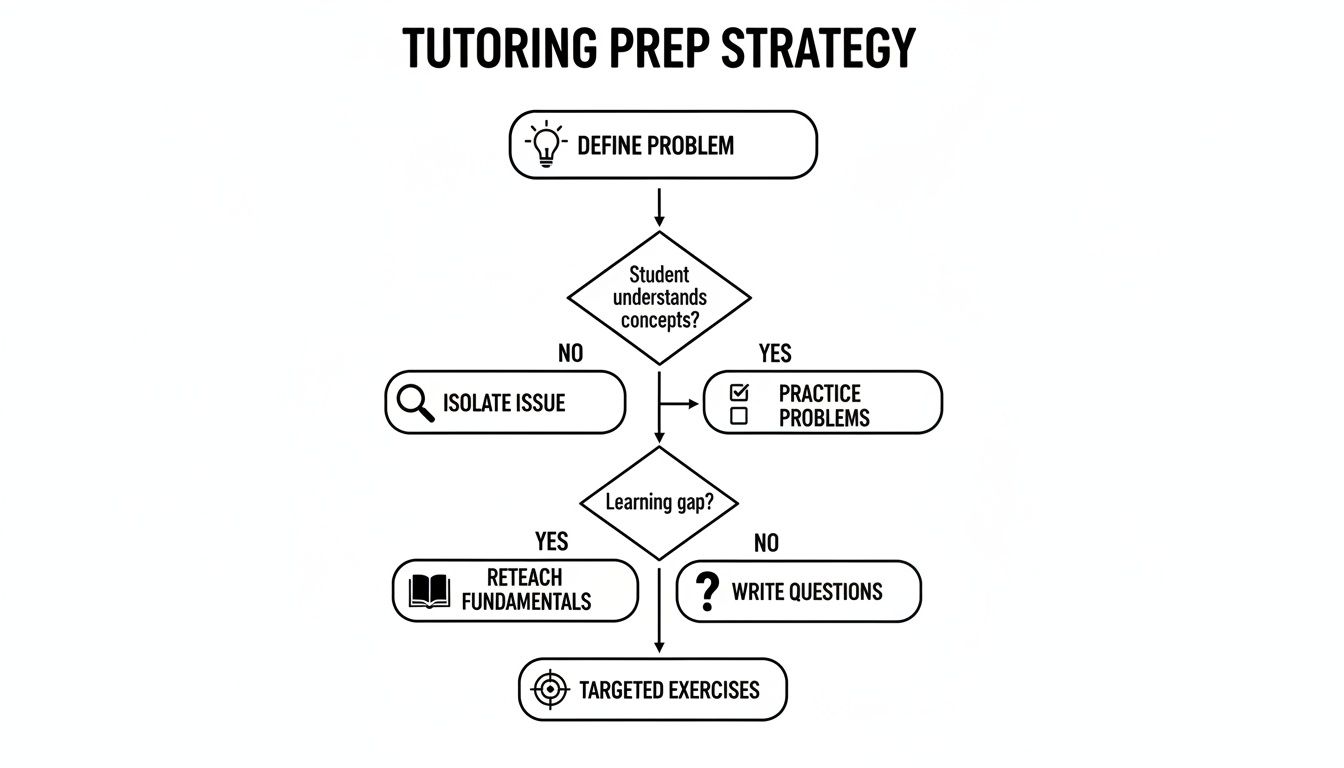
As you can see, a successful session starts long before the call. It’s all about defining the problem, isolating the issue in your app, and having your questions ready to go.
Key Questions to Guide Your Decision
Still on the fence? Ask yourself these three questions. The answers will make the right choice much clearer.
What is my budget? If it's zero, your world is limited to self-serve resources and the community forum. If you have some funds, think about the return on investment. Tutoring is an investment in your skills, while hiring a developer is an investment in a finished product.
What is my timeline? If you're facing an urgent, project-killing bug, a scheduled tutoring session is the fastest way to get a targeted solution. If your timeline is longer and you need a massive project built from the ground up, an agency's structured approach might fit better.
Clarity is your most valuable asset. Choosing a support path isn't just about fixing a bug; it's about making sure the solution aligns with your long-term ambitions. An intelligent investment now will pay for itself many times over in saved time and money.
Ultimately, picking the right Bubble.io support is a strategic move. By being honest about your goals, budget, and how you learn best, you can stop spinning your wheels and find the exact help you need to drive your project forward.
Your Top Bubble Support Questions, Answered
As you get deeper into Bubble.io, you're bound to run into questions. What starts as a simple learning curve can quickly turn into complex, app-specific puzzles. Knowing where to turn for help is half the battle.
Let’s tackle some of the most common questions builders ask when they hit a wall. Getting this right will save you a ton of time, money, and frustration.
Is Bubble's Official Paid Support Worth It?
Bubble's own paid support plans are great for certain things, but it's crucial to know their limits. Think of them as your hotline for issues with the Bubble platform itself. They're your go-to for reporting bugs, asking about your account or billing, or getting updates during a service outage.
But when it comes to your app's unique logic—like why a specific workflow isn't firing or how to structure your database for a new feature—the official channel often isn't the best fit. Responses can be slow, and the advice might be too general. For those "I'm stuck right now and need an expert to show me how to fix it" moments, you'll get faster, more practical results from one-on-one tutoring.
Should I Hire an Agency, a Freelancer, or a Tutor?
This is a big one, and the right answer really boils down to what you're trying to achieve. Each of these options solves a completely different problem.
Hire an Agency: Go this route when you have a significant budget and want a team to build and manage your entire application from the ground up. It's a "done-for-you" solution.
Hire a Freelancer: This is perfect for specific, well-defined tasks. Need someone to build out a new feature or fix a set of known bugs? A freelancer can execute that for you.
Choose a Tutor: This is for you if your primary goal is to learn how to build it yourself. A tutor is an expert guide who helps you get unstuck, teaches you best practices, and empowers you to solve problems independently.
Tutoring is about empowerment; hiring is about delegation. If you want to become a more capable Bubble developer, tutoring is the way to go. If you just need a task checked off your list, hiring a freelancer or agency is the better choice.
Can I Really Build a Scalable Business on Bubble?
100% yes. Countless successful, high-growth businesses are built entirely on Bubble. But here's the catch: scalability isn't automatic. It's a direct result of smart, efficient design from the very beginning.
To build an app that stays fast as your user count grows, you need a rock-solid understanding of database architecture and optimized workflows. This is exactly where getting the right kind of Bubble.io support pays off. Investing in expert guidance from a one-on-one coach ensures you're building on a strong foundation, preventing major performance headaches later on. It’s the difference between building with confidence and just hoping for the best.
Feeling stuck or want to make sure your app is built for scale? The Codeless Coach offers personalized 1-on-1 tutoring sessions to help you build faster, overcome roadblocks, and master Bubble. Book a session today and turn your idea into reality.











